JWT Authentication
The JSON Web Token (JWT) authentication method is used by merchants authenticating their APIs sent to Global-e APIs.
It is possible to configure JWT authentication for a specific API, while other APIs will use merchant GUID authentication.
To Create the JWT Token
Prerequisites
The following setup should be done before applying to a JWT token:
Global-e adds a user for the merchant in Global-e DB. The name of the user is identified by Global-e.
Global-e confirms with the merchant the name created.
The Merchant generates a key using Postman / Swagger (not in the Production environment) using the Authentication Service - CreateUpdateUser API.
The Merchant implements the GetToken API to renew the token. If expired - Global-e API returns an error.
Note: Make sure to use the Global-e API environment such as connect.bglobale.com, or api.global-e.com.
Create the Token
The following steps should be implemented by the merchant / Platform for every API call to GE CORE:
Send user name + password to “/Authentication/GetAuthenticationToken” API. The username and password are provided to the merchant by GE.
Receive JWT token. The JWT token can be cached and reused by the merchant until it expires (15 minutes is the default TTL).
Add the returned JWT token to the HTTP header in every API call.
Note: The merchant GUID must still be specified in the request URL, in addition to the JWT token in the HTTP header.
Note: The returned token and the username are sent as part of the API request, in the HTTP request header. With that, the MerchantGUID must still be specified in the request URL, in addition to the JWT token in the HTTP header
GetAuthenticationToken API
Use the GetAuthenticationToken API to obtain a JSON web token (JWT). Send a username and password that are obtained by Global-e and receive a JWT token.
The returned token and the username are sent as part of the API request, in the HTTP request header. With that, the MerchantGUID must still be specified in the request URL, in addition to the JWT token in the HTTP header
Method/URL
POST https://{globale_sever}/Authentication/GetAuthenticationTokenCall the GetAuthenticationToken API as in the following URL:
https://{server_name}/Authentication/GetAuthenticationToken
Parameter | Type | Description | Mandatory |
|---|---|---|---|
| String | Text that optionally describes the reason for Success status | |
| Boolean | Indicates if the API call was successful. Success property value may be only TRUE. Otherwise, an ErrorInfo is returned. | |
| String | JWT encoded token. | |
| Int | The Token expiry time in minutes. |
Examples
Request
{
    "userName": "yuvalta",
    "password": "password"
}
Success Response
{
    “Success”: true,
    “Token”:
    "eyJhbGciOiJIUzI1NiIsInR5cCI6IkpXVCJ9.InsgXHUwMDI3RVhwaXJlc1x1MDAyNyA6IFx1MDAyNzU0NTQ1N
    DU0NTQ1NDU0XHUwMDI3LCBcdTAwMjdNZXJjaGFudEdVSURcdTAwMjcgOiBcdTAwMjdqZ2RzZ2pkc2pnZ
    GhzZ2RzaGdkaHNnZGhnXHUwMDI3IH0i.ZLUuZIMraFXVRcpZzkOQWdFDmRI4ypLXK6bNnVxG4do”
    “TTLInMinutes”: 15
}
Fail Response
{
   "type": "https://tools.ietf.org/html/rfc7231#section-6.5.1",
    "title": "One or more validation errors occurred.",
    "status": 400,
    "traceId": "|f1c6be73-42d43d27971c276a.",
    "errors": {
           "Password": [
            "Password length can't be less than 8 or greater than 50 characters."
           ]
     }
}
Note
By default, the token expires within 15 minutes unless you specify that the token should be valid for longer.
Using the JWT Key in the Header
Once the token has been generated, call the API of choice using the relevant credentials in the header.
Example
key= ”Authorization” | value = "my_jwt_token" Key= ”UserName”| value = "userName"
Example of JWT in Header
curl -X POST https://[globale domain]/[API] \
     -H "Authorization: Bearer my_jwt_token" \
     -H "UserName: userName" \
     -H "Content-Type: application/json"
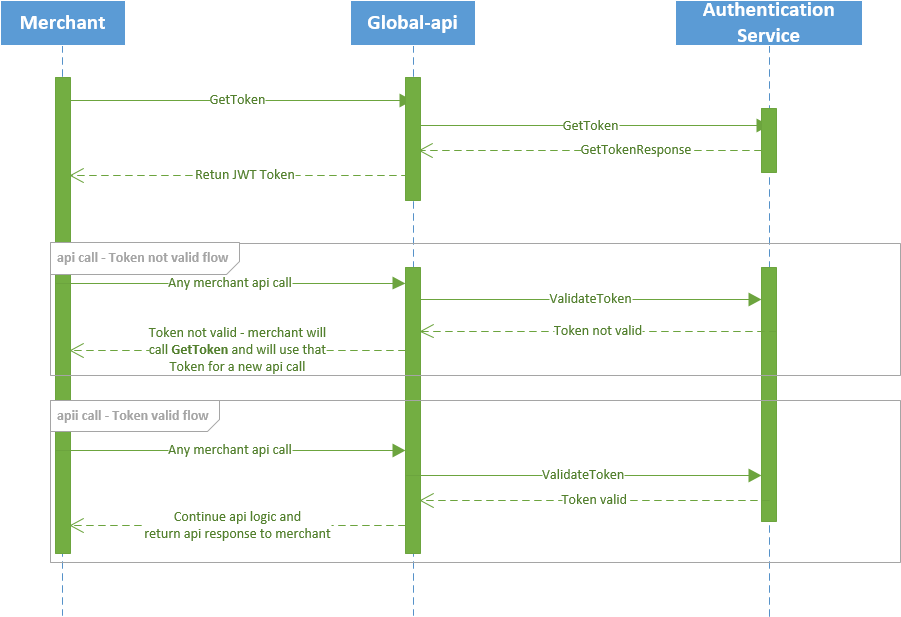
Interaction Diagram
The diagram below shows the interaction between the Merchant code, the Global‑e API code, and the authentication service.
 |