Price Calculation
Global‑e cartridges can calculate the end-customer price in several different ways. Here is about them.
What is List and Sale Price in terms of Salesforce B2C Commerce?
By default, SFCC can return only maximum two price book prices for the same product on Storefront, whether it's PLP, PDP or Cart page. If SFCC found one price book, active and assigned to the Site, which has valid product-price assignment (definition) - there will be only one price (Sale) rendered on storefront. If SFCC found two price books, active and assigned to the Site, which have valid product-price assignments (definitions) - there will be two prices rendered on storefront: List price (the highest) and Sale price (the lowest).
Additionally to this logic, SFCC can also find a Promotional price (if it can be determined/calculated on the current page). If there is Promotional price and it is lower than current Sale price - then SFCC will render always two prices: List price, which is current Sale price, and Sale price, which is Promotional price.
How we calculate International Price
The logic of calculating the price for selected Country and Currency is as following:
Product Price
Dynamic Price
get the merchant Promotional price or price from the current, available, active and assigned to the Site price book(s)
apply Product TAX VAT Coefficients
multiply on end-customer Currency FX Rate
multiply on end-customer Product Class/Country Coefficient Rate
apply end-customer Rounding and Formatting
render the end-customer price
Fixed SFCC Price
get the SFCC fixed price from fixed price book(s) if configured and defined
render the price as is
if no fixed price found in fixed price book - go to Dynamic Price and calculate price dynamically
Not Product Prices (like search refinement by price)
get the merchant price
multiply on end-customer Currency FX Rate
multiply on end-customer Country Coefficient Rate
apply end-customer Rounding and Formatting
render the end-customer price
The Basket Prices
Global‑e Cartridge will calculate the price for each Line Item in the Basket and reset it by using standard SFCC LineItem.setPriceValue(...) API method. So all the rest calculations, like price adjustments, order total price, etc., will be done by SFCC engine (with minimum adjustments from Global‑e Cartridge).
The Order Prices (My Account / Order History)
All prices for International Order (including product line item, shipping, taxes & duties, order totals) will be calculated based on the values from custom attributes of the Order and it's Line Items.
All prices for your domestic Order (non-international or not Global‑e Order) will be retrieved and rendered in exactly the same way as before (without) Global‑e cartridge.
Fixed Price
If the current shipping country is set as Fixed Price Country, customer will not be able to change the currency in the Country Switcher and the following logic for price rendering will be applied.
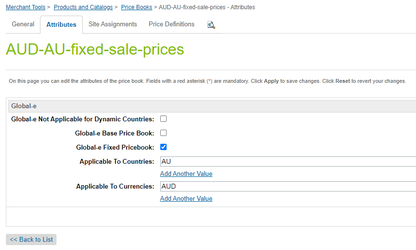
Fixed SFCC Price is the end-customer price which won't be converted dynamically but will be used AS IS from Salesforce B2C Commerce standard price books if it's configured so in Global‑e Price book custom attributes ("Global‑e Fixed Pricebook", "Applicable To Countries" and "Applicable To Currencies"). The Fixed Price Books exists and they have valid product price assignments (definitions). If there is only one Fixed Price in one of the Fixed Price Book (list or sale), or only one Fixed Price Book is configured (with valid product price assignment) - only one Fixed Price will be shown, even if there are two prices defined in the original/primary/default Merchant price books (list and sale).
Configuration example:
Fixed Price Books should not be assigned to the required site but should be active/enabled.
Depending on configuration on the Global-e side, if is selected Fixed Price country are possible next scenarios/handle ways.
Only fixed pricebooks are taken into account/processed
The prices are searched and taken only from Fixed price books for country.
If the price definition does not exist in Fixed price books then a n/a(null) price is displayed on the storefront.
The fixed and based pricebooks are taken into account/processed
The prices are searched and taken from Fixed price books for the country.
If the price definition does not exist in Fixed price books then the prices are searched and taken from base price books (site assigned price books in merchant’s currency) and processed as a Dynamic price conversion.
Then is displayed the converted price(which is generated based on the price definition of base price book) or n/a(null). By default on the
By default on the Global-e side is activated option - Only fixed pricebooks are taken into account/processed. Contact Global-e if you wish to used the option. The fixed and based pricebooks are taken into account/processed instead of default.
Use case examples
Example 1: One Fixed List Price, one Regular List Price
Description | Sample | |
|---|---|---|
Given | Regular List Price Book has a valid product price assignment. Fixed Price Book is configured and it has valid product price assignment. | gbp-m-list-prices = £11.00 fixed-list-US-USD = $14.44 |
Result | The Price (only one) will be used from Fixed List Price Book and rendered on the storefront | $14.44 |
Example 2: One Fixed List Price, two Regular Prices (list and sale)
Description | Sample | |
|---|---|---|
Given | Regular List and Sale Price Books have valid product price assignment. Fixed List Price Book is configured and it has valid product price assignment. | gbp-m-list-prices = £11.00, gbp-m-sale-prices = £10.00 fixed-list-US-USD = $14.44 |
Result | The Price (only one) will be used from Fixed List Price Book and rendered on the storefront | $14.44 |
Example 3: One Fixed Sale Price, two Regular Prices (list and sale)
Description | Sample | |
|---|---|---|
Given | Regular List and Sale Price Books have valid product price assignment. Fixed Sale Price Book is configured and it has valid product price assignment. | gbp-m-list-prices = £11.00, gbp-m-sale-prices = £10.00 fixed-sale-US-USD = $13.13 |
Result | The Price (only one) will be used from Fixed Sale Price Book and rendered on the storefront | $13.13 |
Example 4: Two Fixed Prices (list and sale), one Regular List Price
Description | Sample | |
|---|---|---|
Given | Regular List Price Book has a valid product price assignment. Fixed List and Sale Price Books are configured and they have valid product price assignments. | gbp-m-list-prices = £11.00 fixed-list-US-USD = $14.44, fixed-sale-US-USD = $13.13 |
Result | Two Fixed Prices (list and sale) will be used from Fixed List and Sale Price Books and rendered on the storefront | $13.13 |
Example 5: Two Fixed Prices (list and sale), two Regular Prices (list and sale)
Description | Sample | |
|---|---|---|
Given | Regular List and Sale Price Books have valid product price assignment. Fixed List and Sale Price Books are configured and they have valid product price assignments. | gbp-m-list-prices = £11.00, gbp-m-sale-prices = £10.00 fixed-list-US-USD = $14.44, fixed-sale-US-USD = $13.13 |
Result | Two Fixed Prices (list and sale) will be used from Fixed List and Sale Price Books and rendered on the storefront | $13.13 |
Example 6: No Fixed Price, two Regular Prices (list and sale), with "Use Only Fixed Prices"
Description | Sample | |
|---|---|---|
Given | Regular List and Sale Price Books have valid product price assignment. No Fixed List and no Fixed Sale Price Books are configured. "Use Only Fixed Prices" Global‑e Site Preference is configured to "Yes" | gbp-m-list-prices = £11.00, gbp-m-sale-prices = £10.00 null, null "Yes" |
Result | null will be rendered | null |
Dynamic Price
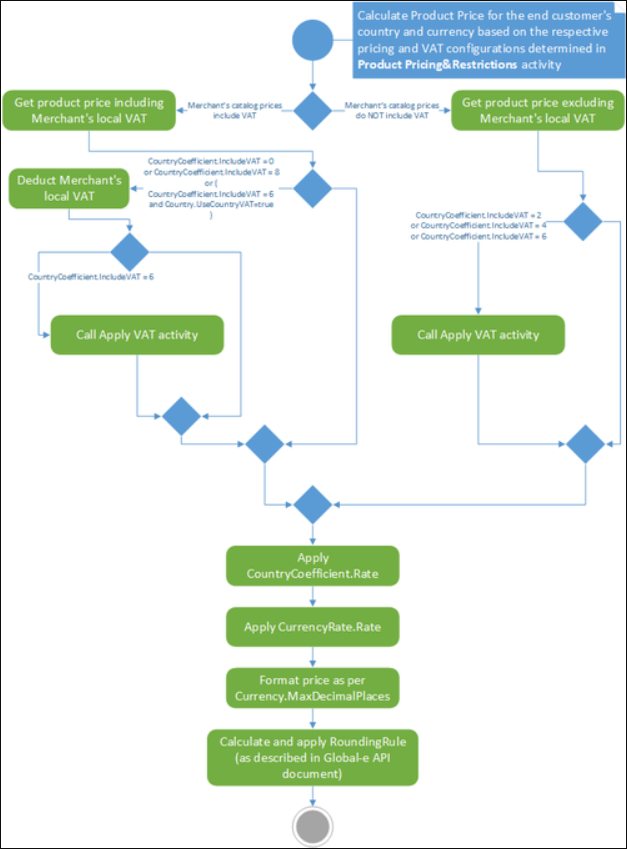
If the current country is not Fixed Price country, or current Product does not have any Fixed Price defined in the Fixed Price books, the end-customer Global‑e price will be calculated dynamically, according to this logic:
 |
Price Rounding and Formatting
After the end-customer Price is calculated/converted, it can be rounded and formatted in accordance to the configuration of the end-customer Currency and current Locale (in Request). The Price is formatting only for displaying it properly on Storefront and any View component, but not for internal (back-end) calculations (like for SendCart, etc.).
Examples:
Price (before rounding and formatting) | Max Decimal Places | Current Request (Customer's) Locale | Formatted Price | Comments |
|---|---|---|---|---|
1234.45678 | 2 | en_GB | £1,234.46 | Price is rounded to 1234.46 and then formatted with using Global‑e Currency (GBP) Symbol and current Customer's Locale (en_GB) |
1234.45678 | 3 | en_US | $1,234.457 | Price is rounded to 1234.457 and then formatted with using Global‑e Currency (USD) Symbol and current Customer's Locale (en_US) |
1234.45678 | 2 | ru_RU | RUB1 234,46 | Price is rounded to 1234.46 and then formatted with using Global‑e Currency (RUB) Symbol and current Customer's Locale (ru_RU) |
1234.45678 | 0 | ja_JP | ¥1,234 | Price is rounded to 1234 and then formatted with using Global‑e Currency (JPY) Symbol and current Customer's Locale (ja_JP) |
Price Calculation on other pages
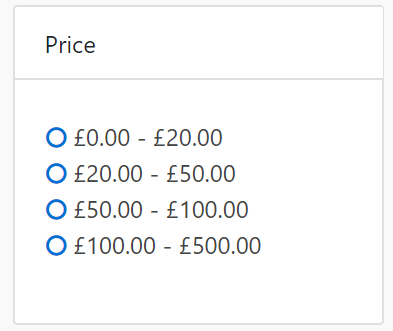 | 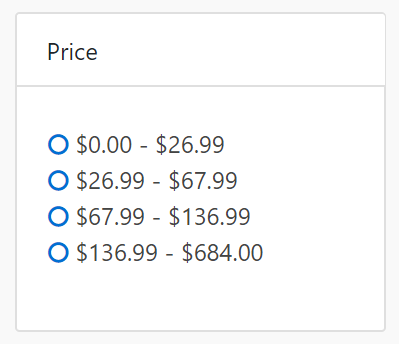 |
As displayed in the above images (Price Refinement filter), the left one is in local (original) Merchant GBP Currency, the right one - is in Global‑e end-customer USD Currency.
In this case, the values will be converted regardless of Product Class Coefficient Rate and Fixed Price country configuration, only Country coefficient Rate will be taken into account.
Hence, the real filtered products prices on PLP might be slightly higher or lower than it is selected in the Price filter.
For fixed countries/currencies separately should be configured price refinements levels and then they will be taken and shown on PLP (as they are), otherwise, price refinements block will not be shown if is selected fixed price country but were not configured price refinements levels for the currency of the selected country.
Price Book custom attributes configuration
Custom attribute | Description |
|---|---|
Global‑e Not Applicable for Dynamic Countries | In some cases, it's required to exclude some price books which are active and assigned to a site for Global‑e customers. If the setting is enabled the price book is excluded from applicable price books (relevant only for dynamic price conversion). |
Global‑e Base Price Book | If a price book should be used as a base price book (assigned to a site and uses default merchant currency) for dynamic conversion and as a fixed price book for some countries this setting should be enabled. |
Global‑e Fixed Pricebook | Identifies if a price book should be used for fixed-price countries. |
Applicable To Countries * | Identifies for which countries the price book is applicable (relevant for both dynamic and fixed price strategies). |
Applicable To Currencies * | Identifies for which currencies the price book is applicable (relevant for both dynamic and fixed price strategies). |
Global-e Cache Price Book ** | Identifies if a price book is used for caching purposes. |
Global-e Cache Price Book Combinations ** | Global-E country/currency combinations to which the price book is applicable. |
* - at least one of these custom attributes should be populated in case of using the price book with the fixed price strategy.
** - never change the values manually, such attributes are populated by the code.
Coefficient Rates
On top of the regular FX Rate, additional Product Class / Category or Country Coefficient Rate can be applied to the end-customer price, according to the Merchant preferences.
Product Class / Category Coefficient Rate has higher priority than Country Coefficient Rate, means that if Product Class / Category Coefficient Rate is provided - Country Coefficient Rate will be ignored for products of specified Product Class / Category.
Coefficient Rate GlobaleSettings Job Step
Global‑e Cartridge int_globale has a scheduled job - GlobaleSettings, which is part of the cartridge and ready to use out-of-the-box.
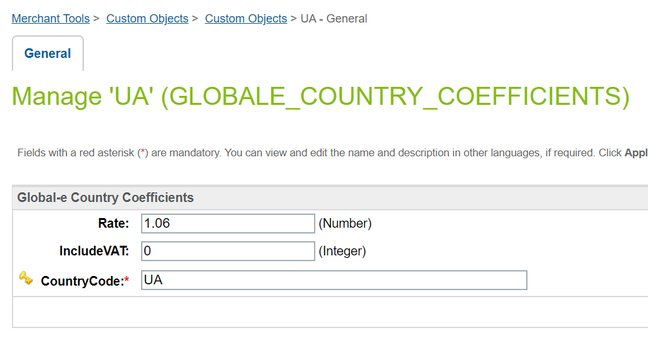
One of the step of this job is CountryCoefficients, this step is pulling the data about coefficients (/Browsing/CountryCoefficients) and store it either into GLOBALE_COUNTRY_COEFFICIENTS or GLOBALE_PRODUCT_CLASS_COEFFICIENTS Custom Object, depends on type of the Coefficient.
Product Class / Category Coefficient Rate
If ProductClassCode is provided then the Coefficient Rate will be applied for products of the specified Product Class / Category, Country Coefficient Rate will be ignored.
You need to specify (in Global-e Site Preferences GLOBALE-PRODUCT) the attribute (system or custom, both supported) of the system object Product which will be storing the ID/name of Product Class / Category, which should be used when the end-customer price is calculated.
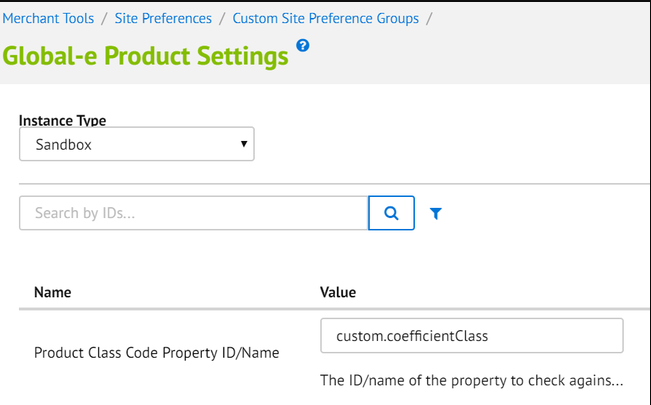
The value can be simple ID of the product attribute (like "brand"), in this case Global-e cartridge will try to find that attribute as system attribute "brand" of the product.
Custom attributes are also supported
To set a customer attribute set the attribute as "custom.any_custom_attribute" and the Global-e cartridge will try to find that attribute as custom attribute "any_custom_attribute" of the product ("any_custom_attribute" should be replaced by the ID of your custom attribute).
Once the Product Class Code Property ID/Name has been found, Global‑e cartridge will go to GLOBALE_PRODUCT_CLASS_COEFFICIENTS Custom Object and try to find the record of Coefficient Rate configured to the specified Product Class / Category and Shipping Country.
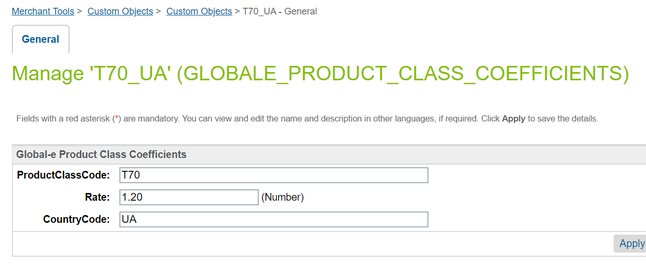
Country Coefficient Rate
If "ProductClassCode" is empty (not provided) then the Country Coefficient Rate will be applied. Global-e cartridge will go to GLOBALE_COUNTRY_COEFFICIENTS Custom Object and try to find the record of Coefficient Rate configured to the specified Shipping Country.