Promotions
Our cartridge(s) supports most of the common Promotions available in Salesforce B2C Commerce. In Business Manager, you configure promotions just like you would for domestic customers with a few additional Global‑e custom attributes. In this document, you will find the basic settings for Promotions that you will be using for International Customers (applicable for Global‑e checkout).
Any of your Promotion will be considered as applicable promotion for Global‑e Checkout, only if it is valid and active, assigned to ongoing Campaign, triggered by one of the valid Campaign Qualifiers: Customer Group, Coupon Code or Source Code. Additionally, there will be extra custom attributes of the Promotion object which needs to be configured.
Note
Keep in mind that displaying product promotional prices on PLP(Category page)/Search page/PDP, etc. requires at least one price book in base/site currency with price definitions assigned to the SFCC site. Even if the SFCC site has only Global-e Fixed countries and only SFCC “fixed” price books are used there, the price book in base/currency should be assigned to the site. The price from base price books will not be taken into account and used on the SFCC storefront, but base price books allows to show products promotional price.
Promotion Thresholds
The promotion thresholds are always based on Merchant Default Currency (regardless of what strategy is used (fixed or dynamic) or currency is selected). For example:
The Merchant Default Currency is GBP currency
The promotion should be applied only to fixed-price countries in EURO currency
If the configured promotion threshold is 70 - it means that promotion will be applied to the basket only if the basket total is equal to or greater than 70 GBP
Global‑e Promotion Custom Attributes
Promotion Discount Type
This custom attribute represents all Discount Types currently supported by Global‑e. It should be set to the same value under the SFCC "Promotion Rule" section.
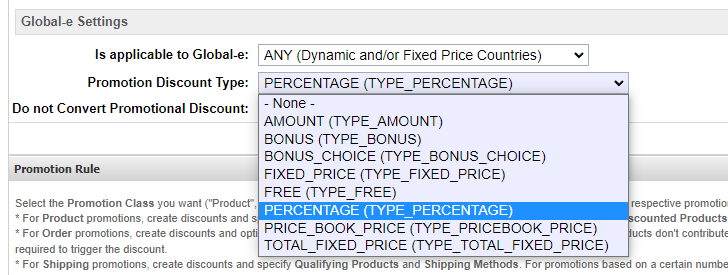
Do not Convert Promotional Discount
If this is enabled, the promotion discount value is used as is, which is calculated by SFCC logic in the native currency. For example, check this box if you would like the promotion to give a discount of 10 currency value regardless of the currency the customers use (e.g. $10, €10, or £10). This is only applicable for AMOUNT, FIXED_PRICE, PRICE_BOOK_PRICE or TOTAL_FIXED_PRICE discount types.
Global-e Free Shipping Method
The custom attribute allows you to define the free shipping method in the Global-e checkout. Only relevant for free shipping promotions.
Note
Keep in mind that SFCC shipping methods are not linked with the Global-e ones so it’s not possible to specify a free shipping method using the system promotion configuration.
Campaign
The Campaign should be configured as usually, no special requirements. But in most of the cases, to be able to distinguish between Domestic and International Promotions you will be using Customer Groups. So when you are assigning the Promotion to any of your Campaign, depends on your requirements - assign proper Customer Group.
Free International Shipping Promotion
Our cartridge supports Free International Shipping Promotion. This Promotion can be configured using special custom attributes provided by Global‑e metadata, based on Coupon/Source Code, or for some markets (for example for Netherland Customers) using the Customer Group(s). This promotion can be used ONLY with Global‑e Checkout.
Promotion
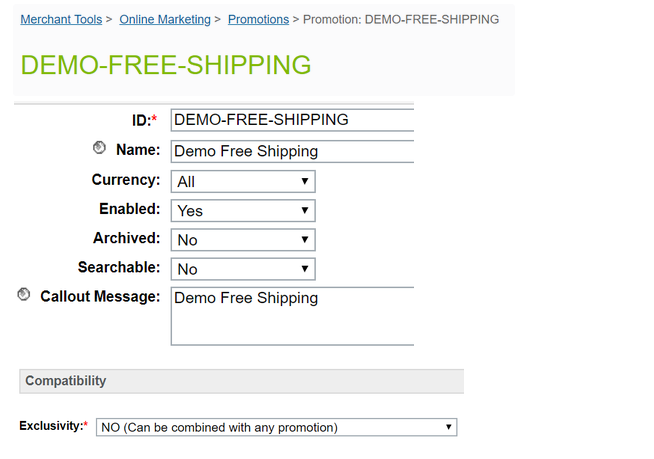
Open SFCC BM, go to Merchant Tools → Online Marketing → Promotions
Create new Promotion (ID, Name, Description, Callout Message - totally up to you)
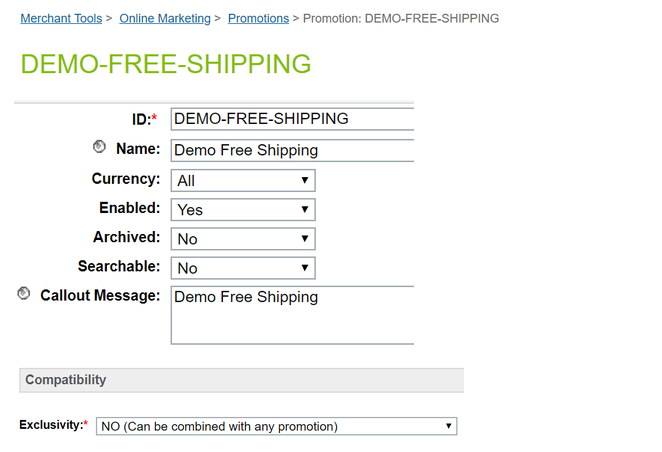 |
Exclusivity is totally up to you.
 |
Click on Apply button to save the initial settings.
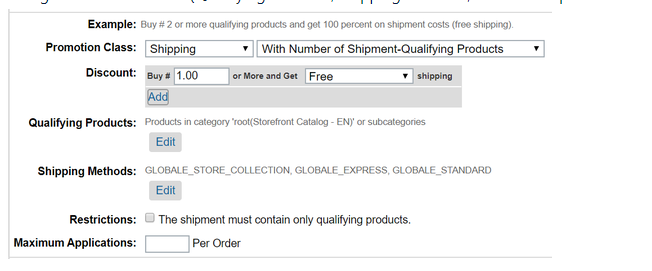
Configure Promotion Rule (Qualifying Products, Shipping Methods, all Global‑e predefined SFCC Shipping Methods) like on the screenshot below:
 |
Click on Apply button to save all changes.
All settings of the Promotion are optional (following the standard SFCC Rules), so you can configure it according to your requirements, except only the following:
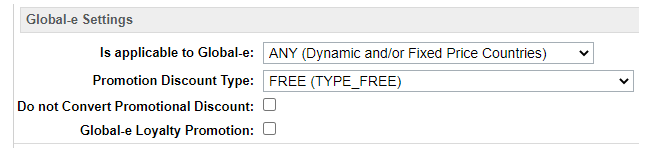
Global‑e Settings / Is applicable to Global‑e - should not be set to NONE
Global‑e Settings / Promotion Discount Type - should be set to FREE
Promotion Class - should be Shipping
Discount - should be configured so it will be always Free shipping
Campaign
Open SFCC BM, go to Merchant Tools → Online Marketing → Campaigns
Create a new Campaign (or open existing one, where you want to assign your Promotion to):
 |
If you need to assign any special Customer Group - assign it in Customer Groups: in this example the Customer Group GlobaleCustomers is assigned to this Campaign.
If you need to Apply this Campaign with the created above Promotion based on Coupon Code - please create Coupon Code as usually and assign it in Coupons.
Assign Promotion created earlier to this Campaign.
Please make sure that Required Qualifiers is set to All in Promotions Experience.
Click on Apply button to save all changes.
All settings of the Campaign are optional, so you can configure it according to your requirements, based on standard SFCC instructions.
Global‑e Checkout
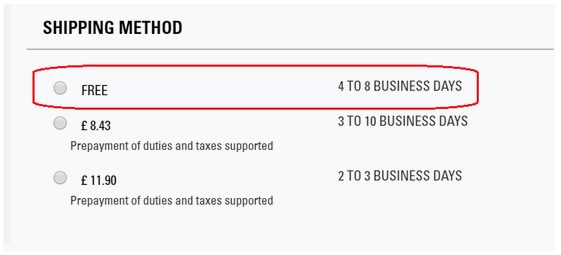
Once the Promotion and Campaign become applicable (either due to Customer Group, Source Code or Coupon Code entered on a Cart page), the Customer should be able to see Free shipping option on Global‑e Checkout:
 |
Promotions Support Matrix
Promotion class | Condition Type | Discount Type | GE Promotion Discount Type | GE Do not Convert Promotional Discount | Supported Dynamic Price | Supported Fixed Price | Comment |
|---|---|---|---|---|---|---|---|
Product | Without Qualifying Products | Percent Off | PERCENTAGE | — | Yes | Yes | See 10% off all men's gloves example |
Amount Off | AMOUNT | Supported | Yes | Yes | See 10$ Off All Earrings for focus countries example | ||
Fixed Price | FIXED_PRICE | Supported | Yes | Yes | |||
Price From Pricebook | PRICE_BOOK_PRICE | Supported | Yes | Yes | |||
Percent Off Product Options | PERCENTAGE | — | Yes | Yes | |||
Bonus Product(s) | BONUS | — | Yes | Yes | |||
Choise Of Bonus Products (List) | BONUS_CHOICE | — | Yes | Yes | |||
Choise Of Bonus Products (Rule) | BONUS_CHOICE | — | Yes | Yes | |||
Fixed Price Shipping | — | — | No | No | Shipping price calculated on GE side | ||
Free shipping | — | — | No | No | Shipping price calculated on GE side | ||
With amount (value) of qualifying products * | Percent Off | PERCENTAGE | — | Yes | Yes | ||
Amount Off | AMOUNT | Supported | Yes | Yes | |||
Fixed Price | FIXED_PRICE | Supported | Yes | Yes | |||
Price From Pricebook | PRICE_BOOK_PRICE | Supported | Yes | Yes | |||
Percent Off Product Options | PERCENTAGE | — | Yes | Yes | |||
Bonus Product(s) | BONUS | — | Yes | Yes | |||
Choise Of Bonus Products (List) | BONUS_CHOICE | — | Yes | Yes | |||
Choise Of Bonus Products (Rule) | BONUS_CHOICE | — | Yes | Yes | |||
Fixed Price Shipping | — | — | No | No | Shipping price calculated on GE side | ||
Free shipping | — | — | No | No | Shipping price calculated on GE side | ||
With number (quantity) of qualifying products | Percent Off | PERCENTAGE | — | Yes | Yes | ||
Amount Off | AMOUNT | Supported | Yes | Yes | |||
Fixed Price | FIXED_PRICE | Supported | Yes | Yes | |||
Price From Pricebook | PRICE_BOOK_PRICE | Supported | Yes | Yes | |||
Percent Off Product Options | PERCENTAGE_OFF_OPTIONS | — | No | No | |||
Bonus Product(s) | BONUS | — | Yes | Yes | See Buy Cluster Drop Necklace, Get Free Matching Earrings example | ||
Choise Of Bonus Products (List) | BONUS_CHOICE | — | Yes | Yes | |||
Choise Of Bonus Products (Rule) | BONUS_CHOICE | — | Yes | Yes | |||
Fixed Price Shipping | — | — | No | No | Shipping price calculated on GE side | ||
Free shipping | — | — | No | No | Shipping price calculated on GE side | ||
With Combination of Qualifying Products | Percent Off | PERCENTAGE | — | Yes | Yes | ||
Amount Off | AMOUNT | Supported | Yes | Yes | |||
Fixed Price | FIXED_PRICE | Supported | Yes | Yes | |||
Price From Pricebook | PRICE_BOOK_PRICE | Supported | Yes | Yes | |||
Percent Off Product Options | PERCENTAGE_OFF_OPTIONS | — | No | No | |||
Bonus Product(s) | BONUS | — | Yes | Yes | |||
Choise Of Bonus Products (List) | BONUS_CHOICE | — | Yes | Yes | |||
Choise Of Bonus Products (Rule) | BONUS_CHOICE | — | Yes | Yes | |||
Fixed Price Shipping | — | — | No | No | Shipping price calculated on GE side | ||
Free shipping | — | — | No | No | Shipping price calculated on GE side | ||
Buy X/Get Y | Percent Off | PERCENTAGE | — | Yes | Yes | ||
Amount Off | AMOUNT | Supported | Yes | Yes | |||
Fixed Price | FIXED_PRICE | Supported | Yes | Yes | |||
Price From Pricebook | PRICE_BOOK_PRICE | Supported | Yes | Yes | |||
Free | FREE | — | Yes | Yes | |||
Buy X and Y/Get Z | Percent Off | PERCENTAGE | — | Yes | Yes | ||
Amount Off | AMOUNT | Supported | Yes | Yes | |||
Fixed Price | FIXED_PRICE | Supported | Yes | Yes | |||
Price From Pricebook | PRICE_BOOK_PRICE | Supported | Yes | Yes | |||
Free | FREE | — | Yes | Yes | |||
Buy X for Total | Buy N for total price of Y | TOTAL_FIXED_PRICE | Supported | Yes | Yes | ||
Order | With amount of qualifying products * | Percent Off | PERCENTAGE | — | Yes | Yes | |
Amount Off | AMOUNT | Supported | Yes | Yes | |||
Bonus Product(s) | BONUS | — | Yes | Yes | |||
Choise Of Bonus Products (List) | BONUS_CHOICE | — | Yes | Yes | |||
Choise Of Bonus Products (Rule) | BONUS_CHOICE | — | Yes | Yes | |||
With number of qualifying products | Percent Off | PERCENTAGE | — | Yes | Yes | ||
Amount Off | AMOUNT | Supported | Yes | Yes | See $50 off when buying 5 or more items example | ||
Bonus Product(s) | BONUS | — | Yes | Yes | |||
Choise Of Bonus Products (List) | BONUS_CHOICE | — | Yes | Yes | |||
Choise Of Bonus Products (Rule) | BONUS_CHOICE | — | Yes | Yes | |||
With a Combination of Products | Percent Off | PERCENTAGE | — | Yes | Yes | ||
Amount Off | AMOUNT | Supported | Yes | Yes | |||
Bonus Product(s) | BONUS | — | Yes | Yes | |||
Choise Of Bonus Products (List) | BONUS_CHOICE | — | Yes | Yes | |||
Choise Of Bonus Products (Rule) | BONUS_CHOICE | — | Yes | Yes | |||
Shipping | With Amount of Shipment-Qualifying Products * | Percent Off | PERCENTAGE | — | No | No | |
Amount Off | AMOUNT | — | No | No | |||
Fixed Price | FIXED_PRICE | No | No | ||||
Free | FREE | — | Yes | Yes | |||
With Number of Shipment-Qualifying Products | Percent Off | PERCENTAGE | — | No | No | ||
Amount Off | AMOUNT | — | No | No | |||
Fixed Price | FIXED_PRICE | — | No | No | |||
Free | FREE | — | Yes | Yes | |||
With Combination of Shipment-Qualifying Products | Percent Off | PERCENTAGE | — | No | No | ||
Amount Off | AMOUNT | — | No | No | |||
Fixed Price | FIXED_PRICE | — | No | No | |||
Free | FREE | — | Yes | Yes |
- the promotion threshold amounts could be specified only in the Merchant Default Currency (end-customer currency threshold amounts are not supported)
Examples
10% off all men’s gloves (Product Promotion - Percent Off)
You currently run 10% off all men’s gloves promotion for your domestic customers. Your current promotion is configured as shown below.
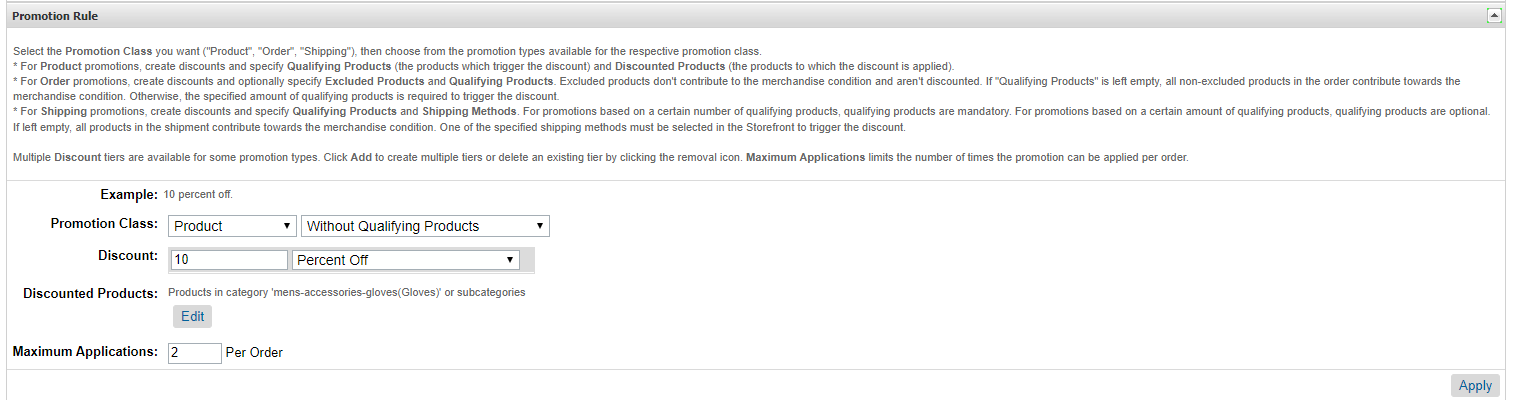
You want to extend this promotion to all international customers as well. To extend this promotion to an international customer, in the same Promotion, go to the “Global-e Settings” section and add the following.

Make sure the Customer Group for your Campaign includes international customers. It could be “Everyone” customer group, or any other specific customer group that you set up that you’d like to qualify for the promotion. For example, if you would like only customers from Canada to receive this discount in addition to your domestic customers, you could configure a specific customer group for them and add it here.

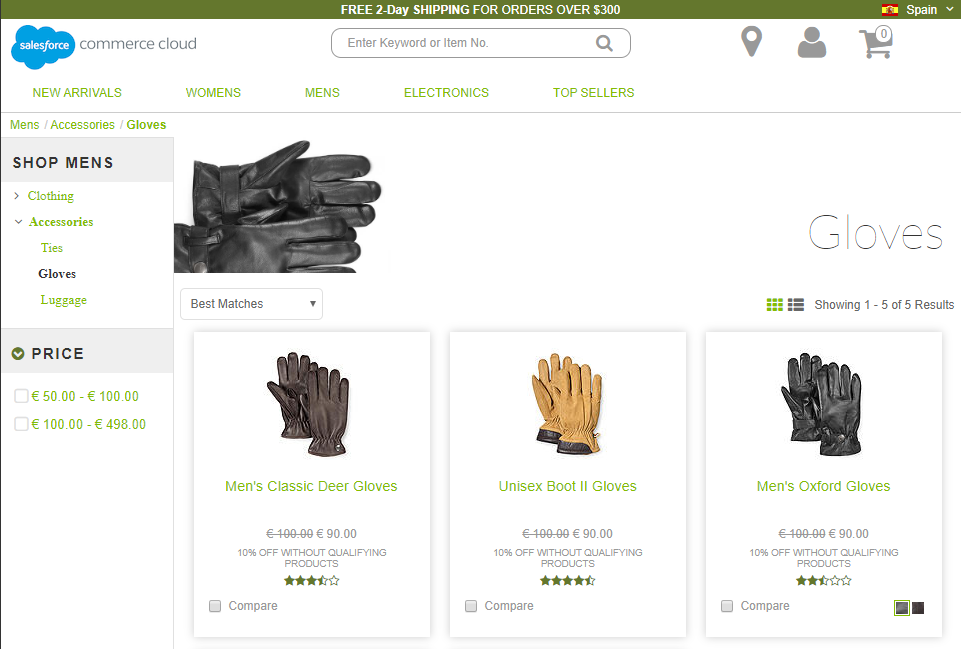
On the storefront, the promotion is now applicable to both domestic and Global‑e operated countries.
$10 Off All Earrings for focus countries (Product Promotion - Amount Off)
You currently run a “10$ Off All Earrings” promotion for your domestic customers. Your current promotion is configured as shown below.
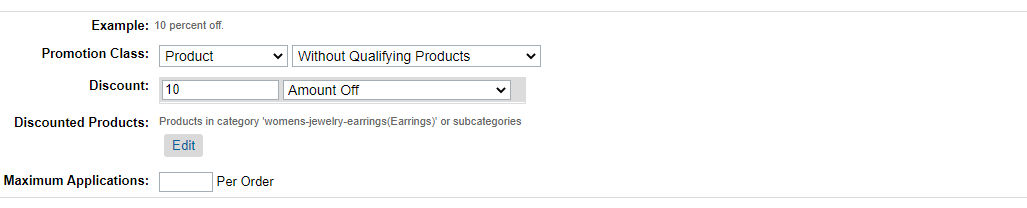
You want to extend this promotion to customers in your focus countries which include Canada, Spain, and Italy. And instead of giving them 10 USD off, you want to give the customer the discount equivalent to 10 of the customer's currency. To do that, the following updates are made to the promotion. Note the “Do Not Convert Promotional Discount” is checked.

A new customer group is created to include Canada, Spain, and Italy.
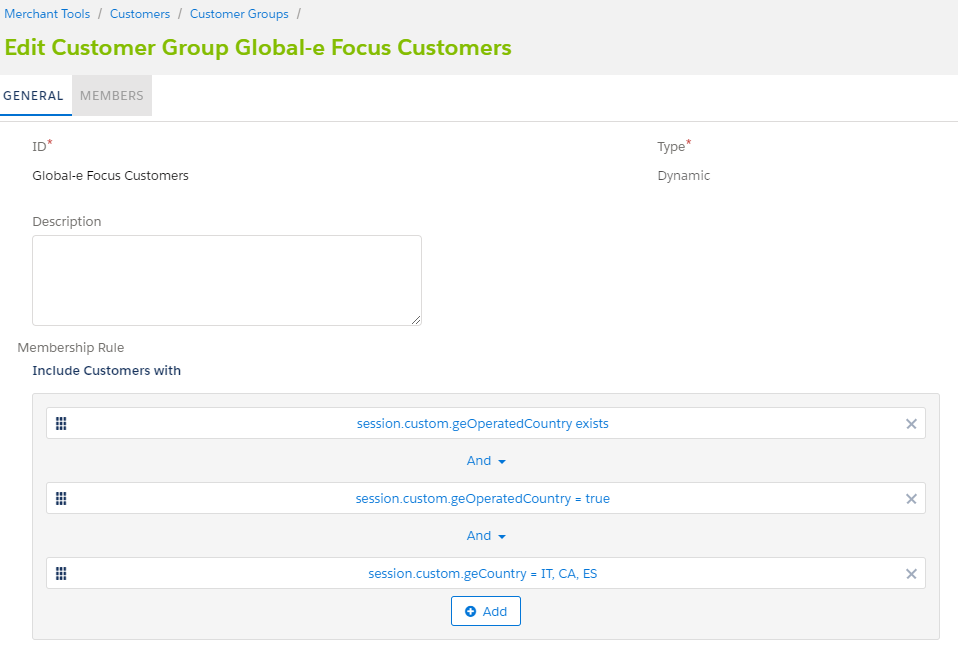
Then update the associated Campaign to include this customer group.

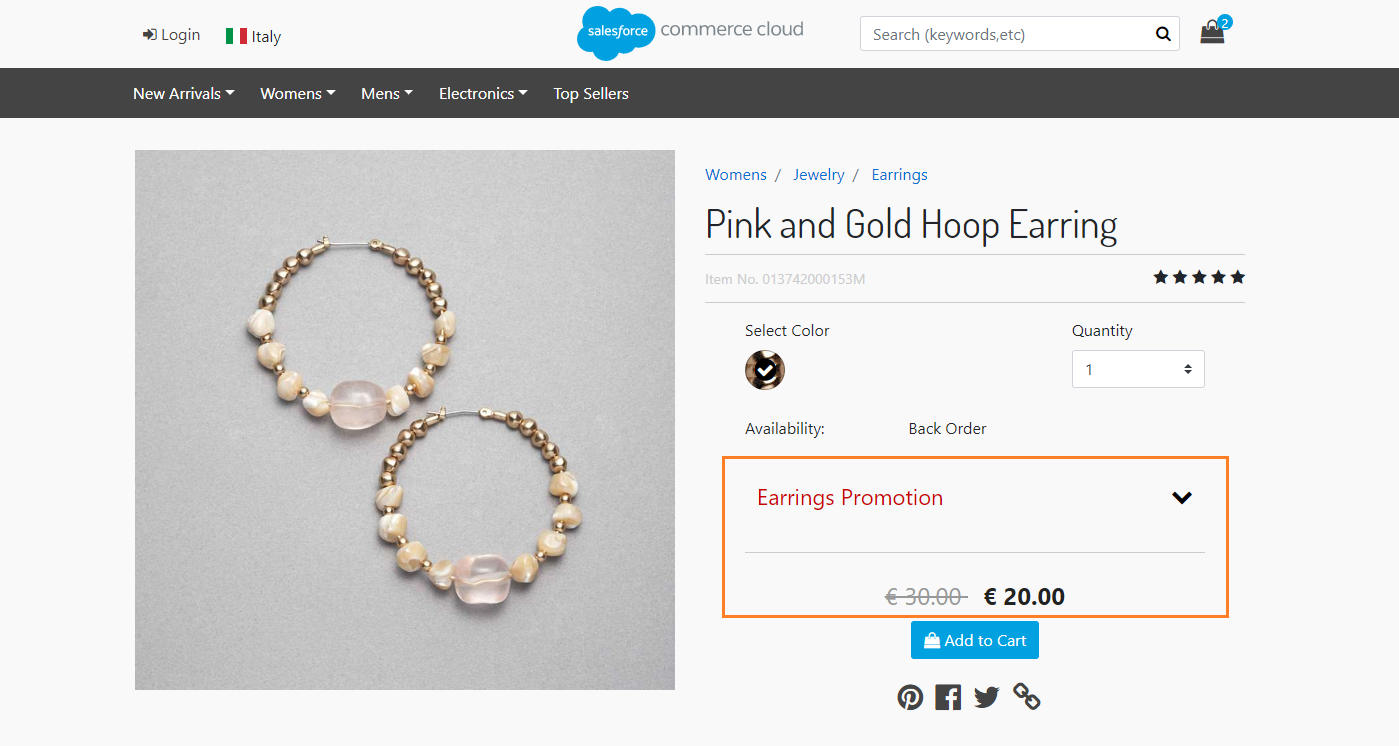
On the storefront, the promotion is now applicable for domestic customers, and customers from Canada, Spain and Italy. Note that the discount amount is in customer currency.
Buy Cluster Drop Necklace, Get Free Matching Earrings (Product Promotion - Bonus Product)
You currently run a “Buy Cluster Drop Necklace, Get Free Matching Earrings” promotion for your domestic customers. Your current promotion is configured as shown below.

You want to extend this promotion to all international customers as well. To extend this promotion to an international customer, in the same Promotion, go to the “Global-e Settings” section and add the following.

Make sure the Customer Group for your Campaign includes international customers. It could be “Everyone” customer group, or any other specific customer group you setup that you’d like to qualify for the promotion. For example, if you would like only customers from Canada to receive this discount in addition to your domestic customers, you could configure a specific customer group for them and add it here.

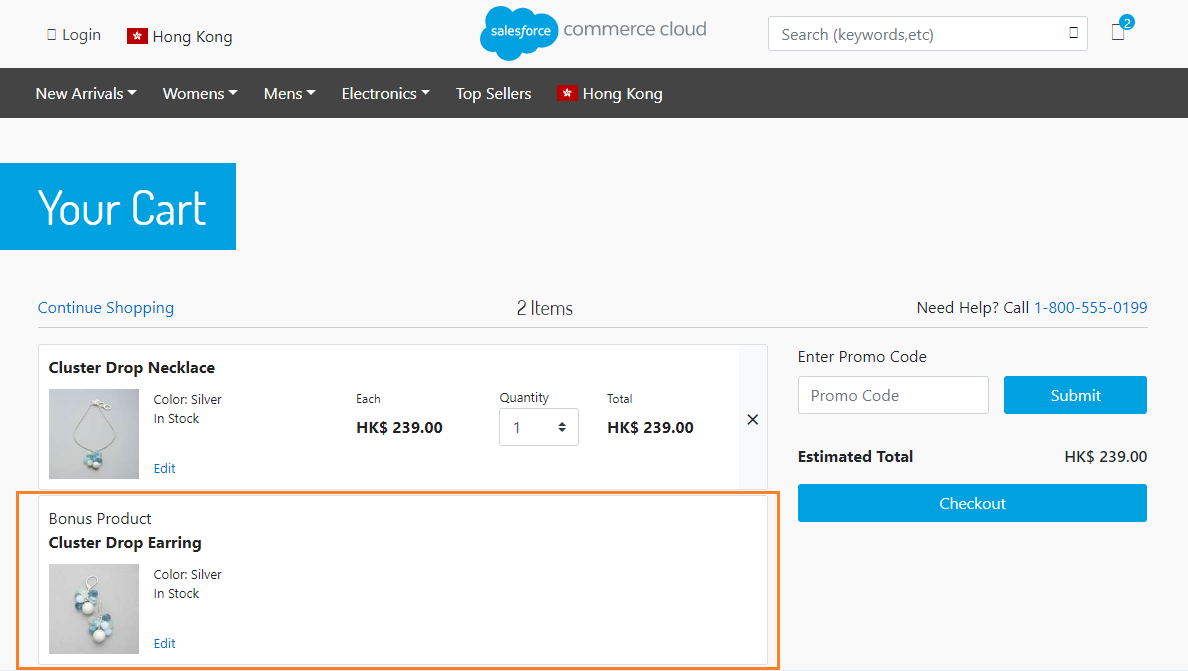
On the storefront, when a customer adds the Cluster Drop Necklace to their basket, the Cluster Drop Earrings are added as a bonus for all domestic customers and customers from Global-e operated countries.
$50 off when buying 5 or more items (Order Promotion - Amount Off)
You currently run a $50 off when buying 5 or more items promotion for your domestic customers. You want to extend this promotion to all international customers as well. Your current promotion is configured as shown below.
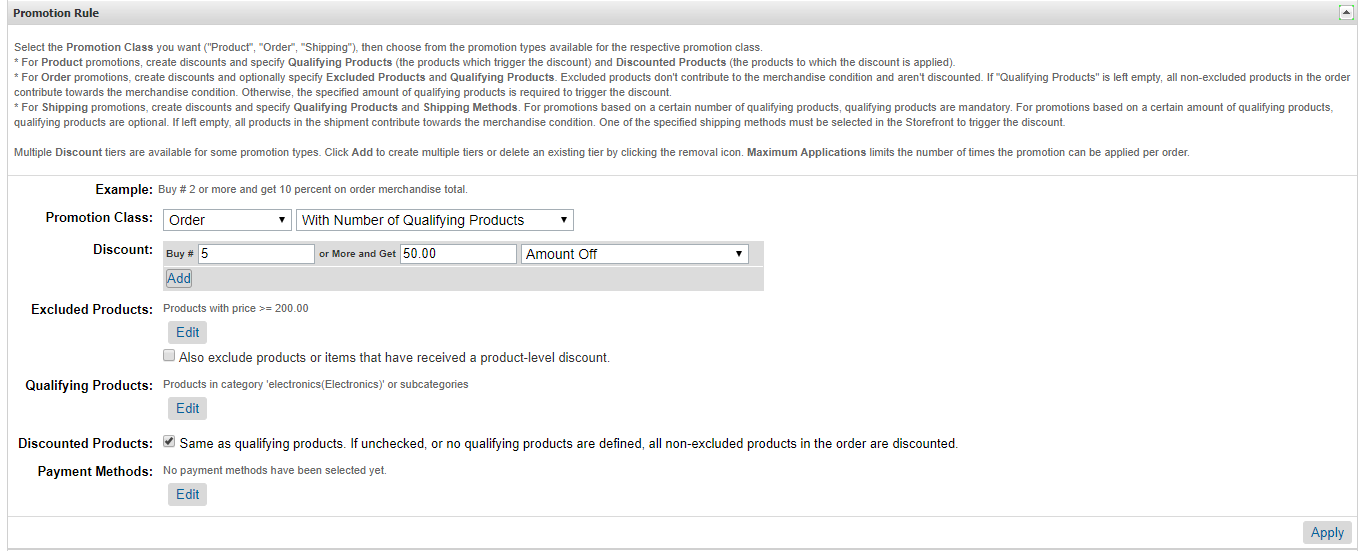
To extend this promotion to an international customer, in the same Promotion, go to the “Global-e Settings” section and add the following.

Make sure the Customer Group for your Campaign includes international customers. It could be “Everyone” customer group, or any other specific customer group you setup that you’d like to qualify for the promotion. For example, if you would like only customers from Canada to receive this discount in addition to your domestic customers, you could configure a specific customer group for them and add it here.

On the storefront, the promotion is now applicable to both domestic and Global‑e operated countries.
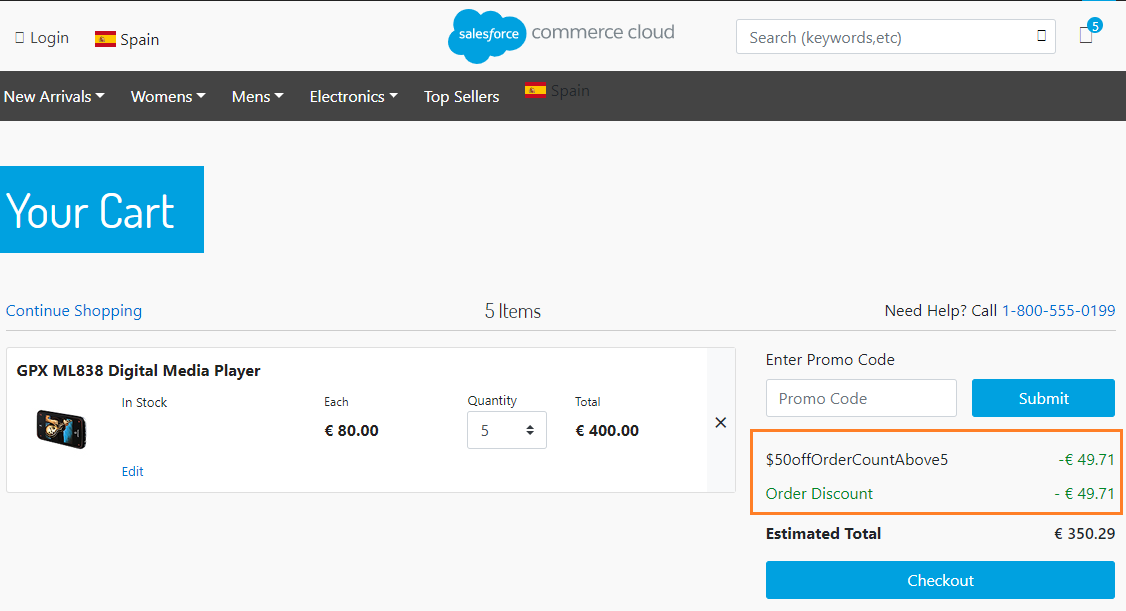
Since “Do not Convert Promotional Discount” is unchecked, the $50 discount is automatically converted to the customer’s currency.