Restricted Forbidden Products
Global‑e Cartridge supports restricted/forbidden products per Country, which means that:
is possible to exclude restricted/forbidden products from Search result based on their configuration.;
is possible to disable for the customer the ability to purchase restricted/forbidden products based on their configuration.
The data about restricted and forbidden products will be retrieved automatically from Global‑e by calling Global‑e RecentProductCountryS API, which is part of GlobaleSettings Job, and will be stored to the custom attribute "geIsForbidden"(example of value: true/false) or "geRestrictedCountries"(contains the list of country codes for the example: AU,UA) of each Restricted / Forbidden product.
Excluding products from the Search Result
By default, restricted/forbidden products will not be excluded from the search result.
If you want to exclude restricted/forbidden products from Search results you can create and configure special Promotion in BM as described below.
The best way for performance-wise to exclude restricted/forbidden products from the Search result is to set Promotion ID and Promotion Product Type to Product Search Model.
Code details
The function helper that applies the promotion to the search result is defined here: "int_globale/cartridge/scripts/helpers/globaleHelpers.js"
/**
 * Apply searchable products promotion
 * @param {dw.catalog.SearchModel} apiProductSearch - SearchModel
 * @param {boolean} isExecuteSearch - allow/prevent executing 'search' method of 'dw.catalog.SearchModel' class
 * @returns {dw.catalog.SearchModel} SearchModel
 */
function applySearchableProductsPromotion(apiProductSearch, isExecuteSearch) {
    /**
     * It is possible to exclude Restricted or Forbidden products from search results
     * In the example below, the exclusion will be done by using the Promotion ID,
     * for example SearchableProducts_AU - will be applied only for Australia,
     * where all Restricted or Forbidden products will be added in 'Qualifying Products' => 'Excluding products',
     * so the promotion will have qualifying products but won't have any discounted products,
     * thus we can filter the search results but the promotional callout message won't be displayed on storefront.
     */
    var globaleSession = require('*/cartridge/models/globale/session');
    if (!globaleSession.get('geOperatedCountry')) {
        return apiProductSearch;
    }
    var searchableProductsPromotionId = getPreference(preferenceKeys.geSearchableProductsPromotionId);
    var searchableProductsPromotion;
    if (searchableProductsPromotionId) {
        var PromotionMgr = require('dw/campaign/PromotionMgr');
        var collections = require('*/cartridge/scripts/util/globale/collections');
        searchableProductsPromotionId = searchableProductsPromotionId
            .replace(/\{country\}/ig, globaleSession.get('geCountry'))
            .replace(/\{currency\}/ig, globaleSession.get('geCurrency'))
        ;
        var applicablePromotions = PromotionMgr.getActiveCustomerPromotions().getProductPromotions();
        if (applicablePromotions && applicablePromotions.length > 0) {
            searchableProductsPromotion = collections.find(applicablePromotions, function (promotion) { return (promotion.ID === searchableProductsPromotionId); });
        }
        if (searchableProductsPromotion) {
            var ProductSearchModel = require('dw/catalog/ProductSearchModel');
            apiProductSearch.setPromotionID(searchableProductsPromotion.ID);
            apiProductSearch.setPromotionProductType(ProductSearchModel.PROMOTION_PRODUCT_TYPE_QUALIFYING);
            if (isExecuteSearch) {
            	apiProductSearch.search();
            }
        }
    }
    return apiProductSearch;
}
SFRA
In SFRA architecture the search result is modified here: int_globale_sfra/cartridge/scripts/helpers/searchHelpers.js
searchHelpers
setupSearch: {
    value: function () {
        var globaleHelpers = require('*/cartridge/scripts/helpers/globaleHelpers');
        var apiProductSearch = this.super.setupSearch.apply(this.super, Array.prototype.slice.call(arguments));
        // apply searchable products promotion
        apiProductSearch = globaleHelpers.applySearchableProductsPromotion(apiProductSearch);
        return apiProductSearch;
    }
}
SiteGenesis Pipelines / Controllers
In SiteGenesis architecture the search result is modified here: int_globale_sitegenesis/cartridge/scripts/models/SearchModel.js
initializeProductSearchModel: {
    value: function () {
        var globaleHelpers = require('*/cartridge/scripts/helpers/globaleHelpers');
        var apiProductSearch = this.super.initializeProductSearchModel.apply(this.super, Array.prototype.slice.call(arguments));
        // apply searchable products promotion
        apiProductSearch = globaleHelpers.applySearchableProductsPromotion(apiProductSearch);

        return apiProductSearch;
    }
}
Site Preference
This is how the Site Preference in GLOBALE preference group can be configured:

Promotion and Campaign
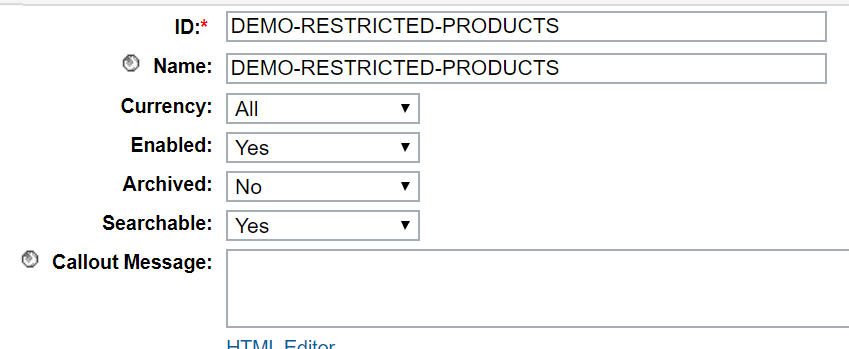
The Promotion in the example below is configured for Australia only (with using Customer Groups), so the restricted/forbidden products will be excluded from Search result for Australia only.
Note: You can also configure one promotion for more than one Global-e operated country by using the Customer Group in Campaign
Create Promotion


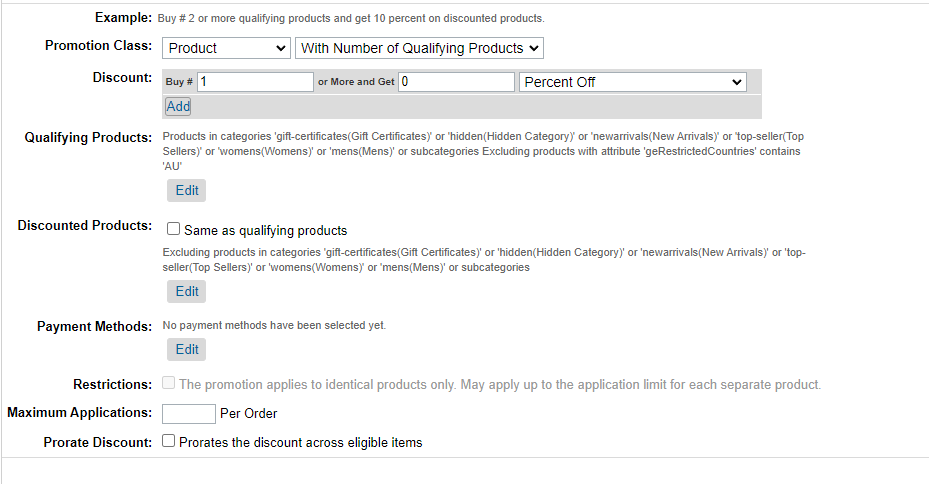
Set Qualifying Products:
Add All products into Included Products 1, and into Excluded Products 1.
Choose Global‑e RestrictedCountries product custom attributes and values of country codes that should be excluded from the scope of active promotion.
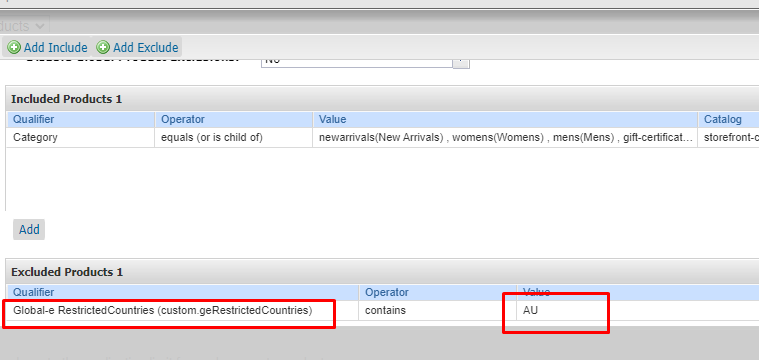
Based on this example, all products with 'AU'(Australia) will be excluded from the custom attribute Global‑e RestrictedCountries from the Search result for Australia.
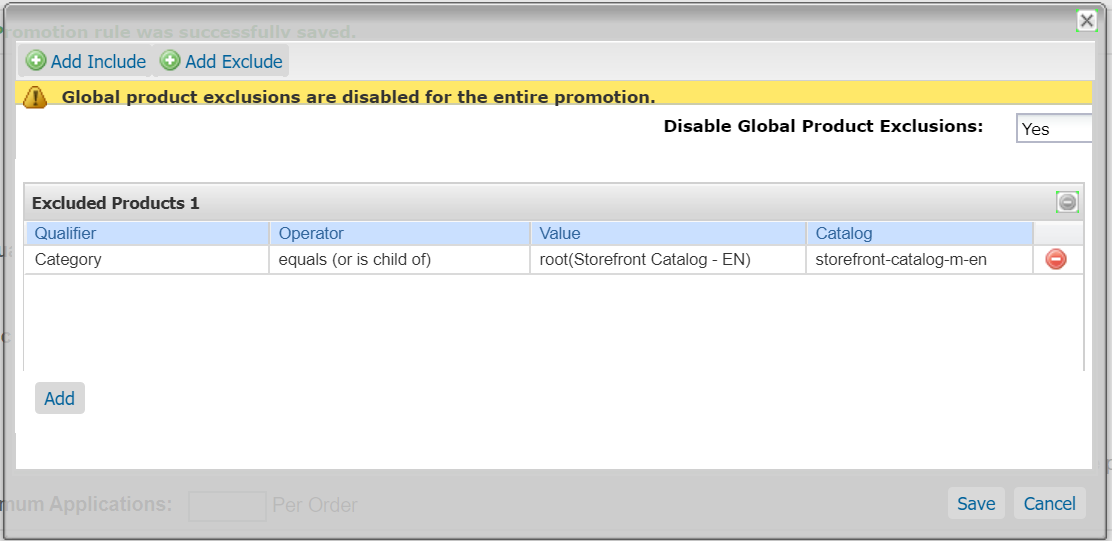
Set Discounted Products:
Remove Included Products 1, and add All products into Excluded Products 1, so no products will be discounted, it's needed for the correct prices shown on PLP/PDP and Basket
Run Search Indexes in BM:
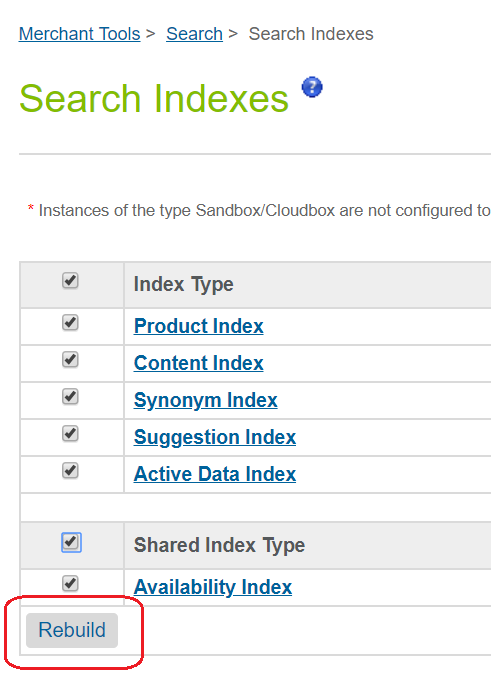
Note that Salesforce B2C Commerce ignores the campaign configuration for Promotions used in ProductSearchModel.setPromotionID(), but we would like to use Campaign and assigned Customer Groups to be able to filter the restricted/forbidden products only for Global‑e operated countries (in this example - Australia). Therefore, we will assign this Promotion to one of the existing Global‑e Campaign and Australian Customer Group.
If the promotion ID contains the placeholders in the code below, you do not need to configure a dynamic customer group and apply it to the campaign
searchableProductsPromotionId = searchableProductsPromotionId
    .replace(/\{country\}/ig, globaleSession.get('geCountry'))
    .replace(/\{currency\}/ig, globaleSession.get('geCurrency'))
If the promotion ID does not contain placeholders, then you do need to apply a dynamic group in the campaign configuration.
Disable the ability to purchase restricted/forbidden products
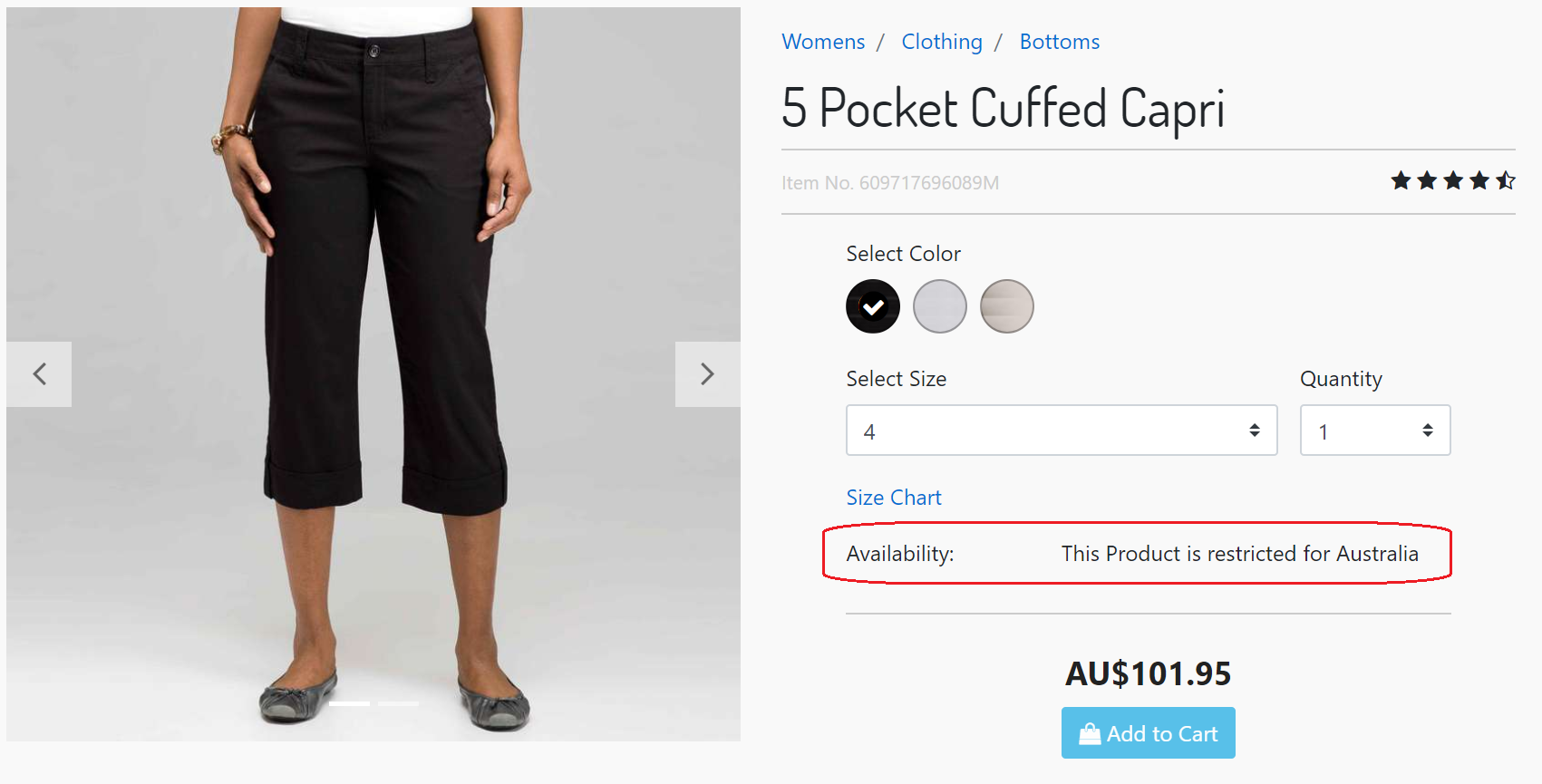
By default, the Restricted or Forbidden product will be shown on PDP with the respective message in the availability section.
It is also possible to not show restricted/forbidden products for selected Shipping Countries on PDP.
SFRA
In SFRA architecture it can be implemented in the "Product" controller with the next piece of the code.
Redirect to Home Page for Restricted and/or Forbidden products
/**
 * Global-e Product Show
 *
 * Merchant Customization: Add custom code to this route if you need custom behavior for
 * Restricted or Forbidden product on PDP page. For example, you could redirect international
 * customers to home page if they click on a restricted or forbidden product as shown in
 * the example below.
 * @example
 * var URLUtils = require('dw/web/URLUtils');
 * var ProductMgr = require('dw/catalog/ProductMgr');
 * var globaleSession = require('{@literal *}/cartridge/models/globale/session');
 * var globaleHelpers = require('{@literal *}/cartridge/scripts/helpers/globaleHelpers');
 * var apiProduct = ProductMgr.getProduct(req.querystring.pid);
 * // Restricted and Forbidden Products
 * var geRestrictionForbiddenMessage = globaleHelpers.getProductRestrictionMessage(apiProduct, globaleSession.get('geCountry'));
 * // Restricted Products only
 * var geRestrictionMessage = globaleHelpers.getProductRestrictionMessage(apiProduct, globaleSession.get('geCountry'), true);
 * // Forbidden Products only
 * var geForbiddenMessage = globaleHelpers.getProductRestrictionMessage(apiProduct, globaleSession.get('geCountry'), false, true);
 * if (geRestrictionForbiddenMessage) {
 *      res.redirect(URLUtils.url('Home-Show')); // redirect to home page
 *      next();
 * }
 */
SiteGenesis Pipelines / Controllers
In SiteGenesis architecture it can be implemented in the "Product" controller/pipeline with the next piece of the code.
Redirect to Home Page for Restricted and/or Forbidden products
/**
 * Global-e Product Show
 *
 * Merchant Customization: Add custom code to this route if you need custom behavior for
 * Restricted or Forbidden product on PDP page. For example, you could redirect international
 * customers to home page if they click on a restricted or forbidden product as shown in
 * the example below.
 * @example
 * var URLUtils = require('dw/web/URLUtils');
 * var ProductMgr = require('dw/catalog/ProductMgr');
 * var globaleSession = require('{@literal *}/cartridge/models/globale/session');
 * var globaleHelpers = require('{@literal *}/cartridge/scripts/helpers/globaleHelpers');
 * var apiProduct = ProductMgr.getProduct(params.pid.stringValue);
 * // Restricted and Forbidden Products
 * var geRestrictionForbiddenMessage = globaleHelpers.getProductRestrictionMessage(apiProduct, globaleSession.get('geCountry'));
 * // Restricted Products only
 * var geRestrictionMessage = globaleHelpers.getProductRestrictionMessage(apiProduct, globaleSession.get('geCountry'), true);
 * // Forbidden Products only
 * var geForbiddenMessage = globaleHelpers.getProductRestrictionMessage(apiProduct, globaleSession.get('geCountry'), false, true);
 * if (geRestrictionForbiddenMessage) {
 *      response.redirect(URLUtils.https('Home-Show')); // redirect to home page
 * }
 */
Einstein Product Recommendations
By default, If the customer clicks on the link of the recommended restricted/forbidden product – the customer will see a restricted/forbidden message (or any other specific behavior, if it's implemented in Product.js controller) and the Customer will not be able to add restricted/forbidden product to Basket.
SFRA and SiteGenesis Pipelines / Controllers
To hide the restricted/forbidden products from the Einstein Product Recommendations - adjust the templates which renders the Einstein Product Recommendations, according to the instruction provided in SFCC documentation.
A sample is below:
Hide Global‑e Restricted/Forbidden Products from Einstein Product Recommendations
<iscontent type="text/html" charset="UTF-8" compact="true"/>
<iscomment> should not be cached, the tiles are cached individually.</iscomment>
<isset name="globaleHelpers" value="${require('*/cartridge/scripts/helpers/globaleHelpers')}" scope="page" />
<isset name="globaleSession" value="${require('*/cartridge/models/globale/session')}" scope="page"/>
<isif condition="${slotcontent}">
    <div class="product-listing product-listing-1x4">
        <h2>${slotcontent.calloutMsg}</h2>
        <ul class="search-result-items tiles-container">
            <isloop items="${slotcontent.content}" var="product" begin="0" end="3">
                <isobject object="${product}" view="recommendation">
                    <isif condition="${globaleHelpers.getProductRestrictionMessage(product, globaleSession.get('geCountry'))}"><iscontinue/></isif>
                    <li class="grid-tile">
                        <isinclude url="${URLUtils.url('Product-HitTile',
                            'pid', product.ID,
                            'showswatches', 'true',
                            'showpricing', 'true',
                            'showpromotion', 'true',
                            'showrating', 'true')}"/>
                    </li>
                </isobject>
            </isloop>
        </ul>
    </div>
</isif>
Global‑e Checkout with restricted/forbidden product(s)
If a customer reaches the Global‑e Checkout with restricted/forbidden products in their basket, they will see a message on the Global‑e Checkout page and will be prevented from proceeding.