You can create product bundles to group products so that they can be sold together. The Product Bundle Mapping screen enables you to import and process products in bundles and handle the mapping to a parent SKU on the Bundle Product Management page.
The product bundle mapping file can be uploaded in one of the following ways:
-
Upload a CSV file via sFTP.
-
Upload manually from the Merchant Portal. See Product Bundle Mapping.
Note
-
The CSV file format is the same for both upload options. No special formatting is required for a specific file upload.
-
The time interval between load requests is 60 minutes.
-
Contact your CSM to enable the sFTP file upload.
To import products in bundles:
-
Navigate to Merchants > Product Management > Product Bundle Mapping from the top menu.
-
Select a merchant from the Merchant menu.
-
Download the Bundle template file by clicking File Format Example.
-
Populate the Bundle template file with the following values:
-
BundleSKU - The parent SKU as it exists on the products table.
-
ChildSKU - The child SKU as it should be passed by the merchant in the GSD request.
-
Quantity - The quantity of the child SKU items for this bundle,
BundleFulfillmentGroup (optional) - A merchant-defined label that groups the child-SKU rows making up one way to fulfil the bundle. Rows that share the same BundleSKU + BundleFulfillmentGroup form one fulfilment option. Free text (for example,
SINGLESorPREPACK); it can be left empty when a Bundle SKU has only one fulfilment option (an empty value means the default/single option) and populated only when a bundle is fulfilled in more than one way - one label per option, shared across that option's rows. Global-e does not auto-group rows - the merchant assigns the label. The legacy 3-column file can still be used for the single-option case.Fill out a row for each parent bundle SKU and child bundle SKU.
File Columns
The mapping file uses the following columns:
Column
Required?
Description
BundleSKURequired
The parent SKU as it exists on the products table.
ChildSKURequired
The child SKU as it should be passed by the merchant in the GSD request.
QuantityRequired
The quantity of the child SKU items for this bundle.
BundleFulfillmentGroupOptional (may be empty)
Merchant-defined label grouping the child rows of one fulfilment option (e.g.
SINGLES,PREPACK). Optional and may be left empty for a single-option bundle; populate it only when the bundle has more than one fulfilment option. -
-
The mapping file supports two formats: the legacy 3-column format (
BundleSKU, ChildSKU, Quantity) and the 4-column format that addsBundleFulfillmentGroupas the 4th column. -
The format is detected from the header row only. Column order is fixed -
BundleSKU, ChildSKU, Quantity[, BundleFulfillmentGroup]- and header names are matched case-insensitively. A single file cannot mix the two formats. -
Legacy 3-column files keep working with no change.
-
A single
BundleSKUcan have several fulfilment groups (multiple rows with differentBundleFulfillmentGroupvalues), so the same bundle can be fulfilled in more than one valid way. -
On import, Global-e replaces per
BundleSKU: all existing rows for a bundle listed in the file are removed and replaced by the rows in the file. To keep multiple groups for a bundle, include every group for that bundle in the same file.
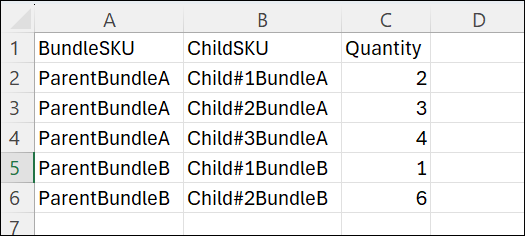
The following figure shows the content included in a product bundle CSV file:
|
BundleSKU |
ChildSKU |
Quantity |
BundleFulfillmentGroup |
|---|---|---|---|
|
PACK-3 |
SHIRT-S |
1 |
SINGLES |
|
PACK-3 |
SHIRT-M |
1 |
SINGLES |
|
PACK-3 |
SHIRT-L |
1 |
SINGLES |
|
PACK-3 |
KIT-3PACK |
1 |
PREPACK |
-
Singles option = 3 rows sharing group
SINGLES(bundle fulfilled as individual child items). -
Pre-pack option = 1 row with group
PREPACK(bundle fulfilled as a single pre-packed kit SKU).
The same bundle in the legacy 3-column format (still valid) - note that a 3-column file supports only one fulfilment group per Bundle SKU; multiple fulfilment groups require the 4-column format with BundleFulfillmentGroup:
|
BundleSKU |
ChildSKU |
Quantity |
|---|---|---|
|
PACK-3 |
SHIRT-S |
1 |
|
PACK-3 |
SHIRT-M |
1 |
|
PACK-3 |
SHIRT-L |
1 |