Implementation of the Solution
GetOrdersDetails API Workflow
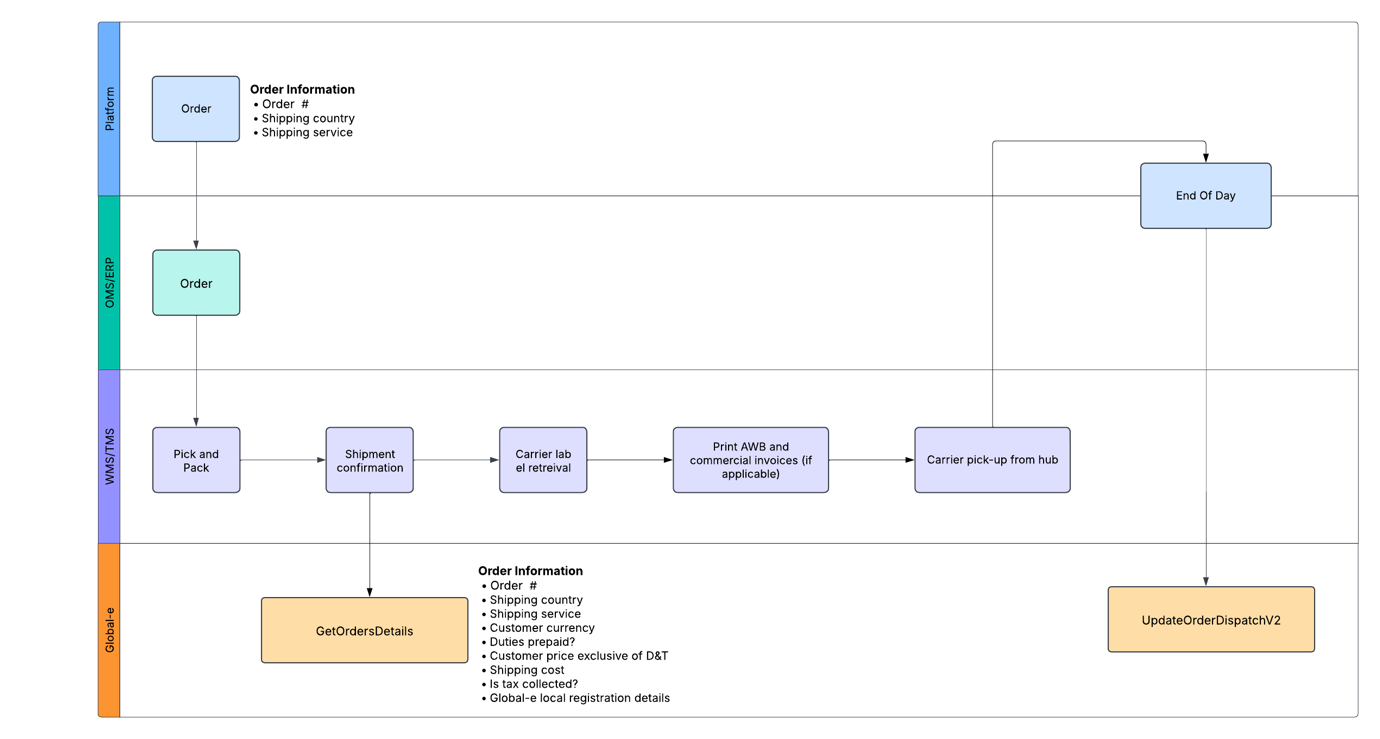 |
API & Environment Details
API Documentation
️ For detailed API specifications, refer to GetOrdersDetails.
Global-e Environments
Note
Consult your Global-e project team to determine the appropriate environments for your integration.
Environment | URL Endpoint |
|---|---|
INT (Integration) | https://connect.bglobale.com/ |
STG (Staging) | https://connect2.bglobale.com/ |
PROD (Production) | https://api.global-e.com/ |
Field Mappings
The API method return a list of order details. In the context of producing shipping documentation, the below fields and associated logic must be considered:
Exporter details | Should remain the same as today, i.e. the brand, 3PL, or other relevant party |
Global-e local tax registration | In specific destinations, such as Norway, the UK, the EU (Cross-border), Switzerland, Australia, New Zealand, Singapore, and Malaysia (the exact list of applicable countries will be confirmed during the project), Global-e is responsible for remitting taxes to local authorities. For orders below the threshold, Global-e’s local tax registration must be included on the commercial invoice and declared to the carrier, as Global-e will handle the direct filing of applicable taxes with the respective local authorities. Merchant.Order.ExporterDetails.LocalRegistrationClearance – A Boolean value indicating whether Global-e will remit the tax locally for the order. If TRUE, the following fields must be considered:
️ Important Note: Global-e’s IOSS number must NOT be displayed on the Commercial Invoices |
Importer and import type mention | If (Merchant.ImporterDetails.ImporterType = 0) “Private Import Mention” for B2C shipment - Merchant.Order.ImportDetails.CustomerTaxId - Customer Tax number provided at checkout as required for clearance into certain markets (eg. Brazil, Turkey) If (Merchant.ImporterDetails.ImporterType = 1) Importer details should have the Mention "Business Importer" – only applicable for shipments to Switzerland. - Merchant.Order.ImporterDetails.Company –Global-e importer entity name for relevant markets (e.g. Switzerland) - Merchant.Order.ImporterDetails.VATRegistrationNumber - Global-e importer entity registration number for relevant markets (e.g. Switzerland) - Merchant.Order.ImporterDetails.Address - Global-e Importer entity |
Shipper name/address | Should remain the same as today, e.g. the brand, 3PL, or other relevant party |
Currency | Merchant.Order.InternationalDetails.CurrencyCode |
Incoterm | If shipping country = “Switzerland” Shipment to be cleared under Global-e’s ZAZ account / "Terms of Delivery" to be decided with carrier ️ Important Note: Only the taxes applicable to the clearance into Switzerland should be billed against Global-e’s ZAZ account. Any other fee charged by the carrier in relation to the clearance should be billed to the Shipper of Record (brand/3PL) Merchant.Order.InternationalDetails.DutiesGuaranteed : true Shipment to be cleared as DDP or equivalent incoterm, to ensure no additional Duties and/or Taxes are requested to be paid at delivery by the customer. If "Merchant.Order.InternationalDetails.DutiesGuaranteed" : false and "Merchant.Order.ExporterDetails.LocalRegistrationClearance” : false Shipment to be cleared as DAP or equivalent incoterm, with applicable Duties and/or Taxes paid at delivery by the customer. If "Merchant.Order.InternationalDetails.DutiesGuaranteed" : false and "Merchant.Order.ExporterDetails.LocalRegistrationClearance” : true Global-e’s local tax registration to be provided to the carrier and presented on the clearance documents, considering that taxes will be filled by Global-e in the destination country (as mentioned in section “Global-e local tax registration number”) Shipment booking to be done following carrier requirements (process to be aligned by the brand with carrier) |
Products | <List> Merchant.Order.Products |
· COO | n/a – to be taken from own systems |
· HS Code | n/a – to be taken from own systems |
Price exclusive of D&T | Merchant.Order.Products[i].InternationalDiscountedPriceForCustoms |
Shipping Cost | Merchant.Order.InternationalDetails.DiscountedShippingPrice |
Destination Tax calculation rule | Merchant.Order.TaxCalculationRule - determines how duties and taxes are calculated for an order. Possible values: CIF (Cost, Insurance, and Freight): This method calculates duties and taxes based on the total cost of goods, including insurance and freight charges. FOB (Free on Board): This method calculates duties and taxes based only on the value of the goods Tax calculation rules defined per country in Global-e system. Clearance documents to be aligned accordingly. |
Total shipment declarative value for customs | Merchant.Order.TotalValueForCustoms |
Platform Mapping
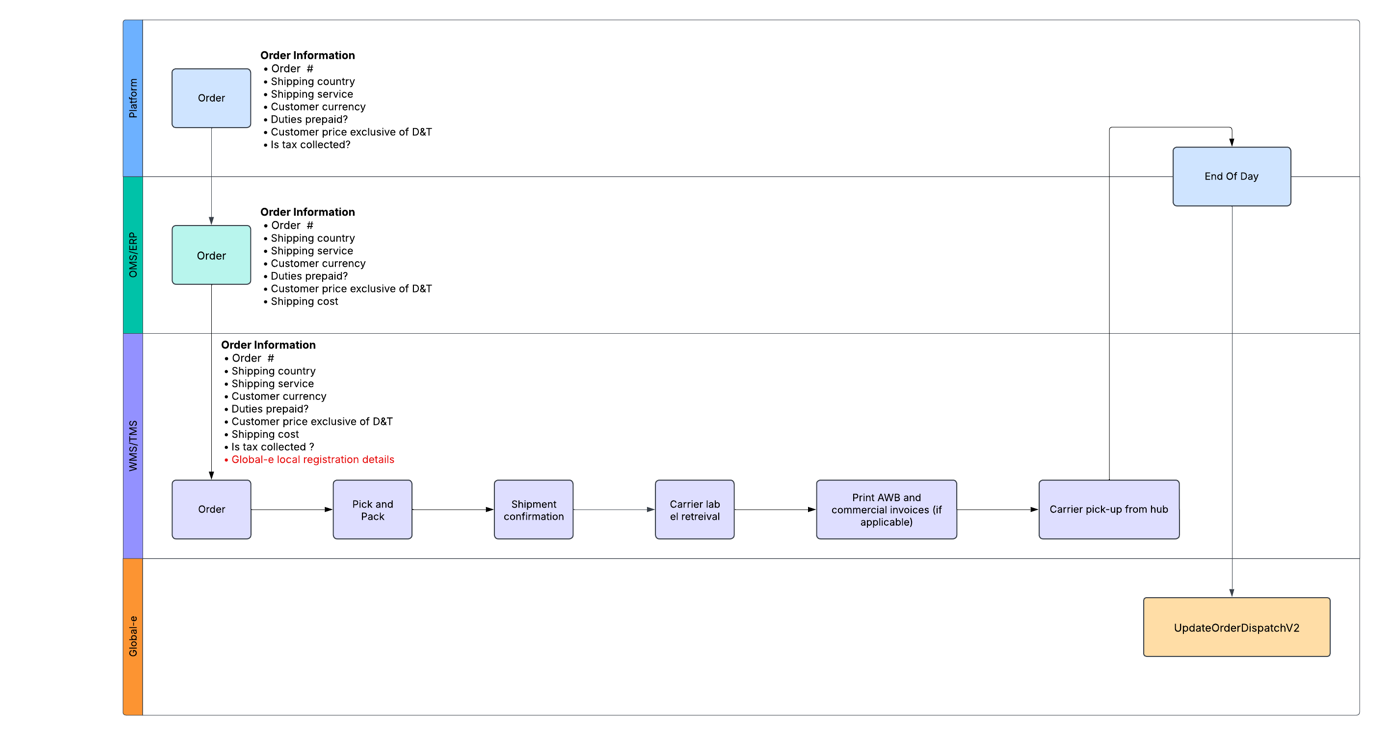 |
SFCC Mapping
Exporter details | Should remain the same as today, e.g. the brand, third party logistics (3PL), or other relevant party |
Global-e Local registration details | In specific destinations, such as Norway, the UK, the EU (Cross-border), Switzerland, Australia, New Zealand, Singapore, and Malaysia (the exact list of applicable countries will be confirmed during the project), Global-e is responsible for remitting taxes to local authorities. For orders below the threshold, Global-e’s local tax registration must be included on the commercial invoice and declared to the carrier, as Global-e will handle the direct filing of applicable taxes with the respective local authorities. The relevant details for each destination will be provided separately to allow for it to be stored in the relevant system as part of the integration. ️ Important Note: Global-e’s IOSS number must NOT be displayed on the Commercial Invoices To determine when Global-e local registration details need to be declared, use the below field: geLocalRegistrationClearance – A Boolean value indicating whether the order is tax collected. |
Importer and import type mention | If (shipping country != Switzerland) “Private Import Mention” for B2C shipment geCustomerTaxId - Customer Tax number provided at checkout as required for clearance into certain markets (eg. Brazil, Turkey) Else Importer details should have the Mention "Business Importer" Importer details to Switzerland will be communicated in separate file |
Shipper name/address | Should remain the same as today, i.e. the brand, 3PL, or other relevant party |
Currency | geCustomerCurrencyCode |
Incoterm | If shipping country = “Switzerland” Shipment to be cleared under Global-e’s ZAZ account / "Terms of Delivery" to be decided with carrier ️ Important Note: Only the taxes applicable to the clearance into Switzerland should be billed against Global-e’s ZAZ account. Any other fee charged by the carrier in relation to the clearance should be billed to the Shipper of Record (brand/3PL) If geDutiesGuaranteed: true Shipment to be cleared as DDP or equivalent incoterm, to ensure no additional Duties and/or Taxes are requested to be paid at delivery by the customer. If geDutiesGuaranteed: false and geLocalRegistrationClearance: false Shipment to be cleared as DAP or equivalent incoterm, with applicable Duties and/or Taxes paid at delivery by the customer. If geDutiesGuaranteed: false and geLocalRegistrationClearance: true Global-e’s local tax registration to be provided to the carrier and presented on the clearance documents, considering that taxes will be filled by Global-e in the destination country (as mentioned in section “Global-e local tax registration number”) Shipment booking to be done following carrier requirements (process to be aligned by the brand with carrier) |
Products | <product-lineitem> data from SFCC order record |
· COO | n/a – to be taken from own systems |
· HS Code | n/a – to be taken from own systems |
Price exclusive of D&T | geInternationalDiscountedPriceForCustoms |
Shipping Cost | geTotalDiscountedShippingPrice |
Destination Tax calculation rule | geTaxCalculationRule - determines how duties and taxes are calculated for an order. Possible values: CIF (Cost, Insurance, and Freight): This method calculates duties and taxes based on the total cost of goods, including insurance and freight charges. FOB (Free on Board): This method calculates duties and taxes based only on the value of the goods Tax calculation rules defined per country in Global-e system. Clearance documents to be aligned accordingly. |
Total shipment declarative value for customs | geTotalValueForCustoms |
Shopify Mapping
For brands/third party logistics (3PLs) relying on the Shopify data to create the shipping documents related to Global-e orders, most of the additional information required is made available through the Shopify note_attributes, as detailed in the table below.
Important
While for standard orders, the required note_attributes will be added prior to the Shopify order status being updating to PAID (typically acting as the trigger for export), please note that for orders where no payment is taken (e.g. influencer orders, replacements), or those paid via Gift Cards, the additional data will only be added after the order is marked as PAID, requiring specific logic to be built as part of the order export process.
Exporter details | Should remain the same as today, i.e. the brand, 3PL, or other relevant party |
Global-e Local registration details | In specific destinations, such as Norway, the UK, the EU (Cross-border), Switzerland, Australia, New Zealand, Singapore, and Malaysia (the exact list of applicable countries will be confirmed during the project), Global-e is responsible for remitting taxes to local authorities. For orders below the threshold, Global-e’s local tax registration must be included on the commercial invoice and declared to the carrier, as Global-e will handle the direct filing of applicable taxes with the respective local authorities. The relevant details for each destination will be provided separately to allow for it to be stored in the relevant system as part of the integration. ️ Important Note: Global-e’s IOSS number must NOT be displayed on the Commercial Invoices To determine when Global-e local registration details need to be declared, use the below field: order.note_attributes [LocalRegistrationClearance] – A Boolean value indicating whether the order is tax collected. |
Importer and import type mention | If (shipping country != Switzerland) “Private Import Mention” for B2C shipment Else Importer details should have the Mention "Business Importer" Importer details to Switzerland will be communicated in separate file |
Shipper name/address | Should remain the same as today, i.e. the brand, 3PL, or other relevant party |
Currency | order.presentment_currency |
Incoterm | If shipping country = “Switzerland” Shipment to be cleared under Global-e’s ZAZ account / "Terms of Delivery" to be decided with carrier ️ Important Note: Only the taxes applicable to the clearance into Switzerland should be billed against Global-e’s ZAZ account. Any other fee charged by the carrier in relation to the clearance should be billed to the Shipper of Record (brand/3PL) If order.note_attributes: [ { name: "DutiesPrePaid", value: "true" } Shipment to be cleared as DDP or equivalent incoterm, to ensure no additional Duties and/or Taxes are requested to be paid at delivery by the customer. If order.note_attributes: [ { name: "DutiesPrePaid", value: "false" } and order.note_attributes: [ { name: "LocalRegistrationClearance", value: "false" } Shipment to be cleared as DAP or equivalent incoterm, with applicable Duties and/or Taxes paid at delivery by the customer. If order.note_attributes: [ { name: "DutiesPrePaid", value: "false" } and order.note_attributes: [ { name: "LocalRegistrationClearance", value: "true" } Global-e’s local tax registration to be provided to the carrier and presented on the clearance documents, considering that taxes will be filled by Global-e in the destination country (as mentioned in section “Global-e local tax registration number”) Shipment booking to be done following carrier requirements (process to be aligned by the brand with carrier) |
Products | order.line_items |
· COO | n/a – to be taken from own systems |
· HS Code | n/a – to be taken from own systems |
Price exclusive of D&T | order.note_attributes [ InternationalOrderProductsForCustoms ] |
Shipping Cost | order.note_attributes [DiscountedShippingPrice] |
Destination Tax calculation rule | order.note_attributes [TaxCalculationRule] - determines how duties and taxes are calculated for an order. Possible values: CIF (Cost, Insurance, and Freight): This method calculates duties and taxes based on the total cost of goods, including insurance and freight charges. FOB (Free on Board): This method calculates duties and taxes based only on the value of the goods Tax calculation rules defined per country in Global-e system. Clearance documents to be aligned accordingly. |
Total shipment declarative value for customs | order.note_attributes [TotalValueForCustoms] |
GEM Mapping
Exporter details | Should remain the same as today, i.e. the brand, third party logistics, or other relevant party |
Global-e Local registration details | In specific destinations, such as Norway, the UK, the EU (Cross-border), Switzerland, Australia, New Zealand, Singapore, and Malaysia (the exact list of applicable countries will be confirmed during the project), Global-e is responsible for remitting taxes to local authorities. For orders below the threshold, Global-e’s local tax registration must be included on the commercial invoice and declared to the carrier, as Global-e will handle the direct filing of applicable taxes with the respective local authorities. The relevant details for each destination will be provided separately to allow for it to be stored in the relevant system as part of the integration. ️ Important Note: Global-e’s IOSS number must NOT be displayed on the Commercial Invoices To determine when Global-e local registration details need to be declared, use the below field: Merchant.Order.ExporterDetails.LocalRegistrationClearance – A Boolean value indicating whether the order is tax collected. |
Importer and import type mention | If (Merchant.ImporterDetails.ImporterType = 0) “Private Import Mention” for B2C shipment Merchant.Order.ImportDetails.CustomerTaxId - Customer Tax number provided at checkout as required for clearance into certain markets (eg. Brazil, Turkey) If (Merchant.ImporterDetails.ImporterType = 1) Importer details should have the Mention "Business Importer" Importer details to Switzerland will be communicated in separate file |
Shipper name/address | Should remain the same as today, i.e. the brand, 3PL, or other relevant party |
Currency | Merchant.Order.InternationalDetails.CurrencyCode |
Incoterm | If shipping country = “Switzerland” Shipment to be cleared under Global-e’s ZAZ account / "Terms of Delivery" to be decided with carrier ️ Important Note: Only the taxes applicable to the clearance into Switzerland should be billed against Global-e’s ZAZ account. Any other fee charged by the carrier in relation to the clearance should be billed to the Shipper of Record (brand/3PL) CautionOnly the taxes applicable to the clearance into Switzerland should be billed against Global-e’s ZAZ account. Any other fee charged by the carrier in relation to the clearance should be billed to the Shipper of Record (brand/Third Party Logistics). Merchant.Order.InternationalDetails.DutiesGuaranteed : true Shipment to be cleared as DDP or equivalent incoterm, to ensure no additional Duties and/or Taxes are requested to be paid at delivery by the customer. if "Merchant.Order.InternationalDetails.DutiesGuaranteed": false and "Merchant.Order.ExporterDetails.LocalRegistrationClearance”: false Shipment to be cleared as DAP or equivalent incoterm, with applicable Duties and/or Taxes paid at delivery by the customer. if "Merchant.Order.InternationalDetails.DutiesGuaranteed": false and "Merchant.Order.ExporterDetails.LocalRegistrationClearance”: true Global-e’s local tax registration to be provided to the carrier and presented on the clearance documents, considering that taxes will be filled by Global-e in the destination country (as mentioned in section “Global-e local tax registration number”) Shipment booking to be done following carrier requirements (process to be aligned by the brand with carrier) |
Products | <List> Merchant.Order.Products |
· COO | n/a – to be taken from own systems |
· HS Code | n/a – to be taken from own systems |
Price exclusive of D&T | Merchant.Order.Products[i].InternationalDiscountedPriceForCustoms |
Shipping Cost | Merchant.Order.InternationalDetails.DiscountedShippingPrice |
Destination Tax calculation rule | Merchant.Order.TaxCalculationRule - determines how duties and taxes are calculated for an order. Possible values: CIF (Cost, Insurance, and Freight): This method calculates duties and taxes based on the total cost of goods, including insurance and freight charges. FOB (Free on Board): This method calculates duties and taxes based only on the value of the goods Tax calculation rules defined per country in Global-e system. Clearance documents to be aligned accordingly. |
Total shipment declarative value for customs | Merchant.Order.TotalValueForCustoms |