Reconciliation Report
The Reconciliation Report is a structured financial data file provided by Global-e to merchants. It offers comprehensive details of all your sales. The report is generated automatically once a week and the Global-e Finance team is available for any questions regarding the files or data.
The report is delivered once a week to the registered Distribution List (DL).
Starting in 2026, an updated layout of the report was introduced. This documentation covers both the original and the updated layouts.
To receive the updated report layout instead of the original layout, please contact your CSM.
The Reconciliation Report includes the following sections, which you can view by selecting the relevant tab:
Note
The Reconciliation Report is presented in your local currency, and all information is aligned with your country’s specific rules and regulations.
Orders are included in the reconciliation according to their Received in Hub date, while refunds are included based on their Creation date.
Verify that you review the status of your orders on a regular basis, to ensure that all orders dispatched have progressed to Received In Hub. Orders not received in the hub may delay payment of said orders.
For guidance regarding the current status of any order, or to progress orders dispatched which have not yet progressed to Received In Hub, contact your CSM.
For more information, see the original layout video.
For more information about the Reconciliation process, see The Reconciliation Process (Finance).
Summary
This section is an overview of all the fields displayed in the Summary tab. It describes both the original and updated layouts, and includes important details of each.
Original Layout
The following image shows the original layout:
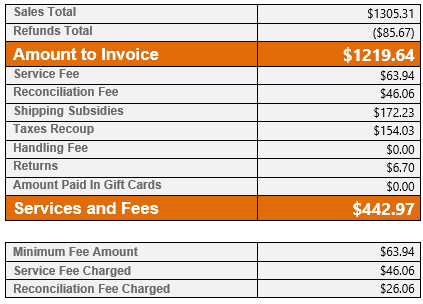
Section | Field Name | Description |
|---|---|---|
Invoice | Sales Total | Total of all sales from the period. |
Refunds Total | Refunds processed during the period. | |
Amount to Invoice | The total of all sales from the period, including discounts (Sales Total), minus the refunds processed during the period (Refunds Total). | |
Services and Fees | Service Fee | A fee based on the percentage per contract. |
Base for Reconciliation Fee | A calculation based on the Total Order Value paid by the customer | |
Reconciliation Fee Percentage | The fee percentage noted in the contract. | |
Reconciliation Fee | Percentage per contract of the base for Reconciliation Fee noted above | |
Shipping Subsidies | The difference between the total cost of shipping and the fixed price paid by the customer. This is also according to your configuration. | |
Taxes Recoup | Duties & Taxes that you have chosen to subsidise for the client. | |
Handling Fee | The handling fees for each order which are processed through the Global-e Merchant hub. | |
Minimum Service Fee Completion | Refers to the monthly minimum amount defined in the contract. At the end of each month, if the total service fee and reconciliation fee collected do not reach the contractual minimum, we charge the merchant the difference to complete the minimum fee. The amount is calculated as: the contractual minimum fee minus the service fee for the month, minus the reconciliation fee for the month. The breakdown will appear at the bottom of the Summary Tab. | |
Returns | The shipping cost for each return shipped back during the period. | |
Amount Paid in Gift Cards | Total amount of all orders paid by Gift Card upon purchase. | |
Minimum Service Fee Completion | Minimum Fee Amount | Refers to the monthly minimum amount defined in the contract. |
Service Fee Charged | Total Service Fee charged over the course of the calendar month. | |
Reconciliation Fee Charged | Total Reconciliation Fee charged over the course of the calendar month. |
Updated Layout
The following figure shows the updated layout:
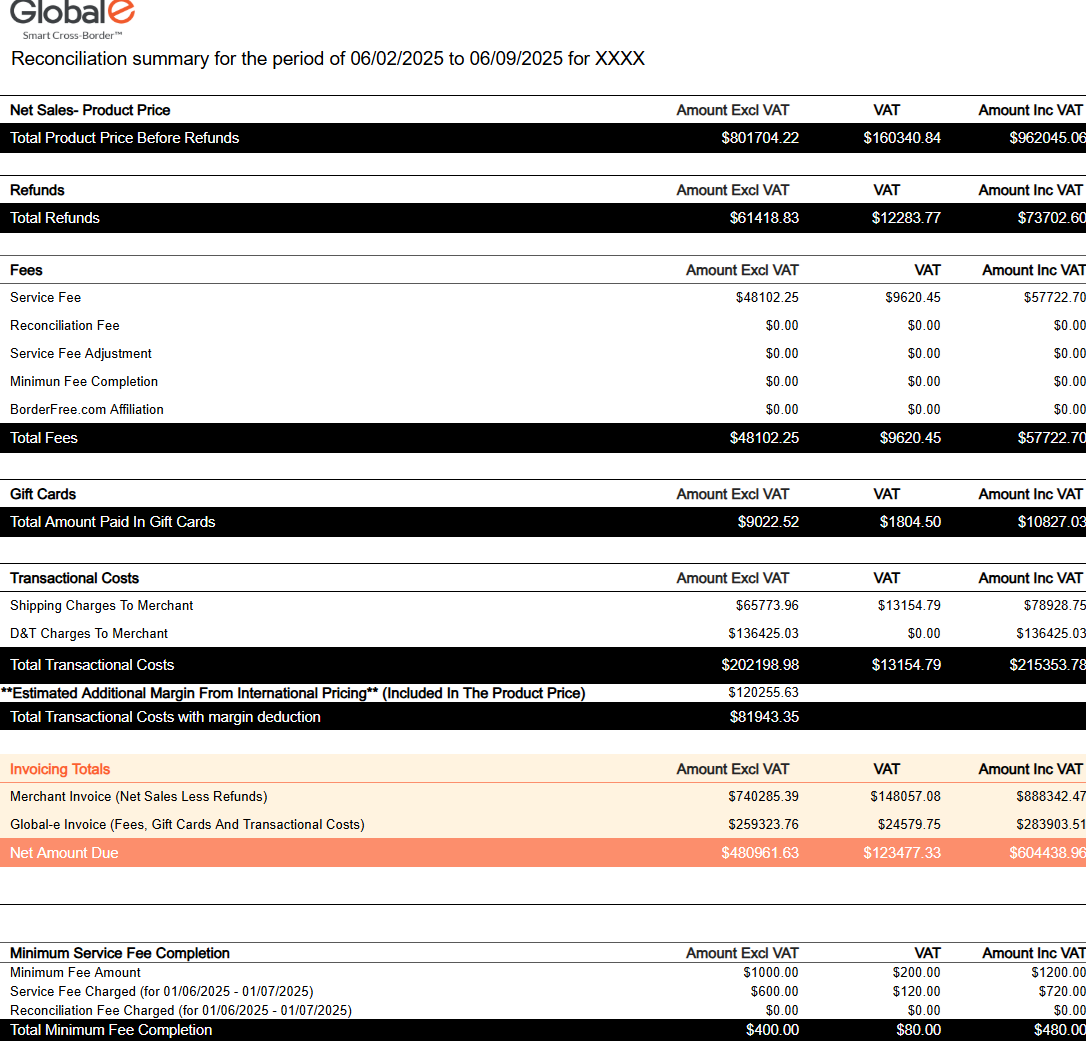
Section | Field Name | Description |
|---|---|---|
Date | Date Period | The report period is always from the initial date up to midnight of the cutoff date (UTC). For example, a report for the 01.01.2025-08.01.2025 includes all orders from the 1st up to and including the 7th; the final date is just the cutoff. |
Net Sales | Total Product Price Before Refunds | Total product for orders marked received in hub (dispatch date when orders are shipped direct; date received in Global-e's hub when shipped via Global-e hub) during the period. |
Refunds | Total Refunds | Total of refunds and adjustments issued against the account within the period. |
Fees | Service Fee | The amount paid for Global-e's Service Fee according to your contract (noted as Platform Fee in the contract). |
Reconciliation Fee | The amount paid for Global-e's Reconciliation Fee according to your contract. | |
Service Fee Adjustment | Adjustment of Service and Reconciliation Fees upon purchase of a product using a gift card which was itself purchased through Global-e. | |
Minimum Fee Completion | “Minimum fee completion” refers to the monthly minimum amount defined in the contract. At the end of each month, if the total service fee and reconciliation fee collected do not reach the contractual minimum, we charge the merchant the difference to complete the minimum fee. The amount is calculated as: the contractual minimum fee minus the service fee for the month, minus the reconciliation fee for the month. The breakdown will appear at the bottom of the Summary Tab. | |
Total Fees | Total of the above fees, including Service Fee, Reconciliation Fee, Service Fee Adjustment, Minimum Fee Completion and Borderfree.com Affiliation, as applicable. | |
Gift Cards | Total Amount Paid In Gift Cards | Total amount of all orders paid by Gift Card upon purchase. |
Transactional Costs | Shipping Charges To Merchant | Includes (for breakdown of the below, see Shipping Per Parcel tab for 1 and 2, see Returns tab for 3): |
| ||
D&Ts Charges To Merchant | Deduction of Duties & Taxes built into the product price as part of the business proposition - refer to models: Hidden Forced DDP and Partial Forced DDP. | |
Total Transactional Costs | Total of Shipping Charges To Merchant and D&Ts Charges To Merchant | |
Margin | **Estimated Additional Margin From International Pricing** (Included In The Product Price) |
|
Total Transactional Costs with margin deduction | Total value of Total Transactional Costs less Estimated Additional Margin From International Pricing | |
Invoicing Totals | Merchant Invoice (Net Sales Less Refunds) | Total amount to be invoiced for sales and refunds either by the merchant or on their behalf by Global-e (Self-Billing Invoicing). |
Global-e Invoice (Fees, Gift Cards And Transactional Costs) | Total amount to be invoiced by Global-e for Total Fees, Total Transactional Costs and Total Gift Cards. | |
Net Amount Due | The final amount due after deducting the Global-e Invoice from the Merchant invoice. | |
Minimum Service Fee Completion | Minimum Fee Amount | Refers to the monthly minimum amount defined in the contract. |
Service Fee Charged (for 01/**/20** - 01/**/20**) | Total Service Fee charged over the course of the calendar month. | |
Reconciliation Fee Charged (for 01/**/20** - 01/**/20**) | Total Reconciliation Fee charged over the course of the calendar month. | |
Total Minimum Fee Completion | Refers to the final fee due after deducting Service Fee and Reconciliation Fee Charged from the Minimum Fee Amount. |
Products and Orders
This section provides an overview of all the fields displayed in the Products and Orders tabs:
The following figure shows the Products tab layout:

The following figure shows the Orders tab layout:

# | Field Name | Description |
|---|---|---|
1 | GE Order# | This is a unique Global-e ID which is created for each order in the our system - for example, GE7733229GB |
2 | Date Created | The date on which the order is created in Global-e's system. |
3 | Date Received In Hub | This date can have two meanings. If you are you shipping through Global-e's hub, this will be the day the order is scanned into our hub. If you are shipping directly to the end customer, this will be the same as the date of shipment. |
4 | Merchant Order# | Your ID number for the order, normally taken from your platform. |
5 | Destination Country | The destination country to which the order was shipped. |
6 | EU / Non EU | For “EU” merchants: This flag is to indicate whether the destination country is in the EU. For “NON-EU” merchants: not applicable |
7 | Delivery Method | The shipping method selected by the customer at checkout. |
8 | Product, SKU, Product Reference and Quantity | These columns contain all of the identification numbers, descriptions, and also quantities of each product. |
9 | Gross Item Price/Gross Item Price Ex VAT | The price of each product excluding merchant VAT and before the deduction of discounts. |
10 | Total Product Discount | The discount value against each product or order excluding merchant VAT. |
11 | Net Item Price/Net Item Price Ex VAT | The price of each product or total of the order excluding merchant VAT and after the deduction of discounts. |
12 | VAT % (Merchant) | The percentage of VAT which applies on the product price or order total. |
13 | VAT Amount (Merchant) | The VAT amount which applies on the product price or order total. |
14 | Net Item Price Incl VAT | The product price or order total, including merchant VAT. |
15 | Extra Margin Amount | Will appear only in the “orders” tab. Dynamic Pricing - Margin built into the product price usually to cover the estimated average duties and taxes and/or shipping costs per destination country/product category. Fixed Pricing - For orders that include countries or products set as Fixed Price, the estimated margin amount is calculated based on a virtual coefficient rate defined per country. |
Shipping per Parcel
The following figure shows the ShippingPerParcel table:

This section provides an overview of all the fields displayed in the ShippingPerParcel tab.
# | Field Name | Description |
|---|---|---|
1 | GE Order# | GE Order# This is a unique Global-e ID which is created for each order in the our system - for example, GE7733229GB |
2 | Parcel Codes | An unique identifier for each parcel - it is possible that there will be more than one parcel per order. |
3 | Date Created | Date Created The date on which the order is created in Global-e's system. |
4 | Date Received In Hub | This date can have two meanings. If you are you shipping through Global-e's hub, this will be the day the order is scanned into our hub. If you are shipping directly to the end customer, this will be the same as the date of shipment. |
5 | Merchant Order# | Merchant Order# Your ID number for the order, normally taken from your platform. |
6 | Destination Country | Destination Country The destination country to which the order was shipped. |
7 | EU / Non EU | For “EU” merchants: This flag is to indicate whether the destination country is in the EU. For “NON-EU” merchants: not applicable |
8 | Delivery Method | Delivery Method The shipping method selected by the customer at checkout. |
9 | Is Replacement Order | Is Replacement Order Is this parcel for a replacement order, yes or no. |
10 | Tracking Number | Tracking Number Tracking number for each parcel. |
11 | Count Parcels | Count Parcels The number of parcels attributed to a single line. |
12 | Weight Kg | Weight Kg The total weight of the parcels attributed to this line. |
13 | Shipping Paid By Customer | The shipping cost paid by the customer - a fixed rate according to configuration. |
14 | Shipping Cost | Total actual shipping cost |
15 | Shipping Subsidies/ Shipping Subsidies -Excl VAT | Subsidisation of shipping cost - the difference between the amount paid by customer and the total shipping cost. |
16 | Shipping Subsidies - VAT | The VAT of the subsidisation, set according to merchant VAT settings. |
17 | Shipping Subsidies - Inc VAT | Subsidisation of shipping cost, including VAT. |
18 | Total Duties and Taxes | Total duties & taxes related to all parcels included in each line. |
19 | Taxes Recoup/Taxes Subsidization | Subsidisation of duties & taxes, if you have chosen to subsidise duties & taxes, either fully or partially. |
20 | Duties Paid By Customer | Portion of duties and taxes paid by customer separately to product and shipping. |
21 | Handling Fee | Handling Fee These are the handling fees for each order which is processed through Global-e's hub. |
Refunds and Refund Components
The following figure shows the RefundsComponents table:

This section provides an overview of all the fields displayed in the Refunds and RefundsComponents tabs.
# | Field Name | Description |
|---|---|---|
1 | Refund Id | This is a unique Global-e ID which is created for each refund or adjustment in the our system. |
2 | Refund Date Created | Creation date of the refund or adjustment in Global-e's system. |
3 | GE Order# | This is a unique Global-e ID which is created for each order in the our system - for exmaple, GE7733229GB |
4 | Order Date Created | The date on which the order is created in Global-e's system. |
5 | Merchant Order# | Your ID number for the order, normally taken from your platform. |
6 | Destination Country | The destination country to which the order was shipped. |
7 | EU / Non EU | For “EU” merchants: This flag is to indicate whether the destination country is in the EU. For “NON-EU” merchants: not applicable |
8 | Refund Reason | The reason selected when the refund or adjustment was created in Global-e's system. |
9 | Refund Status | The status of the refund or adjustment - for example, completed or manual. |
10 | Refund Products | All products included in the refund or adjustment. |
11 | Refund Components, SKU & Product Reference | Refund Components, SKU and Product Reference of products reimbursed or adjusted by line. |
12 | Refund Quantity | Refund Quantity of each product refunded or included in the adjustment. |
13 | Refund Notes | Notes added when the refund or adjustment was created in Global-e's system. |
14 | Refund Amount/ Refund Amount Ex VAT | Total of the refund or adjustment, excluding VAT. |
15 | VAT | VAT relevant for the refund or adjustment. |
16 | Refund Amount Incl VAT | Total of the refund or adjustment, including VAT. |
Returns
The following figure shows the Returns table:

This section provides an overview of all the fields displayed in the Returns tab.
# | Field Name | Description |
|---|---|---|
1 | GE Order# | This is a unique Global-e ID which is created for each order in the our system - for example, GE7733229GB |
2 | Date Created | The date on which the order is created in Global-e's system. |
3 | RMA Number | Unique ID number created for each return label - RMA. |
4 | Tracking Number | Tracking number for each parcel. |
5 | Merchant Order# | Your ID number for the order, normally taken from your platform. |
6 | Destination Country | The destination country to which the order was shipped. |
7 | Shipping Method | Delivery method used for the return shipment. |
8 | Return Weight (gr) | Actual weight of the return in kilos. |
9 | Customer Payment Merchant Currency | Return shipping costs paid by customer - a fixed rate according to configuration. |
10 | Total Return Cost Merchant Currency/ Total Return Cost Merchant Currency excl. VAT | The total return costs, excluding VAT. |
11 | Total Merchant Cost Merchant Currency/ Total Merchant Cost Merchant Currency excl VAT | This is the difference between the amount paid by customer and the total actual return cost. |
12 | Total Merchant Cost - VAT | VAT relevant to the return subsidy. |
13 | Total Merchant Cost Merchant Currency incl VAT | The total cost to merchant, including VAT. |
Service Fee
This section provides an overview of all the fields displayed in the Service Fee tab, according to your contract.
# | Field Name | Description |
|---|---|---|
1 | Product Paid by Customer | Total product paid by customers at checkout |
2 | Shipping Paid by Customer | Total of the shipping paid by customers at checkout |
3 | D&T Paid by Customer | Total of all duties and taxes paid separately from the product and shipping amounts at checkout |
4 | Total Order Value | Total of the previous three fields, being the total order value paid at checkout including product and shipping, as well as duties and taxes |
5 | Base for Service Fee | The base for the service fee, being the total order value listed under the Total Order Value field |
6 | Service Fee Percentage | Service fee percentage as agreed in the merchant's contract |
7 | Service Fee | A percentage of the total order value paid by customers, calculated as Total Order Value * Service Fee Percentage |
8 | Base for Reconciliation Fee | The base for the reconciliation fee, being the total order value listed under the Total Order Value field |
9 | Reconciliation Fee Percentage | Reconciliation fee percentage as agreed in the merchant's contract |
10 | Reconciliation Fee | A percentage of the total order value paid by customers, calculated as Total Order Value * Reconciliation Fee Percentage |
Gift Cards
The following figure shows the Gift Cards table:

This section provides an overview of all the fields displayed in the GiftCards tab.
# | Field Name | Description |
|---|---|---|
1 | GE Order# | This is a unique Global-e ID which is created for each order in Global-e system - for example, GE7733229GB |
2 | Date Created | The date on which the order is created in Global-e's system. |
3 | Date Received In Hub | This date can have two meanings. If you are you shipping through Global-e's hub, this will be the day the order is scanned into our hub. If you are shipping directly to the end customer, this will be the same as the date of shipment. |
4 | Merchant Order# | Your ID number for the order, normally taken from your platform. |
5 | Destination Country | The destination country to which the order was shipped. |
6 | EU / Non EU | For “EU” merchants: This flag is to indicate whether the destination country is in the EU. For “NON-EU” merchants: not applicable. |
7 | Delivery Method | The shipping method selected by the customer at checkout. |
8 | Gift Card Used Value | Total portion of the order value paid by gift card at checkout. |