Modules Architecture
Server-side browsing localisation
International Checkout from cart data
Orders in SAP Hybris were created following the native SAP Hybris creation flow with additional Global‑e Data Attributes
Fraud validation / order cancellation
Order updates (e.g. refund notifications)
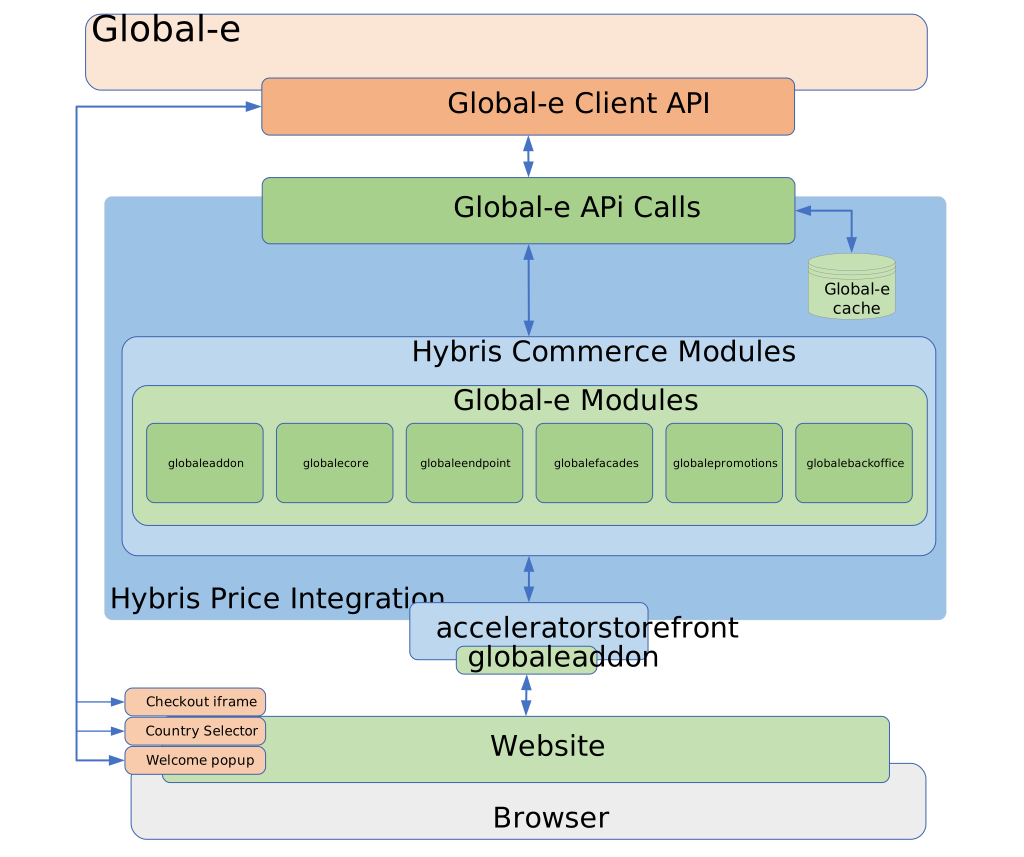
globaleaddon
The globaleaddon adds the Global‑e Country Selector and the Managed Checkout capability to the SAP Hybris Accelerator-based Storefront.
The globaleaddon includes:
If you have a multi-site environment, you can control each website to which you want to add the Global‑e capability.
The
GlobaleSwitcherComponentadds a widget to allow the customer to select their preferred currency and shipping country. The CSS of this component can either be stored and managed by Global‑e or stored and managed by SAP Hybris.To enable the Global-e CSS, check the configuration “Use Global-e Default CSS".
The Global‑e checkout page includes a Global‑e iframe. The OOTB SAP Hybris Accelerator checkout flow definition is overridden by the
globaleaddon-web-spring.xml. The global-e checkout flow is only applicable to Global‑e managed countries.GlobaleCookieToSessionFilterupdates the SCC session with Global‑e specific values, such as the session currency, country, culture, and activities of the customer.The cookie:
GlobalE_Datais updated by theGlobaleCookieToSessionFilterfilter when the customer comes to the site for the first time and has not yet selected their currency or shipping country. This is based on the location taken from the customer IP via an API call to Global‑e.
globalecore
globalecore places REST API calls to the Global‑e API. globalecore uses custom-built caching to speed up the retrieval of the Global‑e data sets from the database.
Client
The Global‑e implementation uses the Spring RestTemplate to communicate with the Global‑e API.
The RestTemplate is the central Spring class for client-side HTTP access.
Conceptually, it is like the JdbcTemplate, JmsTemplate, and the various other templates found within the Spring Framework.
This means, for instance, that the RestTemplate is thread-safe once constructed, and that you can use callbacks to customize its operations.
API Connection Timeouts
By default, the Global‑e Add-on includes a configuration for API connection timeouts. Each timeout represents the maximum time to wait for a Global‑e API response. If there is no response by the expiration time, the call fails.
Here are some examples of key values that you can see in your local. Properties:
globale.api.call.timeout=2000globale.api.connect.timeout=1000globale.api.call.max.connections.host=100globale.api.call.max.total.connections=200
Fixed Product Prices
Fixed prices are used to define a Recommended Retail Price (RRP) per country in the local currency. Fixed prices do not change regardless of Global‑e coefficients, rounding rules, or FX rates.
The fixed price selection process can be configured:
(1) By country and currency – or –
(2) By currency and it is active for all countries that support this feature.
To enable or disable fixed prices based on country, use the Global-e API.
To activate the fallback mechanism (2),
Add the property 'globale.fixed.price.fallback.to.currency.match.enabled=true'.
The fixed price algorithm determines if a PriceRow contains a fixed price for the country and currency (1):
If Global‑e has enabled the session country to allow fixed prices.
AND the type of
PriceRowis aGlobalePriceRow,AND the
PriceRow'sfixedPriceEnabledequals true,AND the
PriceRow's currency equals the Global‑e session's currency,THEN the Price service selects
PriceRowwith country equals Global-e (session)countryAlgorithmto determine if aPriceRowcontains a fixed price for currency (2):WHEN there is no price identified by (1),
AND Global‑e has enabled the session country to allow fixed prices,
AND the type of
PriceRowis aGlobalePriceRow,AND the
PriceRow'sfixedPriceEnabledequals true,AND the
PriceRow's currency equals Global‑e (session) currency,THEN the Price service selects the
PriceRowthat has no defined country.
Solr
The Global‑e Add-on extends the ProductPriceValueProvider and alias with the Global‑e price value provider: GlobaleProductPriceValueProvider.
The price value provider sets the session parameters to ensure that the Global-e add-on has the correct session parameters for price conversion when it creates the price information.
GlobalESessionCountryISOCode: taken from thecmsSite defaultShipToCountry.GlobalESessionCultureCode: set to an empty string.GlobalESessionCurrencyISOCode: not set, butDefaultGlobaleSessionParametersServicefalls back toi18nService.getCurrentCurrency()which is set inProductPriceValueProvidertaken fromIndexConfigcurrencies.GlobalESessionSolr: truecatalogVersionService.setSessionCatalogVersionto the base site’s default catalogue and version.
globaleendpoint
Global‑e sends notifications to the globaleendpoint module. Currently, four notifications are sent via JSON and marshalledmarshalled by the Jackson JSON Processor. POJOs corresponding to Global‑e API classes are annotated with Jackson Core (Data-Binding) annotations to facilitate proper mapping.
globalefacades
The globalefacades module provides simplified interfaces to the service layers.
Overridden Facades include:
DefaultCustomerFacadeis overridden byDefaultGlobaleCustomerFacade.If Global‑e is enabled and the Country is managed by Global‑e, this facade updates the session currency and user.
SessionOverrideCheckoutFlowFacadeis overridden byGlobaleCheckoutFlowFacade.The Express checkout is never enabled for a customer whose county is enabled by Global‑e.
Custom Global‑e-specific converters and populators can also be found in
globalefacades-spring.xml.
globalepromotions
The globalepromotions extension provides support for the SAP Hybris promotion engine.
This extension adds the following conditions:
Global‑e-managed country condition as boolean (choose to activate the promotion if either the customer has selected a Global‑e-managed country or has selected a country that is NOT Global‑e-managed).
Qualifying country promotion with options: “IN”, “NOT IN”. The customer will qualify for the promotion if the session country is either IN or NOT IN a set of countries specified in the condition.
In addition, Global‑e has overridden and replaced the OOTB SAP Hybris currency conversion logic with the Global‑e conversion rates taken from the Global‑e API. This is relevant to any action applying percentage or absolute value discounts.
Example:
If you configure a promotion rule with an order threshold condition in Global‑e supported currency, e.g. 10 GBP,
AND if a customer has another cart currency, for example, CHF, with a cart total value of 15 CHF,
SAP Hybris converts GBP to CHF and evaluates the condition.
In this case, if we assume Global‑e API provides 1.285 as a conversion coefficient, the condition threshold will be converted as 10 GBP = 12.85 CHF, which is under the cart value of 15 CHF, and the promotion is applied.
How it works:
When SAP Hybris translates a promotion into a Drools rule, Global-e substitutes the static price value with ConvertablePriceValue. The ConvertablePriceValue converts and returns prices in runtime based on the Global-e conversion rules.
Global‑e also overrides the key price and discount-related RAO Actions:
GlobaleRuleOrderEntryFixedDiscountRAOActionGlobaleRuleOrderEntryFixedPriceRAOActionGlobaleRuleOrderFixedDiscountRAOActionGlobaleRulePartnerOrderEntryFixedDiscountRAOActionGlobaleRulePartnerOrderEntryFixedPriceRAOActionGlobaleRuleTargetBundlePriceRAOAction
See Known Limitations for information about processes that may trigger an unexpected behaviour (during conversion).
globalebackoffice
globalebackoffice is for Backoffice changes which you can configure in: globalebackoffice-backoffice-config.xml.
The Global‑e add-on also overrides the CurrencyTypeRenderer with the GlobaleCurrencyTypeRenderer to support sub-types of Order Entry.