Technical Flows
Checkout Flow (Technical)
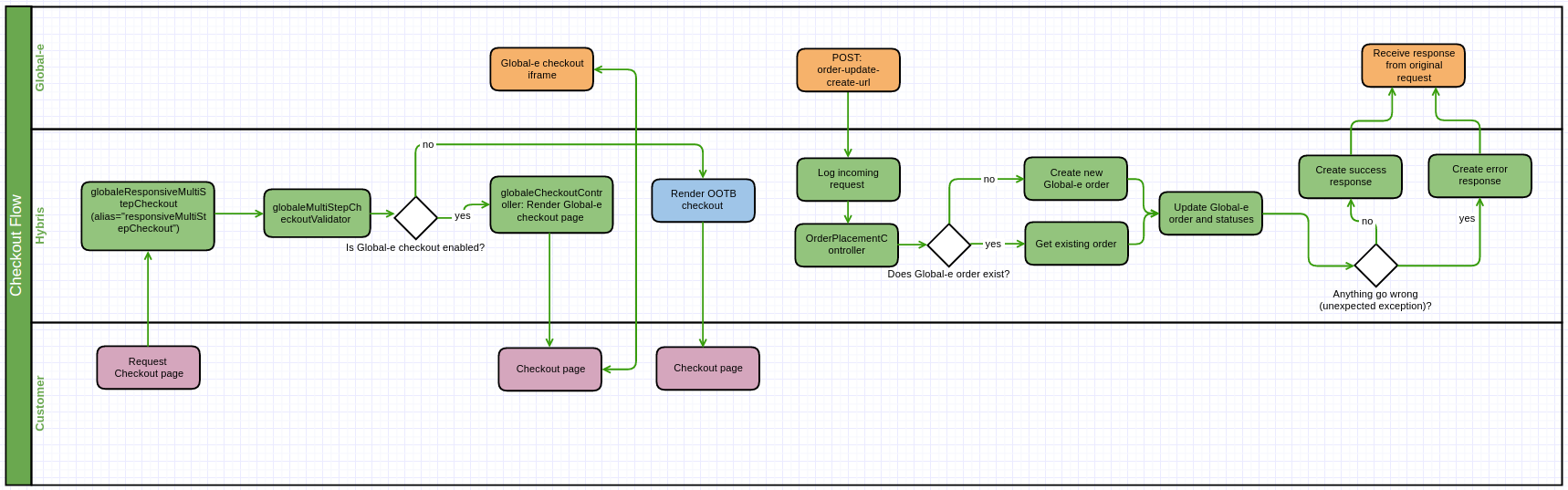 |
During the customer checkout with Global‑e-enabled countries, the customer is redirected to the Global‑e iframe to complete their order.
Once Global‑e completes the checkout process with the customer, Global‑e creates an order and notifies SCC via the module globaleendpoint. This order includes delivery details for the local Global‑e hub, along with the customer’s billing address and payment information.
The JSON file is parsed and converted to a MerchantOrder, which is then unmarshalled again and saved as a string of JSON.
To avoid information loss, if there are missing mappings in the MerchantOrder object, the Global-e add-on makes sure to log any requests in full coming into the web module globaleendpoint using the filter: globaleRequestLogger.
If Global‑e is enabled and the session country is managed by Global‑e, the customer is redirected to the Global‑e checkout (otherwise to typical checkout):
SAP Hybris creates a snapshot of the checkout cart.
SAP Hybris redirects the customer to the Global‑e checkout page.
When the customer submits an order, Global-e creates an internal order.
If the customer has a default shipping and billing address, the addresses are exported with the "
SendCart" request.If the customer aborts the checkout process, the customer is redirected back to the cart page.
Global‑e receives the cart data and handles the payment. If the fraud check passes successfully, Global‑e notifies SAP Hybris (
OrderPlacementController.sendOrderToMerchant), and a merchant order is created.The order notification includes delivery details for the local Global-e hub, along with the customer’s billing address and payment information.
The SAP Hybris order status is updated to
GLOBALE_MANAGED.To avoid information loss, if there are missing mappings in the
MerchantOrderobject, the Global-e add-on logs any requests coming into the web moduleglobaleendpointusing the filterglobaleRequestLogger.
Global‑e manages the order fulfilment lifecycle (see the
OrderPlacementController).Global‑e updates the order status and registers the status history:
globaleOrderStatusHistoryThe current order status is reflected in the custom attribute: GlobaleOrder.currentOrderStatus
Global‑e can remove the session customer cart on order create/update, based on the
Merchant.Order'sClearCartflag.
Global‑e fires the following events that are integrated into the order’s lifecycle:
SendOrderToMerchantEventPerformOrderPaymentEventUpdateOrderShippingInfoEventUpdateOrderStatusEvent
Global‑e Price Calculation Flow (Technical)
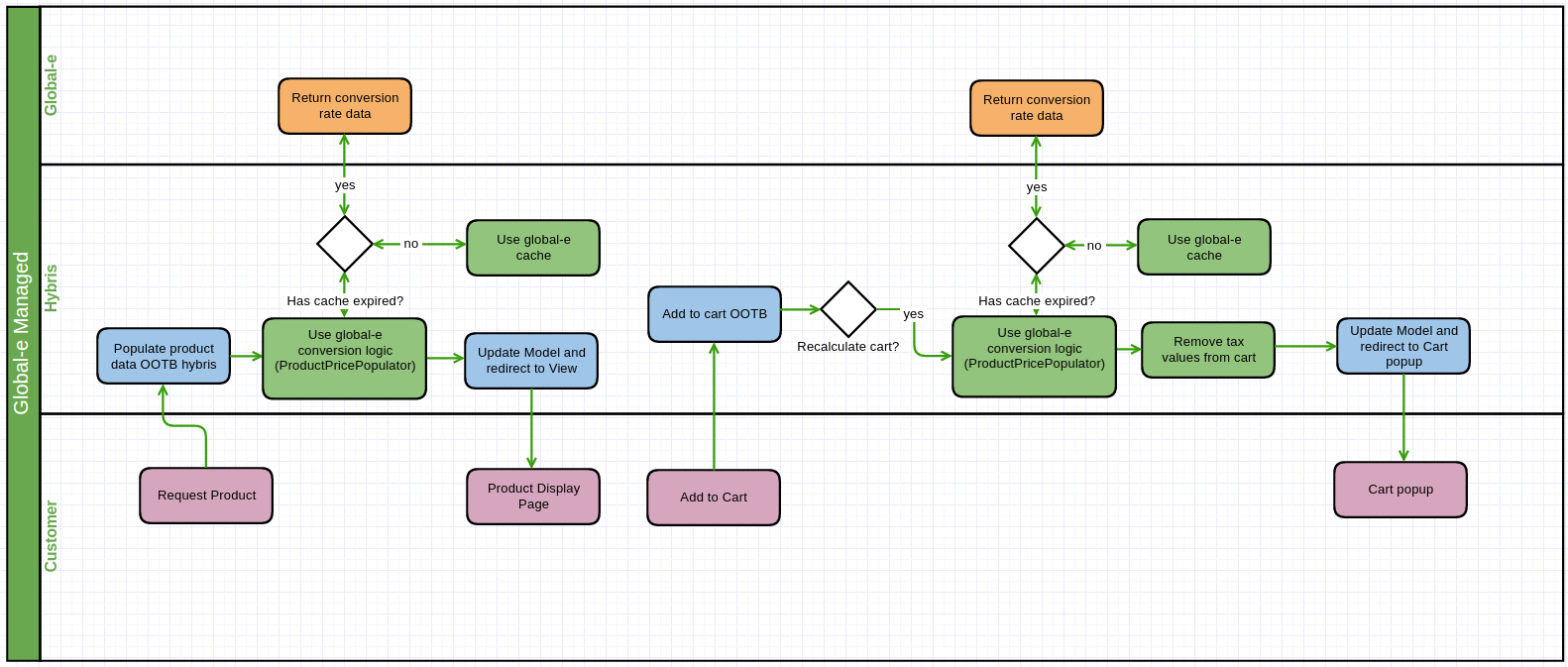 |
The Global‑e flow shows that the custom price factory takes control of creating price information. This allows the product data object to be populated with price rows that are converted and rounded to display on the front end.
The recalculation of a cart forces the price information to go through the same process (price rows converted and rounded). Tax information is managed by Global-e.
The Global‑e cache takes precedence over making a Global‑e API call. Below is a list of the cache entities managed by the Global‑e add-on:
GlobaleRoundingRulesCache
GlobaleCountryCoefficientsCache
GlobaleLocationDefaultCultureCache
GlobaleCurrenciesCache
GlobaleCurrencyRatesCache
GlobaleLocationByIpCache
GlobaleCountriesCache
GlobaleGenericSettingsCache
GlobaleProductCountryCache
Rounding rules, country coefficients, and currency rates are used when converting prices.
Typical Price Calculation Flow (Technical)
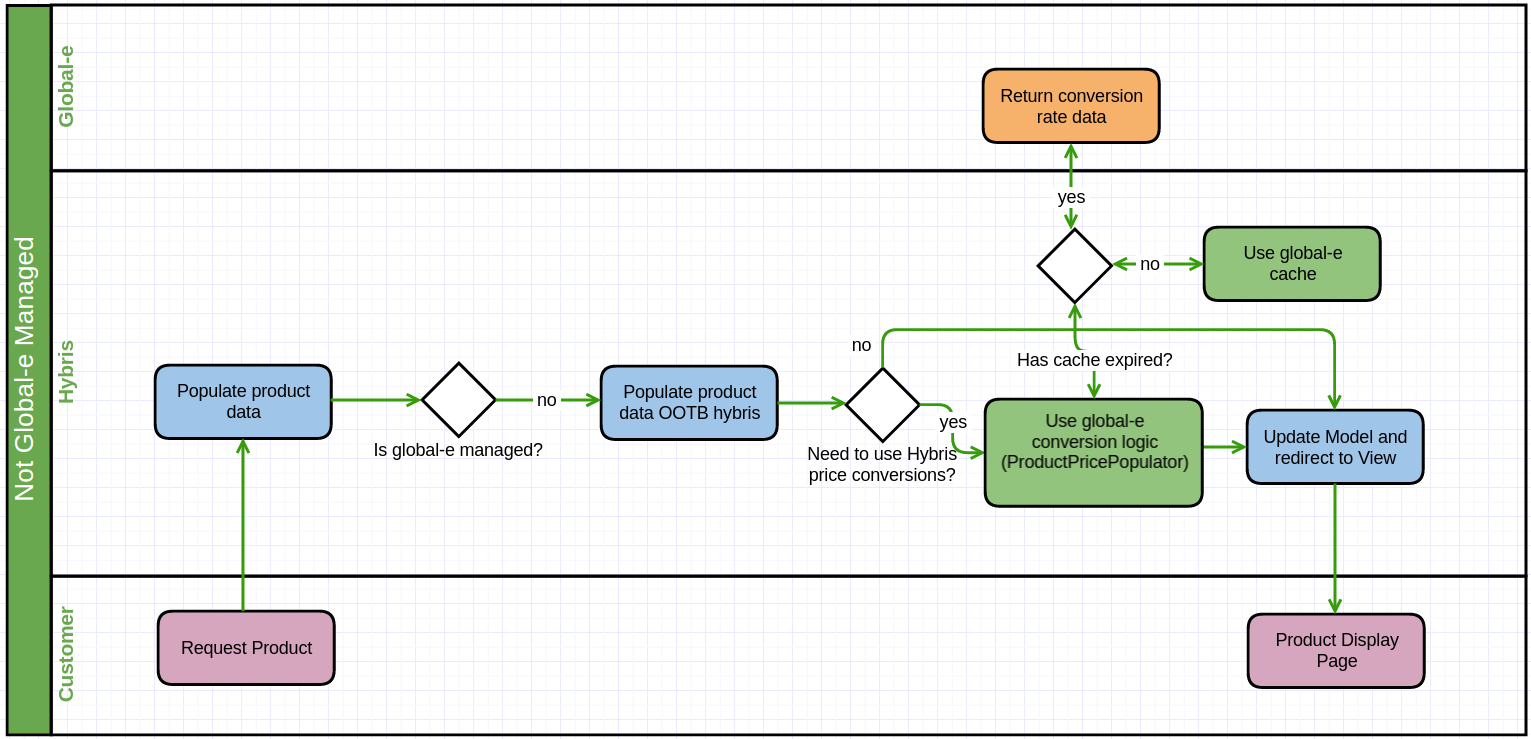 |
Non-Global‑e flow is OOTB behaviour apart from one aspect, in the case SCC tries to use its currency conversion logic. This happens in the following circumstances:
The country is not managed by Global‑e.
The customer selects a currency for which the product does not have a price row.
SCC cannot find a price row and tries to apply the OOTB conversion logic.
In the above example, we will fall back to the standard Global‑e conversion flow over the OOTB SCC conversion logic.
User Country and Currency Preference Flow (Technical)
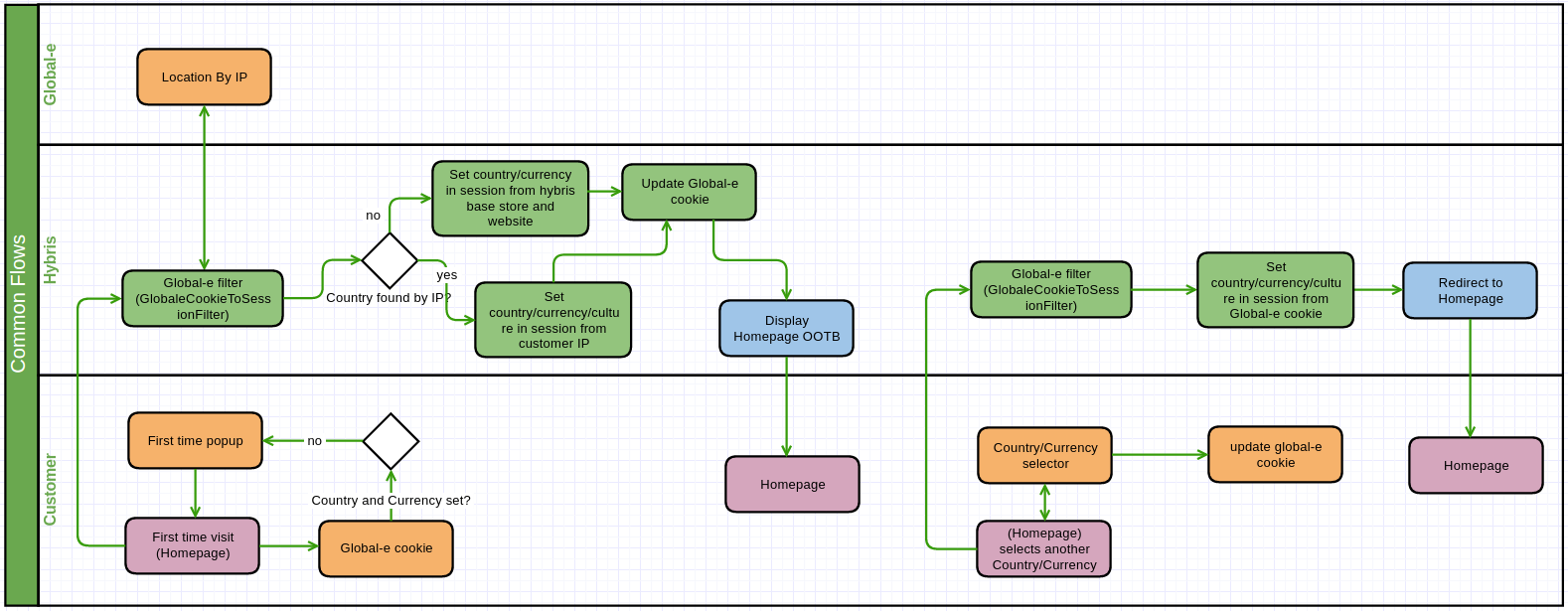 |
Global‑e always displays:
The country and currency selector, even if it does not manage the country.
A “first-time” popup for the customer, if Global‑e cannot find an existing cookie. Cookies are managed by Global‑e by injecting JavaScript. For this feature to work, the customer must have cookies enabled when browsing the site.
Global‑e injects JavaScript and CSS into the website to provide functionality such as the welcome popup, country switcher, checkout form, and more.
In the backend, the GlobaleCookieToSessionFilter custom filter sets up the session based on the customer's chosen country and currency. This is taken directly from the Global‑e cookie: GlobalE_Data.
If the country and currency or currency cannot be found, Global‑e uses the customer’s location by IP and converts the IP into a country, currency, and culture.
If the Global‑e add-on cannot find the location of the IP (e.g., when testing locally), the country, currency, and culture session parameters are set to the default value:
GlobalESessionCountryISOCode = the current site’s default ship-to-country
Global Session Currency ISO Code = the current base store’s default currency
GlobalESessionCultureCode = not set (not mandatory)
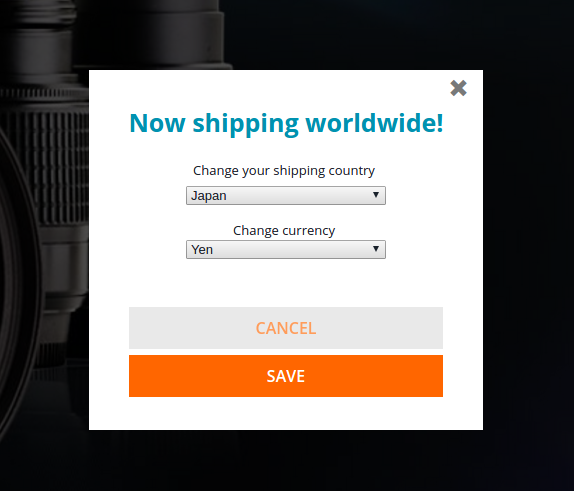 |
When a customer uses the popup to change their country and currency:
The Global‑e cookie is updated with the new country or currency.
The custom GlobaleCookieToSessionFilter updates the SCC session parameters that are used when calculating price conversions.