

Prerequisites
You can check your plugin version by going to Extensions → My Extensions

What you need to do
- Store the values on your products. Make sure each variant that can appear in the cart holds its DDS reference and TARIC document code. Use whichever catalog fields you choose.
- Point the plugin at those fields. Navigate to Extensions, then My Extensions and click on Configure next to the Global-e Cross-Border extension.

eudrDdsReference and eudrTaricCode.
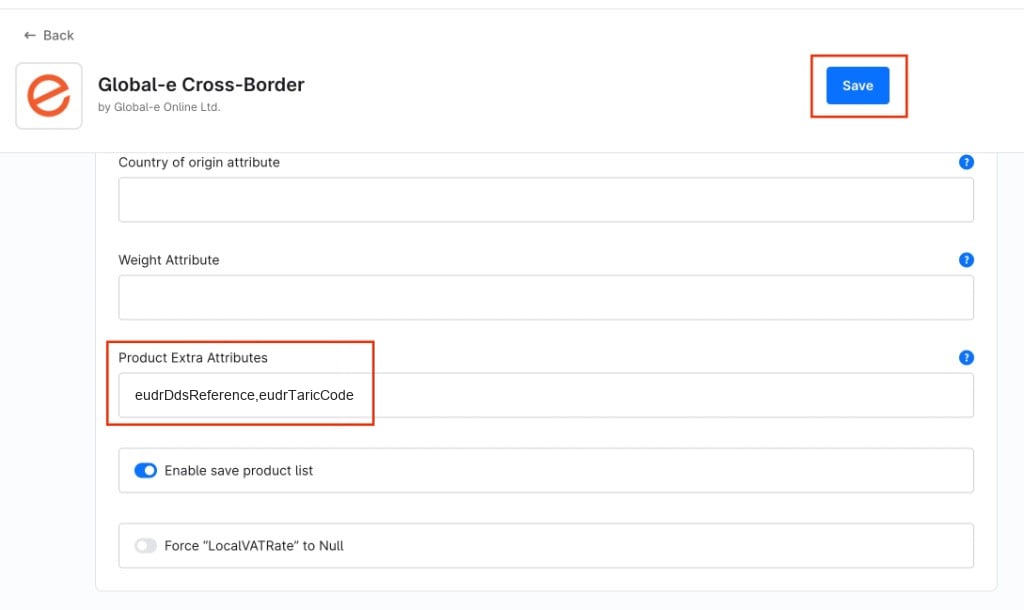
- Save, and clear the Shopware cache if your deployment requires it.
Key points
- One pair of values per variant. Populate each variant that can appear in the cart. A value on the parent product alone is not enough when the variant has no value of its own.
- Omit, don’t fake. When a variant has no value, leave the key out. Never send an empty string, NA, 0 or -.
- EU PID keeps working.
standardcodeandmididentifierare sent unchanged alongside the EUDR keys.