Creating a Refund by Gift Card
Refund by Gift Card is a return resolution for stores that offer gift cards as part of their return policy. It allows you to issue refunds as gift cards, keeping revenue within your store while offering customers flexible spending power on future purchases.
Capabilities
Enabling Refund by Gift Card allows you to:
Issue gift cards as refunds -customers receive a gift card they can use for future purchases. Gift cards can be combined with other gift cards and discount codes at checkout.
Retain revenue in your store - refund customers while keeping the sale value inside your store ecosystem.
Offer incentive bonuses - incentivize customers by offering a bonus amount when they choose this resolution.
Requirements and Limitations
The following list shows the requirements and limitations:
The gift card is issued to customers based on their email address.
Only one new gift card can be issued per RMA.
A new gift card is created each time a gift card refund is issued — gift cards are not rechargeable.
Note: Gift cards in Shopify are not tied to specific accounts, which means anyone with access to the gift card code can use it. Ensure the secure communication and storage of gift card codes to prevent unauthorized use.
Configuring Refund by New Gift Card
There are several settings you can configure to manage how the Refund by New Gift Card resolution behaves in your returns flow.
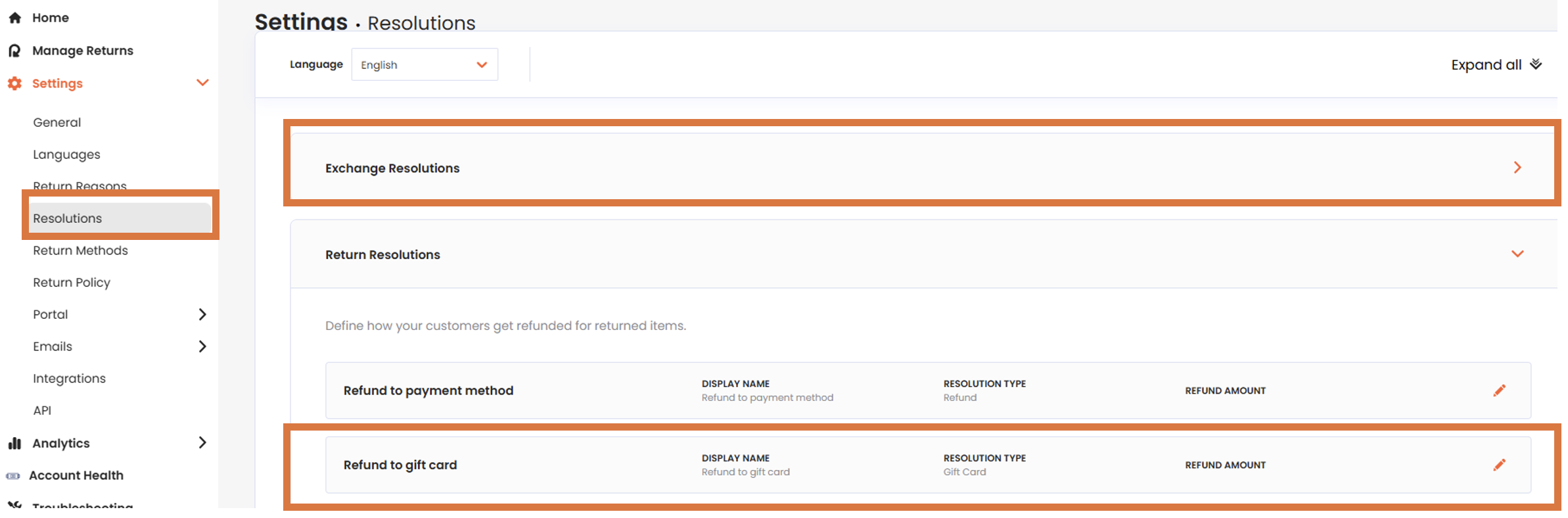
Navigate to Settings > Resolutions.
Open the Return Resolutions section.
Click REFUND BY NEW GIFT CARD.
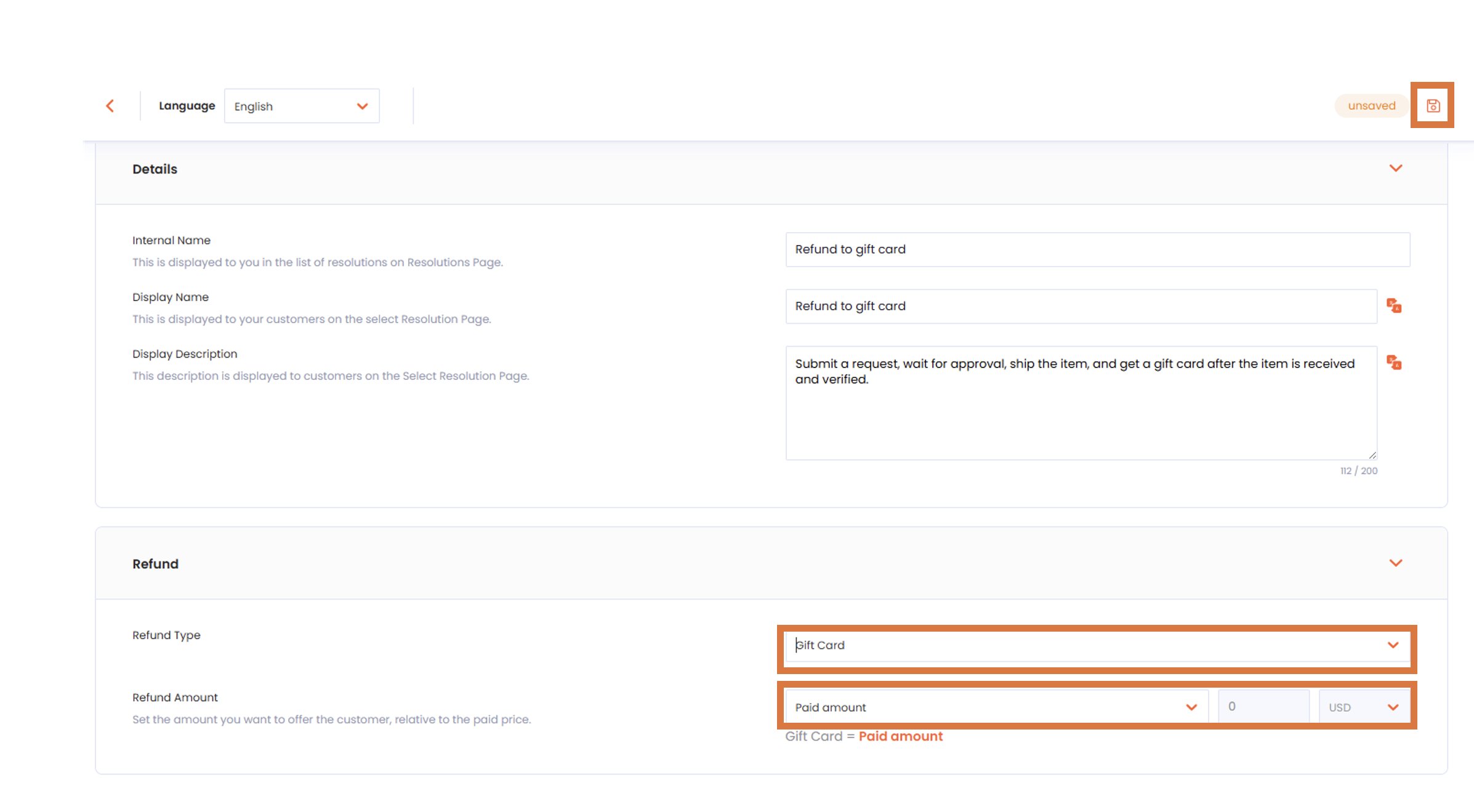
In the Details section, edit the internal name for this resolution. This name is for your reference only- customers will not see it in the portal.
Edit the display name, which is how this resolution will appear in your return portal.
Edit the description, which provides additional details about this resolution in your return portal.
In the Refund section, set the refund type to Gift Card.
Select options from the Refund Amount drop-down to set the amount you want to offer relative to the paid price. You can use this to incentivize customers who choose this refund type.
Click the save icon to save your changes.
You can use this resolution to build your Return Policy, where you can configure additional settings such as eligibility rules, fees, and more.
Issuing a New Gift Card
Once you issue a new gift card, the following takes place automatically:
The system generates a gift card code with an initial balance equal to the refunded amount.
Two email notifications are triggered:
A notification from your store via the dashboard confirming that a gift card has been issued and stating the refunded amount. You can fully customize this email, including the sender address.
A notification from Shopify with a link to the gift card itself, where the customer can view the gift card code and balance.
The refunded amount is documented on both the RMA page and in the order’s notes and timeline.
Setting the Expiration Period of Gift Cards
You can define how long a gift card remains valid after it is issued.
To set the gift card expiration period:
Navigate to Settings > Store Settings.
Open the Refund Alternatives section.
In the Gift Cards Expiration setting, enter the number of days, weeks, or months the gift card should remain valid. For example, enter 10 for a 10-day validity period.
Select the unit of time from the drop-down.
Click the save icon to save your changes.
You can also manage the validity of existing gift cards or delete them through Shopify Admin > Products > Gift Cards.
What’s the Difference Between Gift Cards and Store Credit?
Store credit and gift cards are both types of virtual currency that can be issued as refunds and used for future purchases. The key differences are outlined below.
Feature | Gift Card | Store Credit |
|---|---|---|
Used to pay for | Entire order (items, shipping, taxes) | Item value only (not shipping or taxes) |
Combined with discounts | Yes- can be combined with other gift cards and discount codes | No- cannot be combined with another discount code |
Rechargeable | No- a new gift card is created for each refund | Yes- credit accumulates on the same discount code |
Account-linked | No- anyone with the code can use it | Yes- tied to a specific customer account |
Reminder: Because gift cards in Shopify are not tied to specific accounts, anyone who obtains the gift card code can use it. Ensure gift card codes are communicated securely to the intended customer.