

Order API
API Documentation
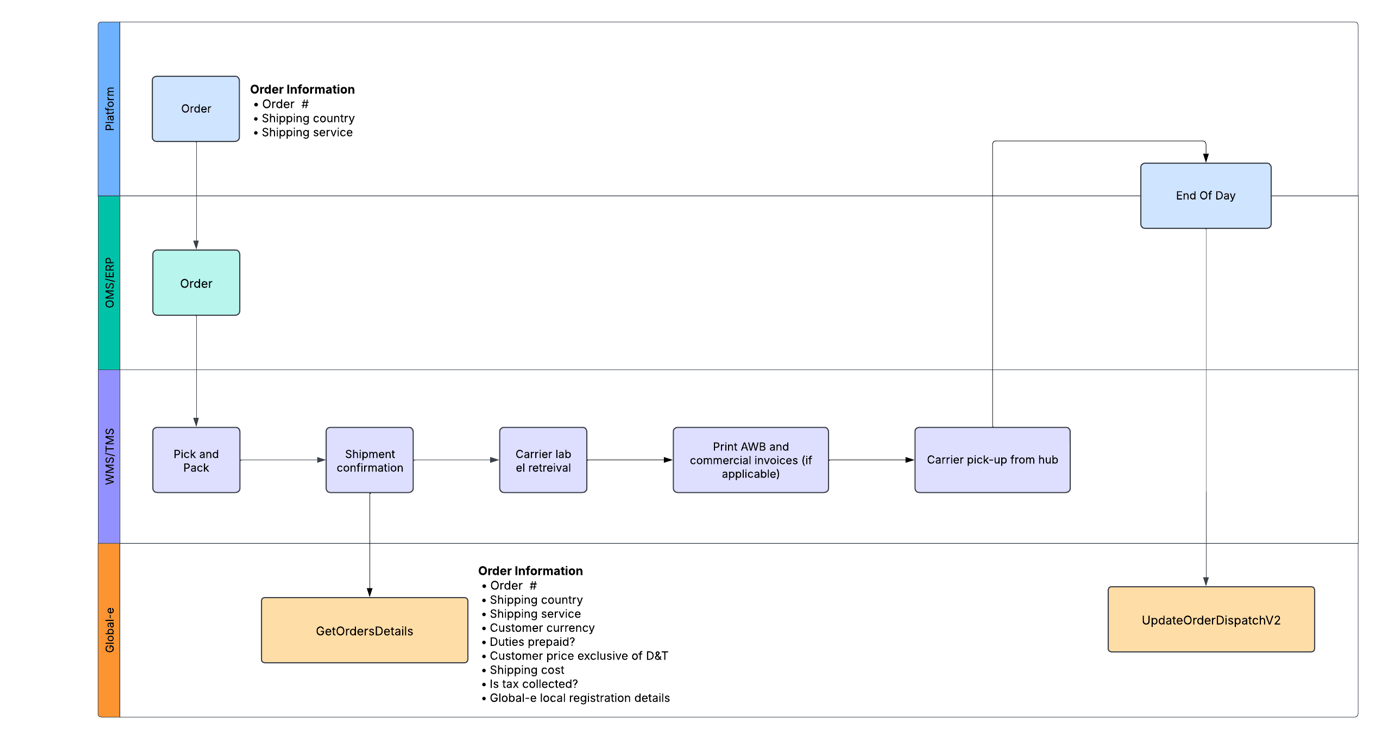
For environment URL endpoints see Global-e Environment Details. Fields mappings The API method return a list of order details. In the context of producing shipping documentation, the below fields and associated logic must be considered:| Exporter details | Global-e/Merchant |
|---|---|
| Global-e local registration details | In specific destinations, such as Norway, the UK, the EU (Cross-border), Switzerland, Australia, New Zealand, Singapore, and Malaysia (the exact list of applicable countries will be confirmed during the project), Global-e is responsible for remitting taxes to local authorities. For orders below the threshold, Global-e’s local tax registration must be included on the commercial invoice and declared to the carrier, as Global-e will handle the direct filing of applicable taxes with the respective local authorities. Merchant.Order.ExporterDetails.LocalRegistrationClearance – A Boolean value indicating whether Global-e will remit the tax locally for the order. If TRUE, the following fields must be considered: Merchant.Order.ExporterDetails.DestinationRegistrationNumber – GE local registration registration number in destination country Merchant.ExporterDetails.EORINumber – GE Entity EORI Merchant.Order.ExporterDetails.IOSSNumber – for shipments to the EU ⚠️ Important Note: 🚨Global-e’s IOSS number must NOT be displayed on the Commercial Invoices🚨 |
| Importer and import type mention | If (Merchant.ImporterDetails.ImporterType = 0) “Private Import Mention” for B2C shipment - Merchant.Order.ImportDetails.CustomerTaxId - Customer Tax number provided at checkout as required for clearance into certain markets (eg. Brazil, Turkey) If (Merchant.ImporterDetails.ImporterType = 1) Importer details should have the Mention “Business Importer” – only applicable for shipments to Switzerland. - Merchant.Order.ImporterDetails.Company –Global-e importer entity name for relevant markets (e.g. Switzerland) - Merchant.Order.ImporterDetails.VATRegistrationNumber - Global-e importer entity registration number for relevant markets (e.g. Switzerland) - Merchant.Order.ImporterDetails.Address - Global-e Importer entity |
| Shipper name/address | Should remain the same as today, e.g. the brand, 3PL, or other relevant party |
| Currency | Merchant.Order.InternationalDetails.CurrencyCode |
| Incoterm | If shipping country = “Switzerland” Shipment to be cleared under Global-e’s ZAZ account / “Terms of Delivery” to be decided with carrier ⚠️ Important Note: Only the taxes applicable to the clearance into Switzerland should be billed against Global-e’s ZAZ account. Any other fee charged by the carrier in relation to the clearance should be billed to the Shipper of Record (brand/3PL) Merchant.Order.InternationalDetails.DutiesGuaranteed : true Shipment to be cleared as DDP or equivalent incoterm, to ensure no additional Duties and/or Taxes are requested to be paid at delivery by the customer. If “Merchant.Order.InternationalDetails.DutiesGuaranteed” : false and “Merchant.Order.ExporterDetails.LocalRegistrationClearance” : false Shipment to be cleared as DAP or equivalent incoterm, with applicable Duties and/or Taxes paid at delivery by the customer. If “Merchant.Order.InternationalDetails.DutiesGuaranteed” : false and “Merchant.Order.ExporterDetails.LocalRegistrationClearance” : true Global-e’s local tax registration to be provided to the carrier and presented on the clearance documents, considering that taxes will be filled by Global-e in the destination country (as mentioned in section “Global-e local tax registration number”) Shipment booking to be done following carrier requirements (process to be aligned by the brand with carrier) |
| Products | <List> Merchant.Order.Products |
| · COO | n/a – to be taken from own systems |
| · HS Code | n/a – to be taken from own systems |
| Price exclusive of D&T | Merchant.Order.Products[i].InternationalDiscountedPriceForCustoms |
| Shipping Cost | Merchant.Order.InternationalDetails.DiscountedShippingPrice |
| Destination Tax calculation rule | Merchant.Order.TaxCalculationRule - determines how duties and taxes are calculated for an order. Possible values: CIF (Cost, Insurance, and Freight): This method calculates duties and taxes based on the total cost of goods, including insurance and freight charges. FOB (Free on Board): This method calculates duties and taxes based only on the value of the goods Tax calculation rules defined per country in Global-e system. Clearance documents to be aligned accordingly. |
| Total shipment declarative value for customs | Merchant.Order.TotalValueForCustoms |