

Conceptual Overview
API Endpoints SummaryCheckout (First Order)
To initiate the subscription purchase behavior on checkout, the eCommerce platform passes product-level subscription attributes to Global-e on the cart. The attributes are passed per subscription product; multiple subscription products in one cart are supported, sharing one billing frequency. The required attributes are:
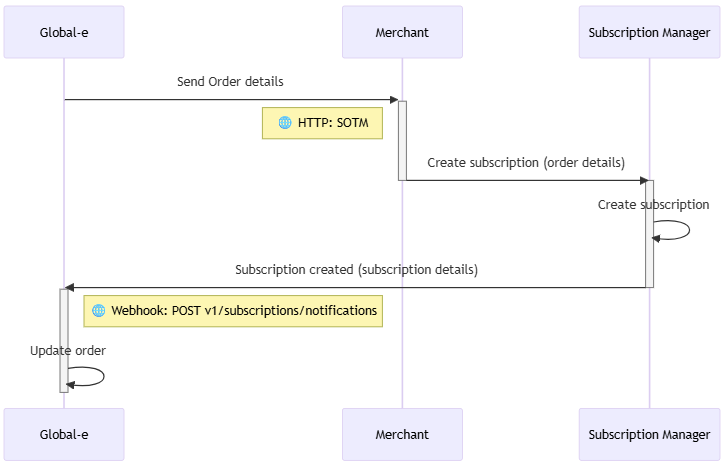
Once the shopper decides to purchase the subscription, Global-e processes the first payment (or $0 if a trial), securely tokenizes the payment details and creates the initial order on Global-e platform.
The following shows the flow sequence after first order completed:
Recurring Payment
The following figure shows the Recurring Payment flow sequence: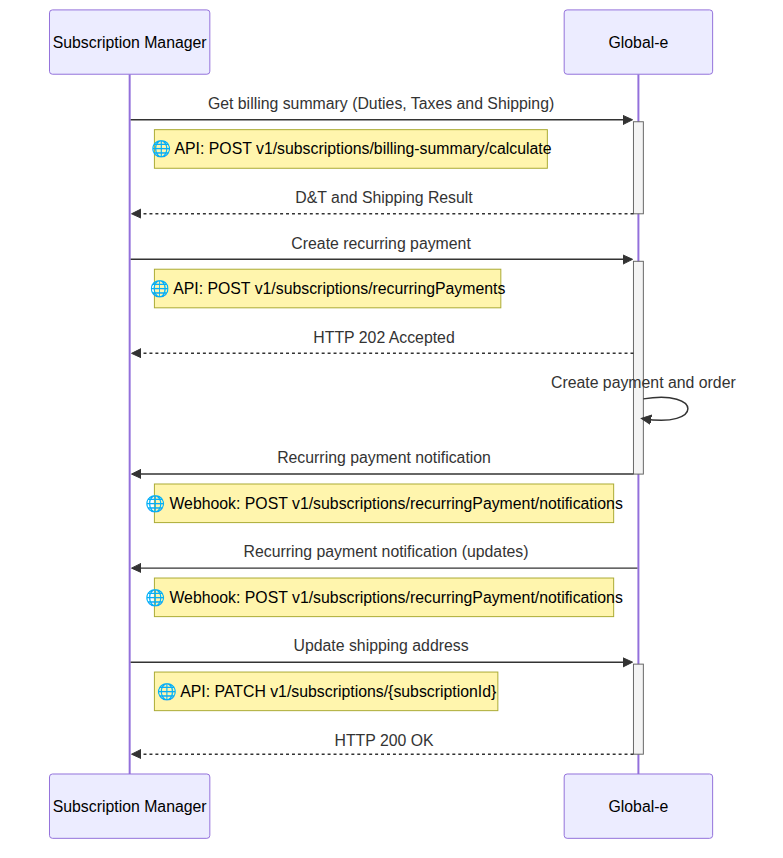
Contract Management (Shopper Actions)
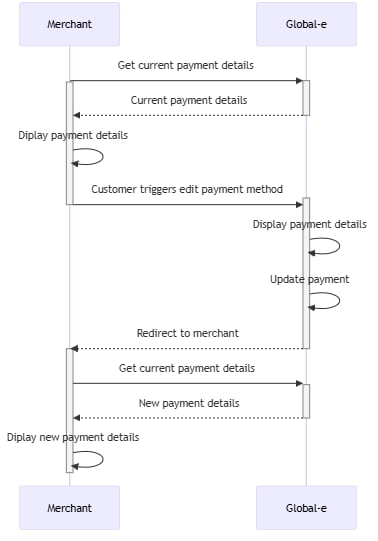
Update payment method Subscribers can change the payment method on an active subscription. Global‑e provides a secure, hosted widget for the change itself. Credit cards and PayPal are supported, including switching between them. Shoppers can view and update stored payment methods via a Global‑e–hosted, PCI-compliant widget. Global‑e stores the new payment reference against the subscription, so future renewals use it. The widget also provides the ability to edit the billing address, within the same country. The merchant calls Get subscription and payment reference details on the Global‑e Web domain (for example web.global-e.com) to display the shopper’s current masked payment method and billing address, then loads the Global‑e payment form as an iFrame on its own page. That call is server-to-server only — themerchantGuid it takes is a secret key that identifies the merchant and must not be exposed in browser-side code.
Card details are entered inside the Global‑e hosted iFrame and never reach the merchant page or server, keeping the merchant out of PCI scope for this flow.
globale.merchant.client.jsmust be loaded so thatGlobalEis available globally.- The DOM element identified by
containermust exist before calling UpdatePaymentMethod.
/subscriptions/{subscriptionId}); Global-e validates the new address (same country only) and updates the subscription details, so all future recurring orders ship to the new address.
See flow details here
Authentication and Security
The endpoints the Subscription Manager calls accept either a JWT bearer token or an API key, both issued to the Subscription Manager by Global-e. For how to obtain and renew a JWT token, see API Authentication. To use the API key instead, pass it in thex-api-key header:
merchantGuid in its path rather than by either of these credentials. That value is a secret key — issue the call server-to-server and keep it off the browser.
Idempotency
Every endpoint in the Subscriptions set requires anIdempotency-Key header. It is a UUID that identifies the request, so that the operation is applied at most once however many times it arrives:
409.
API reference
Every endpoint in the Subscriptions set, with its full request and response contract:Subscription notifications
POST /subscriptions/notificationsCalculate billing summary
POST /subscriptions/billing-summary/calculateCreate recurring payment
POST /subscriptions/recurringPaymentsRecurring payment notifications
POST /subscriptions/recurringPayments/notificationsUpdate a subscription
PATCH /subscriptions/{subscriptionId}Get subscription and payment reference details
GET /Payments/Subscriptions/{merchantGuid} — called by the merchant, server-to-server