

standardcode and mididentifier. Your SKU is already sent separately, so there is no new SKU field to add.
For what each identifier is, see The three identifiers on the overview page.
Where each identifier goes
Adding the required data on the product page
-
S-PID — Standardised Product Identifier (
standardcode). In your Wix dashboard, navigate to Products and open the product. Product without variants. In the Inventory and pre-order section, fill in Barcode (GTIN).Product without variants: Barcode (GTIN) in Inventory and pre-order. Product with variants. In the Inventory and pre-order section, click Go to Variants. Product with variants: inventory is managed per variant. Fill in Barcode (GTIN) for each variant that can appear in the cart, then click Apply & Continue.
 Variants page: one Barcode (GTIN) per variant.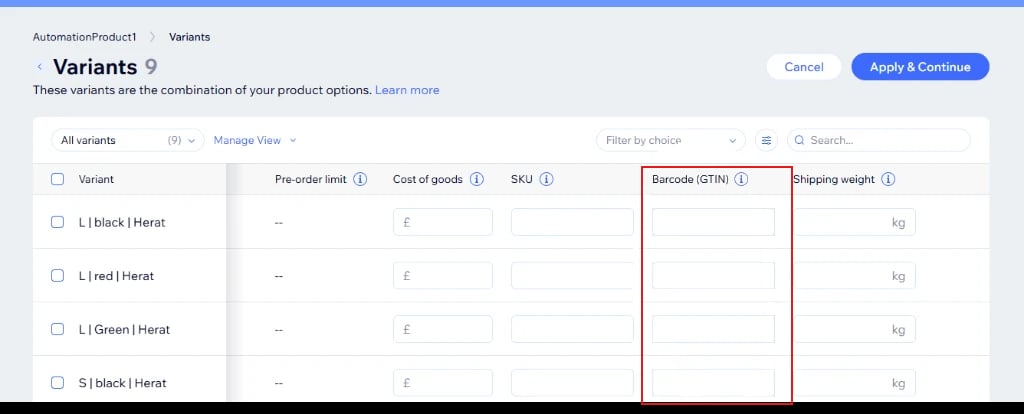
-
NS-PID — Non-Standardised Product Identifier (
mididentifier). Scroll to the Global-E App Production section at the bottom of the product page and fill in midIdentifier. This is set once per product and applies to all of its variants. The same section also holds garanImageURL, which is used for GARAN labels, not for EU PID.Global-E App Production section: midIdentifier.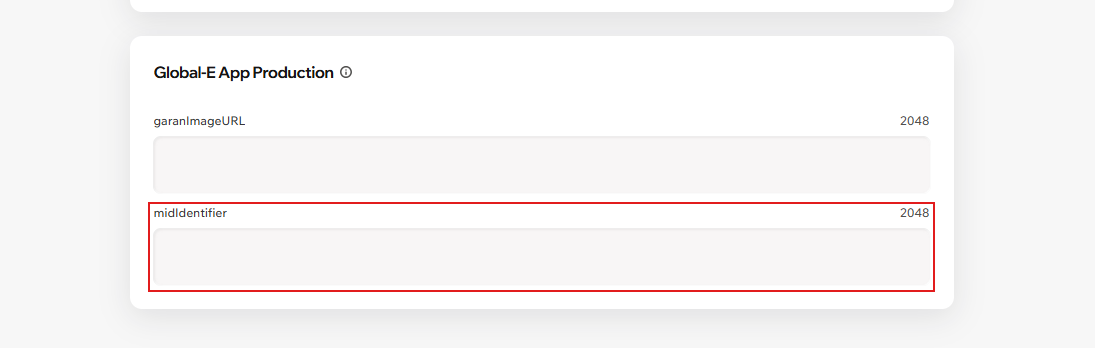
- Save the product, place a test order, and confirm both keys appear when values exist and are omitted when blank.
Key points
- S-PID per variant. For products with variants, fill in Barcode (GTIN) on each variant that can appear in the cart.
- NS-PID per product. midIdentifier is set at product level, so every variant of a product sends the same value.
- Omit, don’t fake. Leave the field empty when you have no value. Never enter NA, 0 or -.
- When values are read: at checkout, when the customer proceeds to Global-e. Updated product values apply on that product’s next checkout.