Placeholders
The Global‑e templates are based on the Mustache templating specification and language. For more information on Mustache, see https://mustache.github.io/mustache.5.html.
Mustache serves as a powerful templating system that enables the utilization of pre-existing text files containing designated placeholders. These placeholders are dynamically substituted with values specific to a particular request during runtime.
Global‑e supports two types of placeholders that you can use in the HTML template:
Placeholders related to Orders, such as the order ID, shipping address, totals, products, and more.
Custom placeholders to manage Text Resources, which can hold texts, translations, links, and html snippets for the header, footer, and CSS.
Custom Placeholders
Custom placeholders often start with the prefix TR_ to differentiate between order placeholders and resource placeholders. However, this convention is not mandatory.
Example: TR_Salutation
To add, create and upload custom placeholders:
Include your custom placeholder values in your text resource file as keys (without
{}).Include the custom placeholders' unique key {
TR_Salutation} in your HTML template.
Required Placeholders
Subject
SenderName
SenderEmail
Variations
[CountryName].SenderName
[CountryName].SenderEmail
Note
CountryName is a 2-letter country code. For example, use US for USA.
Available Placeholders
This section provides a list of placeholder tags and examples.
Customer
The following placeholders are supported in all email types.
{{FirstName}}{{LastName}}{{FullName}}- the recipient's first name and last name{{Email}}- the recipient's email address
Usage:
<div>Dear {{FirstName}}</div>
<div>Hello {{FullName}}</div>
<div>Dear {{LastName}}</div>
<div>Your email address: {{Email}}</div>
Order
The following placeholders are supported in all email types.
{{OrderReceiveDate}}{{OrderTrackingNumber}}{{OrderId}}{{MerchantOrderId}}{{MerchantInternalOrderId}}{{OrderConfirmedDate}}
Usage:
<div> We have received your order on {{OrderReceiveDate}}.</div>
<div> Your tracking number is {{OrderTrackingNumber}} </div>
<div> Your order id is {{OrderId}} </div>
<div> Your merchant order id is {{MerchantOrderId}} </div>
<div> Your merchant internal order id is {{MerchantInternalOrderId}} </div>
<div> Your order has been confirmed on {{OrderConfirmedDate}}</div>
Merchant
The following placeholders are supported in all email types.
{{CustomerSupportEmail}}{{MerchantName}}{{MerchantStatementName}}
Shipping
The following placeholders are supported in all email types.
{{ShipFullName}}{{ShipFirstName}}{{ShipAddress}}{{ShipAddress2}}{{Company}}{{ShipState}}{{ShipCity}}{{ShipZip}}{{ShipPhone}}{{ShipCityRegion}}{{ShipCompanyName}}{{ShipCountry}}{{ShippingMethodName}}{{ShippingService}}{{CarrierName}}{{ShipVatRegistrationNumber}}{{ShippedTo<CountryCode>}}Note
ShippedTois a 2-letterCountryCode. For example, IL, TW, U.S. To be able to add logic per shipping country like extra-legal text for Taiwan.
Usage:
{{#ShippedToTW}} // If shipping country is TW

<div>Due to recent regulatory changes for orders shipped to Taiwan, you are required to register your mobile phone number through the EZWAY Customs application, and then pre-authenticate the order once as soon as you are notified by the shipping partner (via SMS/e-mail) and via the EZWAY application to allow the Customs Clearance of the goods.</div>

{{/ShippedToTW}}
Billing
The following placeholders are supported in all email types.
{{BillFullName}}{{BillAddress}}{{BillAddress2}}{{BillState}}{{BillCity}}{{BillZip}}{{BillPhone}}{{BillCityRegion}}{{BillCountry}}{{BillCompanyName}}{{BillVatRegistrationNumber}}
Payment
The following placeholder is supported in all email types.
{{PaymentDetails}}
Other
The following placeholders are supported in all email types except for {{RefundTotals}}, which is only supported in Refund emails.
{{EmailDirection}}- Values: “rtl”, “ltr”.{{Culture}}- See the Culture object.{{Products}}- See the Products, OOSProducts, RefundProducts objects.{{OOSProducts}}- See the Products, OOSProducts, RefundProducts objects.{{OrderTotals}}- See the Order Totals object.{{RefundProducts}}- See the Products, OOSProducts, RefundProducts objects.{{RefundTotals}}- See the Refund Totals object. These placeholders are only supported in Refund emails.{{DisplayGiftMessageInConfirmationEmail}}{{GiftMessage}}{{IsFlashSale}}{{IsRaffle}}{{OrderEtaMessage}}
Usage:
EmailDirection
<body dir=”{{EmailDirection}}”>
Your content here
</body>
Products, OOSProducts, RefundProducts
The following placeholders are supported in all email types. Data availability is based on the status of the order. For example, the OOS products placeholder remains empty if there are no products that are out of stock in the order.
Use the <div> tag as a generic container for associating similar content. In this case, Products, Out of Stock Products, and Refunds Products and their properties. See Products, Out-of-Stock Products, and Refund Products for the list of product properties.
The following example shows the structure for all Product placeholders: 'Products', 'RefundProducts', 'OOSProducts'.
Example:
<div>
{{#Products}}
<span>{{Name}}</span>
{{/Products}}
</div>

<div>
{{#OOSProducts}}
<span>{{Name}}</span>
{{/OOSProducts}}
</div>

<div>
{{#RefundProducts}}
<span>{{Name}}</span>
{{/RefundProducts}}
</div>
Products, Out-of-Stock Products, and Refund Products
You can include the following placeholders in all email types.
The Products, Out-of-Stock, and Refund placeholders serve as containers for general product information and assets.
{{ImageURL}}{{Name}}{{OOSQuantity}}{{OrderedQuantity}}{{Price}}{{ProductCode}}{{#Products}}{{ProductAttributesHTML}}{{/Products}}{{Quantity}}{{Size}}{{Url}}
Products Attributes
You can include the following placeholder in all email types.
This placeholder serves as a container for product attributes.
{{ProductAttributes.[Attribute key name]}}
Example: Render the product attribute ‘Color’ ‘size’.
{{#Products}}<div><span>{{ProductAttributes.color}}</span><span>{{ProductAttributes.size}}</span></div>{{/Products}}
Culture Information
The following placeholders are supported in all email types.
{{Culture.CultureName}}{{Culture.CultureNameDisplay}{{Culture.CultureNameOriginal}}{{Culture.CultureProgId}}{{Culture.CultureURL}}{{Culture.IsRTL}}
Example:
<div>My culture is {{Culture.CultureName}} </div>Order Totals
You can use the following placeholders in all email types.
These placeholders contain the amount with the currency symbol - for example, $100.
{{OrderTotals.OrderDiscounts}}{{OrderTotals.OrderSubTotal}}{{OrderTotals.ShippingDiscounts}}{{OrderTotals.TotalCustomerPrepaidRefundAmount}}{{OrderTotals.TotalDutiesAndTaxes}}{{OrderTotals.TotalDutiesAndTaxesRefundAmount}}{{OrderTotals.TotalGiftCardsRefundAmount}}{{OrderTotals.TotalLoyaltyPointsRefundAmount}}{{OrderTotals.TotalMoneyRefundAmount}}{{OrderTotals.TotalPrice}}{{OrderTotals.TotalProductsRefund}}{{OrderTotals.TotalServiceGestureAmount}}{{OrderTotals.TotalShipping}}
Refund Totals
You can use the following placeholders as part of the Refund Notification Template, to build a dynamic message per refund reason.
These placeholders contain the amount with the currency symbol - for example, $100.
{{RefundTotals.TotalDutiesAndTaxes}}{{RefundTotals.AvalaraSalesTaxes}}{{RefundTotals.TotalDutiesAndTaxesRefundAmount}}{{RefundTotals.TotalGiftCardsRefundAmount}}{{RefundTotals.TotalLoyaltyPointsRefundAmount}}{{RefundTotals.TotalPrice}}{{RefundTotals.TotalProductsRefund}}{{RefundTotals.TotalServiceGestureAmount}}{{RefundTotals.TotalShipping}}
Refund Reasons
You can add the following refund reasons to the Refund notification template to build a dynamic message for each refund reason. For example, if the refund reason is out of stock, render the out-of-stock message as detailed below.
Out-of-Stock Refund Reason
{{#IsOutOfStockRefundReason}}
<tr>
      <td>{{TR_OutOfStockRefundReason}}</td>
</tr>
{{/IsOutOfStockRefundReason}}
Shipping Cost Refund Reason
{{#IsShippingCostRefundReason}}
<tr>
      <td>{{TR_ShippingCostRefundReason}}</td>
</tr>
{{/IsShippingCostRefundReason}}
No SSD Refund Reason
{{#IsNoSDDRefundReason}}
<tr>
       <td>{{TR_NoSDDRefundReason}}</td>
</tr>
{{/IsNoSDDRefundReason}}
Cancelled Order Refund Reason
{{#IsCancelledOrderRefundReason}}
<tr>
       <td>{{TR_CancelledOrderRefundReason}}</td>
</tr>
{{/IsCancelledOrderRefundReason}}
Return Refund Reason
{{#IsReturnRefundReason}}
<tr>
       <td>{{TR_ReturnRefundReason}}</td>
</tr>
{{/IsReturnRefundReason}}
Wrong Item Refund Reason
{{#IsWrongItemRefundReason}}
<tr>
       <td>{{TR_WrongItemRefundReason}}</td>
</tr>
{{/IsWrongItemRefundReason}}
Missing Item Refund Reason
{{#IsMissingItemRefundReason}}
<tr>
       <td>{{TR_MissingItemRefundReason}}</td>
</tr>
{{/IsMissingItemRefundReason}}
Damaged Item Refund Reason
{{#IsDamagedItemRefundReason}}
<tr>
       <td>{{TR_DamagedItemRefundReason}}</td>
</tr>
{{/IsDamagedItemRefundReason}}
Warranty Issue Refund Reason
{{#IsWarrantyIssueRefundReason}}
<tr>
       <td>{{TR_WarrantyIssueRefundReason}}</td>
</tr>
{{/IsWarrantyIssueRefundReason}}
Lowest Price Guarantee Refund Reason
{{#IsLowestPriceGuaranteeRefundReason}}
<tr>
        <td>{{TR_LowestPriceGuaranteeRefundReason}}</td>
</tr>
{{/IsLowestPriceGuaranteeRefundReason}}
Service Gesture Refund Reason
{{#IsServiceGestureRefundReason}}
<tr>
        <td>{{TR_ServiceGestureRefundReason}}</td>
</tr>
{{/IsServiceGestureRefundReason}}
Swapped Part Refund Reason
{{#IsSwappedPartRefundReason}}
<tr>
        <td>{{TR_SwappedPartRefundReason}}</td>
</tr>
{{/IsSwappedPartRefundReason}}
Lost In Transit Refund Reason
{{#IsLostInTransitRefundReason}}
<tr>
       <td>{{TR_LostInTransitRefundReason}}</td>
</tr>
{{/IsLostInTransitRefundReason}}
Out-Of-Stock Item Refund Reason
{{#IsOutOfStockItemRefundReason}}
<tr>
        <td>{{TR_OutOfStockItemRefundReason}}</td>
</tr>
{{/IsOutOfStockItemRefundReason}}
Cancelled Pending Payment Refund Reason
{{#IsCancelledPendingPaymentRefundReason}}
<tr>
        <td>{{TR_CancelledPendingPaymentRefundReason}}</td>
</tr>
{{/IsCancelledPendingPaymentRefundReason}}
Gift Card Redeem Failed Refund Reason
{{#IsGiftCardRedeemFailedRefundReason}}
<tr>
        <td>{{TR_IsGiftCardRedeemFailedRefundReason}}</td>
</tr>
{{/IsGiftCardRedeemFailedRefundReason}}
Damaged Box Received Refund Reason
{{#IsDamageBoxReceivedRefundReason}}
<tr>
        <td>{{TR_DamageBoxReceivedRefundReason}}</td>
</tr>
{{/IsDamageBoxReceivedRefundReason}}
Damaged Product Received Refund Reason
{{#IsDamagedProductReceivedRefundReason}}
<tr>
        <td>{{TR_DamagedProductReceivedRefundReason}}</td>
</tr>
{{/IsDamagedProductReceivedRefundReason}}
Item Not Received Refund Reason
{{#IsItemNoReceivedRefundReason}}
<tr>
        <td>{{TR_ItemNoReceivedRefundReason}}</td>
</tr>
{{/IsItemNoReceivedRefundReason}}
Lost In Shipment Refund Reason
{{#IsLostInShipmentRefundReason}}
<tr>
        <td>{{TR_LostInShipmentRefundReason}}</td>
</tr>
{{#IsLostInShipmentRefundReason}}
Missing Item From Order Refund Reason
{{#IsMissingItemFromOrderRefundReason}}
<tr>
         <td>{{TR_MissingItemFromOrderRefundReason}}</td>
</tr>
{{/IsMissingItemFromOrderRefundReason}}
Other Refund Reason
{{#IsOtherRefundReason}}
<tr>
         <td>{{TR_OtherRefundReason}}</td>
</tr>
{{/IsOtherRefundReason}}
Product Out-of-Stock Refund Reason
{{#IsProductOutOfStockRefundReason}}
<tr>
          <td>{{TR_ProductOutOfStockRefundReason}}</td>
</tr>
{{/IsProductOutOfStockRefundReason}}
Wrong Item Received Refund Reason
{{#IsWrongItemReceivedRefundReason}}
<tr>
       <td>{{TR_WrongItemReceivedRefundReason}}</td>
</tr>
{{/IsWrongItemReceivedRefundReason}}
Wrong Price Charged Refund Reason
{{#IsWrongPriceChargedRefundReason}}
<tr>
       <td>{{TR_WrongPriceChargedRefundReason}}</td>
</tr>
{{/IsWrongPriceChargedRefundReason}}
Lost by Merchant and Refund Refund Reason
{{#IsLostbymerchantandrefundRefundReason}}
<tr>
        <td>{{TR_LostbymerchantandrefundRefundReason}}</td>
</tr>
{{/IsLostbymerchantandrefundRefundReason}}
Gift Card Redeem Refund Reason
{{#IsGiftCardRedeemRefundReason}}
<tr>
         <td>{{TR_GiftCardRedeemRefundReason}}</td>
</tr>
{{/IsGiftCardRedeemRefundReason}}
Cancelled By Customer Request Refund Reason
{{#IsCanceledByCustomerRequestRefundReason}}
<tr>
         <td>{{TR_CanceledByCustomerRequestRefundReason}}</td>
</tr>
{{/IsCanceledByCustomerRequestRefundReason}}
Currency
The following placeholders are supported in all email types.
{{CurrencyCode}}{{CurrencyName}}{{CurrencySymbol}}
Return
The following placeholders are included when return information is available.
{{ReturnId}}{{RMANumber}}{{ReturnDate}}{{ReturnProducts}}- See the Return Product objects.{{TotalProductsRefund}}{{TotalShippingRefund}}{{TotalDutiesRefund}}{{TotalRefund}}
Return Product
The following placeholders are included when return information is available.
{{ProductName}}{{ProductCode}}{{UnitSalePrice}}{{ApprovedQuantity}}{{TotalPrice}}
Store Info
The Store Info placeholders are supported in the following email types:
OrderReplacementDeliveredToStoreOrderDeliveredToStore
Placeholders:
{{Store.Name}}{{Store.Description}}{{Store.Address1}}{{Store.Address2}}{{Store.StateOrProvince}}{{Store.City}}{{Store.Zip}}{{Store.Phone1}}{{Store.Phone2}}{{StoreOpeningHours}}
Tracking Info
The following placeholders are supported when tracking information is available.
{{TrackingNumber}}{{TrackingLink}}
Example of Placeholders in the Products Section
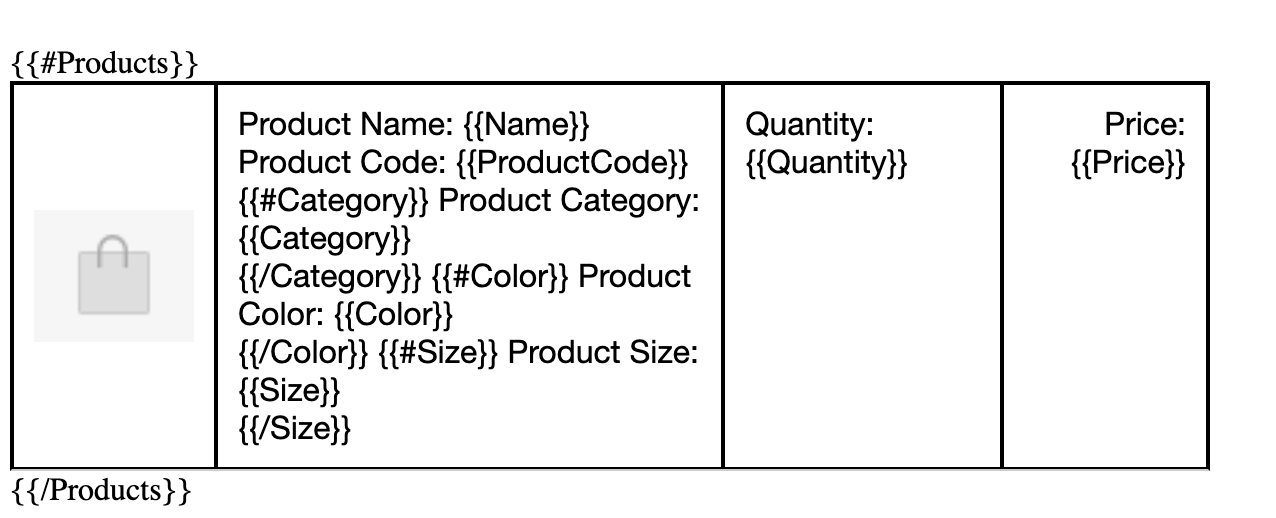 |
Example of Placeholder Rendering in the Products Section
 |