

Overview
From 27 September 2026, EU rules (Directive - EU - 2024/825 - EN - EUR-Lex) require online traders selling goods to EEA consumers (EU + Norway, Iceland and Liechtenstein) to provide clearer information about legal guarantee rights and, for qualifying products, a producer commercial guarantee of durability (free, covering the whole product, lasting more than two years). The regulation requires this information in two places:- On your EEA-facing website — the harmonised legal guarantee notice as a prominent reminder on the storefront; for qualifying products, the GARAN label before purchase (for example on the product page / PDP).
- In the order confirmation email — on a durable medium (for example, an attached PDF), so the shopper receives the harmonised notice and any qualifying GARAN labels after they buy.
- Harmonised legal guarantee notice — official English Commission artwork. Attached by default; contact your CSM to disable harmonised notice attachment on confirmation emails.
- GARAN label — when GARAN attachment is enabled for your account (contact CSM) and you have supplied a valid
GaranImageURLper relevant line item (your PNG, converted to PDF).
No URL for a line item = no GARAN attachment for that item.
Who needs to do what
GaranImageURL, we attach the GARAN. Products without a URL are sent without a GARAN attachment for that item only.
Official artwork — examples
Use the official Commission assets. Do not redesign. Commission download pack. On-Site digital display examples can be found here.Harmonised notice (English)
Global-e attaches this artwork on every qualifying confirmation email by default from 27 September 2026, unless harmonised notice attachment is disabled for your account.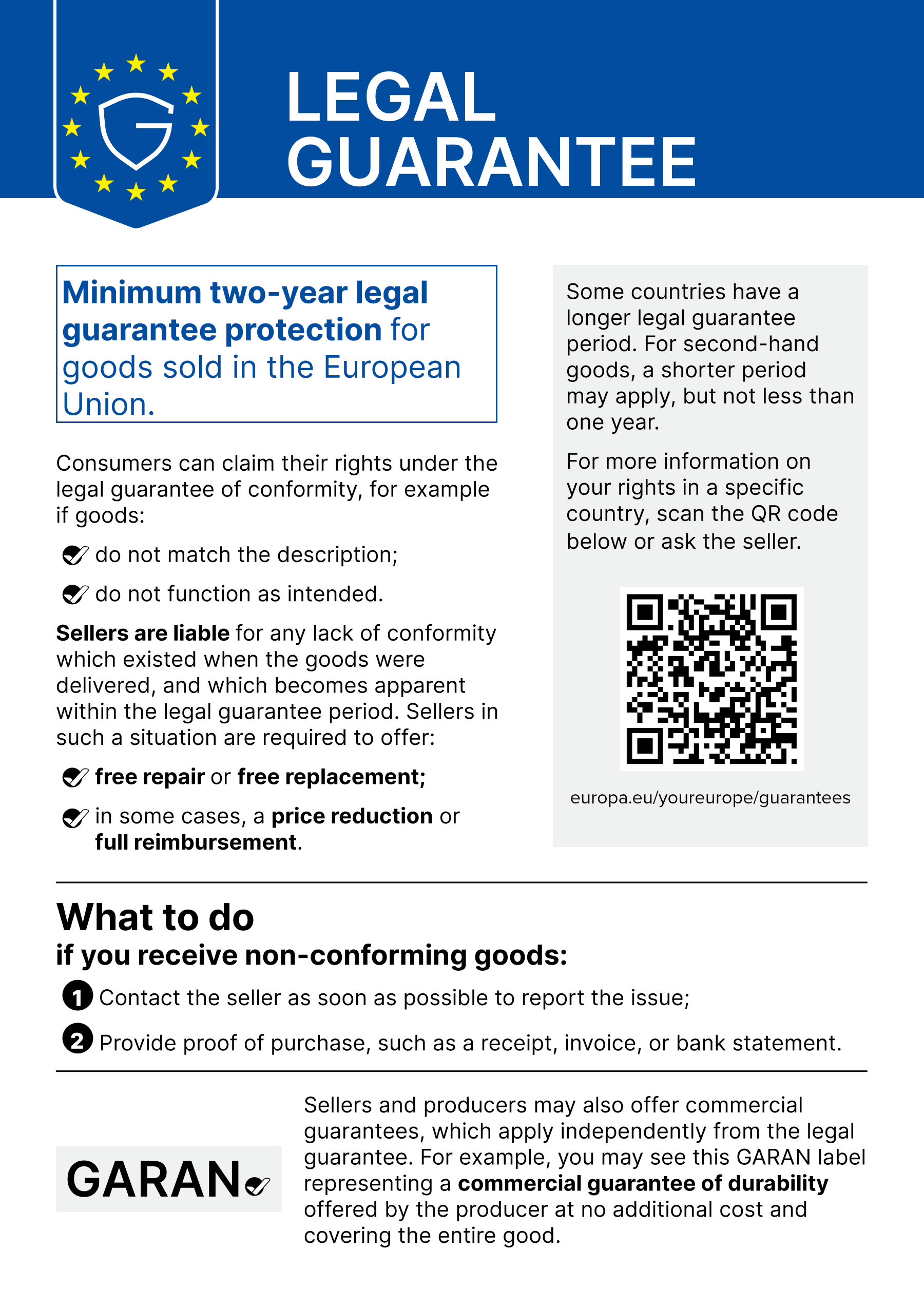
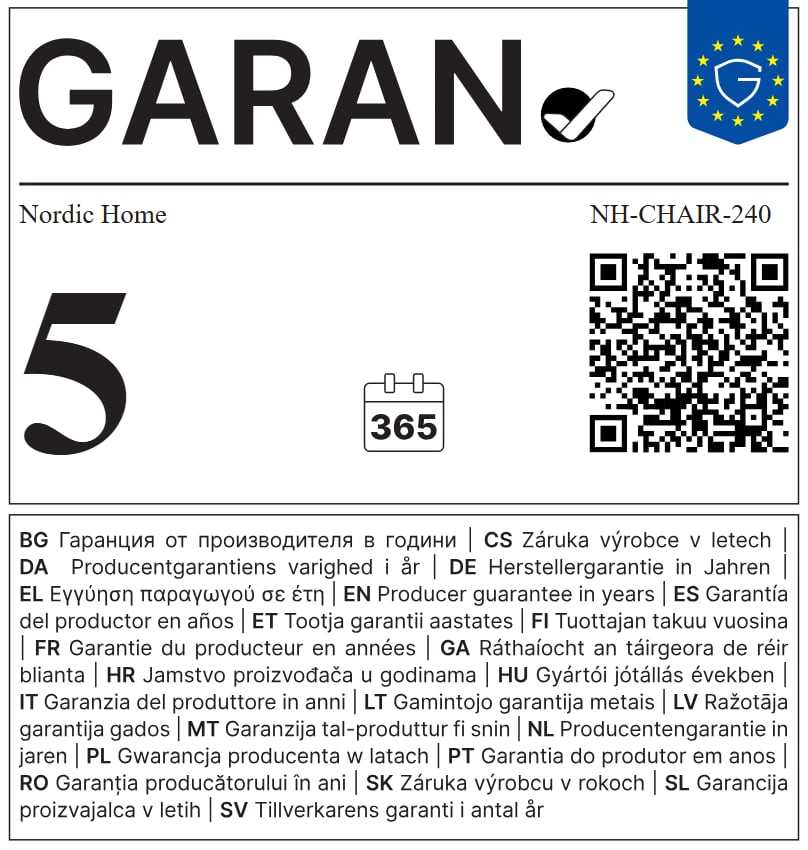
GARAN label — filled example
Illustrative only (use the template as is and update years · brand · model per product). brand and model should be written in English. You must supply your own finished PNG atGaranImageURL for each qualifying product.
GARAN file requirements (PNG)
For each relevant product, prepare a finished GARAN PNG that:- GARAN label should be a color PNG
- Physical size: at least 95 × 100 mm
- Image resolution: at least 300 DPI, which at that minimum size means at least 1122 × 1181 pixels. Do not supply a smaller pixel canvas and scale it up
- Keep the official GARAN artwork unchanged: no distortion, cropping that changes layout, colour shifts, or change of proportions
- Keep the QR code unchanged (content, module pattern, quiet zone). At ~25 × 25 mm and 300 DPI the QR area is about 295 × 295 pixels
- QR encoding: at least 4 pixels per module so it stays scannable. The sample GARAN (QR Version 5) is about 6 px/module; 300 DPI at 95 × 100 mm is intended for QR Version 9 or lower
- The QR code must remain scannable in normal lighting with a standard phone camera
Before you begin — checklist
Step 1 — Default email behaviour and GARAN
Harmonised notice (default)
From 27 September 2026, Global-e automatically attaches the official English harmonised notice (PDF) on every qualifying GE-sent EEA goods confirmation email (EEA by shipping address). Disable: contact your Customer Success Manager (CSM) if you wish to disable harmonised notice attachment on your confirmation emails. This does not remove the harmonised notice link from Terms of Sale (TOS).GARAN (merchant-supplied)
Enable: GARAN attachment is not enabled by default. Contact your Customer Success Manager (CSM) to enable GARAN attachment on your confirmation emails. GARAN will be sent for a line item only when GARAN attachment is enabled for your account and Global-e has received a validGaranImageURL (PNG) for that product. We download the file, convert it to PDF, and attach it to the confirmation email. Line items without a valid URL are sent without a GARAN attachment for that product only. The harmonised notice is still attached on that email unless harmonised notice attachment is disabled for your account.
Step 2 — Supply GARAN image URLs per relevant product
You can provideGaranImageURL using one of the following methods:
GARAN URL requirements
Section A - Catalog: GaranImageURL
Applies to: Merchants who maintain product data in Global-e catalog (or products table) and want GARAN resolved by SKU at email send time.
What to add
Add a product-level attribute:GaranImageURL only on relevant products (free producer commercial guarantee of durability > 2 years, whole product).
Section B - SendCart: SendCartData.Products[].GaranImageURL
Applies to: Merchants / integrators who pass product attributes on the cart for each order.
What to add
For each qualifying line item in the SendCart payload, populate:Platform-specific instructions
Applies to: Merchants using Section A (Catalog) or Section B (SendCart) who need platform-specific setup guidance. Step-by-step guides for supplyingGaranImageURL per platform:
Shopify merchants
Shopify merchants: Global-e does not send Shopify order confirmation emails — Shopify does. Step 1, Step 2, and Sections A–B above apply only where Global-e sends the confirmation email. If you are on Shopify, follow this section instead.What Global-e does for Shopify
Shopify implementation guide
Shopify implementation guideYour storefront obligations (not configured in this guide)
Even when Global-e handles confirmation emails, you remain responsible for:- Displaying the official harmonised legal guarantee notice prominently on your EEA-facing website. Regulatory wording (Directive 2024/825, Recital 28): in cases of online sale, placed as a general reminder on the website of the trader selling goods. Global-e will add a link to the harmonised notice on Terms of Sale (TOS) for all platforms (inc. Shopify). The TOS link supports compliance but does not replace prominent on-site placement — we highly recommend you still display the notice prominently on your storefront. Shopify merchants: see Shopify merchants for full implementation guidance.
- Showing the GARAN label for each qualifying product before purchase (for example on the product page / PDP), where applicable.
Testing checklist
Run at least one end-to-end test on a sandbox or low-volume EEA market after GARAN data setup:Frequently asked questions
About the regulation
What is ECGT?
What is ECGT?
What is it trying to do?
What is it trying to do?
Which merchants are affected?
Which merchants are affected?
Does it apply to merchants based outside the EU?
Does it apply to merchants based outside the EU?
What is the legal guarantee notice?
What is the legal guarantee notice?
What is the GARAN label?
What is the GARAN label?
Does showing one replace the other?
Does showing one replace the other?
Does this regulation require me to start offering new guarantees on my products?
Does this regulation require me to start offering new guarantees on my products?
What do the harmonised notice and GARAN cover — and how are they different?
What do the harmonised notice and GARAN cover — and how are they different?
Who produces the artwork?
Who produces the artwork?
Does it need translating for each market?
Does it need translating for each market?
Where does the legal guarantee notice go?
Where does the legal guarantee notice go?
Where does the GARAN label appear?
Where does the GARAN label appear?
What about the order confirmation email?
What about the order confirmation email?
GaranImageURL. Where both apply, both are provided on a durable medium — attached PDF. Shopify merchants: see Shopify merchants — Global-e will add a link to the harmonised notice on Terms of Sale (TOS) for all platforms (inc. Shopify); you implement notice and GARAN on your website (for example PDP) and Shopify confirmation email per the Shopify implementation guide.Global-e setup and behaviour
Is the data a one-time thing?
Is the data a one-time thing?
Can I disable harmonised notice attachment on confirmation emails?
Can I disable harmonised notice attachment on confirmation emails?
When does the regulation start?
When does the regulation start?
GaranImageURL (PNG) via Catalog or SendCart.What if I do not send GaranImageURL for some products?
What if I do not send GaranImageURL for some products?
GaranImageURL, we attach the GARAN; products without a URL are sent without a GARAN attachment for that item. Other qualifying items on the same order are unaffected. The harmonised notice is still attached on every qualifying email unless harmonised notice attachment is disabled for your account.Can I use a JPG or PDF URL instead of PNG?
Can I use a JPG or PDF URL instead of PNG?
GaranImageURL must point to a PNG file. Global-e converts it to PDF for the email attachment.Do I need both Catalog and SendCart?
Do I need both Catalog and SendCart?
Does Global-e generate the GARAN artwork for me?
Does Global-e generate the GARAN artwork for me?
What about Shopify?
What about Shopify?
Does the order confirmation email change in any way?
Does the order confirmation email change in any way?
Will guarantee years appear in the email body under each product?
Will guarantee years appear in the email body under each product?
Need help?
- Directive: Directive - EU - 2024/825 - EN - EUR-Lex
- Implementation: Implementing regulation - EU - 2025/1960 - EN - EUR-Le
- High Resolution files: Practical guidelines and High Resolution Vector files of the EU notice and label on product guarantees - European Commission
- Digital display: Practical guidelines Harmonised Label&Notice product guarantees (PDF)
- Open a support ticket: Contact Us
- For disabling harmonised notice attachment, GARAN enablement, field mapping, or platform setup: contact your Customer Success Manager.
Legal disclaimer
This guide explains how Global-e attaches the official EU harmonised notice (by default on qualifying GE-sent emails from 27 September 2026, unless harmonised notice attachment is disabled for your account) and qualifying GARAN labels (when GARAN attachment is enabled and you supplyGaranImageURL) as a durable medium. It is not legal advice. Directive (EU) 2024/825 and Implementing Regulation (EU) 2025/1960 apply across EU member states; you remain the trader of record for your storefront, product pages, and any confirmation emails not sent by Global-e. Review your setup with your own legal counsel before go-live (27 September 2026).