Shopify's Multi-Currency
Shopify's multi-currency feature enables customers to view prices in their local currency, make payments in their currency at checkout, and receive refunds in the same currency.
Shopify's multi-currency orders include both the storefront base currency (usually USD) and the customer currency (€, £, ¥, and more).
These currency values are stored as different fields in Shopify:
Shop_money – This field holds the storefront's base currency, which serves as the main currency for the Shopify store and is used for reporting and analytics. It is typically mapped downstream by order management systems (OMS) and accounting systems.
Presentment_money - This field stores the customer currency, visible to international customers in the storefront, cart, checkout, and transactional emails.
FX Conversion and Shopify API
Since Shopify’s multi-currency orders are created as the localised customer currency (presentment_money), Shopify converts the values using FX conversion to get the shop_money in the Shopify Admin and APIs.
Shopify uses different rounding calculation functions for the shop_money value in the Transaction API and Order API:
Order API - This API retrieves the breakdown cost of individual line items in both shop_money and presentment_money. The total amount is calculated as the sum of these individual line items.
Transaction API - This API retrieves the total transacted amount in either shop_money or presentment_money.
FX Rounding Discrepancy
Introduction
This document explores the FX considerations related to Shopify's API and order total calculations.
When importing orders from Shopify into a third-party system, you can retrieve the order total:
Directly from Shopify’s Transaction API
- OR -
By re-calculating all order line items (via the Order API)
Mathematically, the order total from these two APIs would match without FX rounding. However, due to rounding, a decimal discrepancy may occur, as shown in the Rounding Discrepancy Example. This has been verified by Shopify as expected behaviour; it applies to all multi-currency orders and it is not specific to Global‑e.
For more info on Shopify multi-currency and API, see Shopify's Multi-Currency.
Rounding Discrepancy Example
A customer places an order in Canada that costs $395.50 CAD.
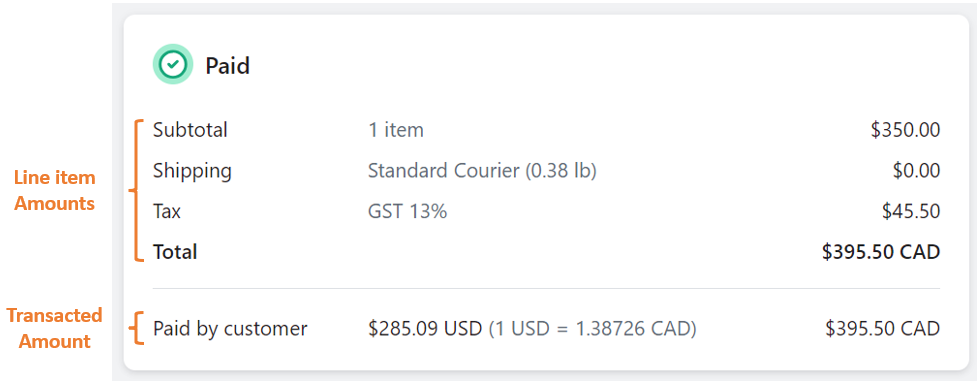 |
The Order API provide the item cost, the shipping cost, the tax, and the sum of all these values.
The Transaction API provides the transacted amount from the customer.
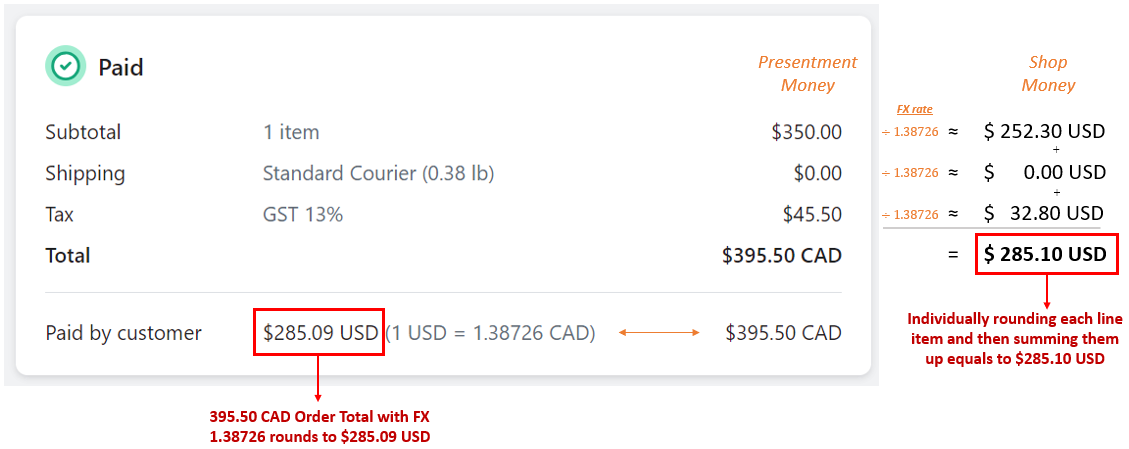 |
With the FX rate at 1.38726, there is a $0.01 difference between the sum of individual line item prices and the total transacted amount. This discrepancy arises due to rounding when comparing the order component FX conversions and the FX conversion of the total itself, leading to a normal and expected mismatch when rounded to two decimal places.
Presentment_money | Shop_money | Calculation | |
|---|---|---|---|
Order API | Line Item 1 = 350.00 CAD Taxes = 45.50 CAD Total price = 395.50 CAD | Line Item 1 = $252.30 USD Taxes = $ 32.80 USD Total price = $285.10 USD | 252.30 USD + 32.80 USD = 285.10 USD |
Transaction API | Total Amount = 395.50 CAD | Total Amount = $285.09 USD | 395.50 CAD / 1.38726 = 258.09 USD |
This behaviour applies to all Shopify multi-currency orders. Shopify has confirmed that this is not a bug and no API changes will be made.
Conclusion
No mandatory actions are needed. If you are using both the Transaction API and the Order API to get the order total, anticipate that the totals will not match exactly for Shopify multi-currency orders.